
fiskaly eReceipt API (1.12.3)
Download OpenAPI specification:
Imprint: fiskaly.com/impressum | Privacy Policy: fiskaly.com/datenschutz
The eReceipt API allows merchants to issue electronic receipts for consumers instead of traditional paper based receipts.
The fiskaly eReceipt API follows Semantic Versioning.
The version number has a pattern of MAJOR.MINOR.PATCH. We increment the
MAJORversion when we make incompatible API changes,MINORversion when we add functionality in a backwards-compatible manner, andPATCHversion when we make backwards-compatible bug fixes.
The current MAJOR version 1 is reflected in the API's base URL: /api/v1.
This API uses UUIDv4. Some requests create new resources. To run such requests, generate a random UUIDv4. Then pass the UUIDv4 in the request body. This UUIDv4 will be assigned to the newly created resource.
A good way to generate a UUIDv4 is to use a library in your programming language of choice (like this) or an online generator (like this). A UUIDv4 created this way will be random and unique throughout the system.
The fiskaly eReceipt API associates a unique identifier with each request. You will find this request identifier in the response headers, under X-Request-Id.
If you need help with a request you have issued, please provide the request identifier. We will find your request and help you faster.
1.12.3(2024-06-10)- Extended VAT rate percentage up to 4 decimals.
1.12.2(2024-03-05)- Extended enum options for
typefield intransaction_details.
- Extended enum options for
1.12.1(2023-09-21)- Extended CustomMediaContent schema with
media_linkproperty.
- Extended CustomMediaContent schema with
1.12.0(2023-08-30)- Extended receipt schema
payment_typeswithtransaction_detailsproperty.
- Extended receipt schema
1.11.1(2023-07-27)- Extended support for custom section
positionproperty by addingISSUING_INFORMATION,HOSPITALITY,FOOTER.
- Extended support for custom section
1.11.0(2023-07-18)- Extended support for a subset of HTML entities within TEXT type Custom Sections
1.10.0(2023-06-28)- Added new endpoint for dictionary.
- Updated
RetrieveReceiptResponseandListReceiptsResponsewith dictionary
1.9.0(2023-06-13)- Extended support specific encoding for
custom_elementswith barcode. Newly supported are these encoding formats:- CODE93
- INTERLEAVED2OF5
- Extended seller information by adding
phone - Extended head information by adding
store_number,cashier_nameandcash_register_number
- Extended support specific encoding for
1.8.0(2023-05-19)- Introduced Add
Configuration Custom Sectionroute to configuration endpoint.
- Introduced Add
1.7.5(2023-04-25)- Introduced
Custom Sectionendpoints.
- Introduced
1.7.4(2023-04-24)- Introduced
UploadMediaendpoint.
- Introduced
1.7.3(2023-04-05)- Allowed additional properties in receipt schema.
1.7.2(2023-03-23)- Removal of default values for Numeric properties. AdditionalProperties are now only allowed in security related properties.
1.7.1(2023-02-16)- Introduced
CustomMediaContentobject in CustomElement.
- Introduced
1.7.0(2023-02-15)- Update to TseSecurity
legal_textproperty, it is now an array of strings instead of an array with a single possible enum value.
- Update to TseSecurity
1.6.2(2023-01-30)- Introduced
changeproperty on receipt for cash transactions.
- Introduced
1.6.1(2023-01-09)- Introduced
full_amount_incl_vat_before_discountandtotal_discount_valueproperties on receipt.
- Introduced
1.6.0(2022-12-15)- Introduced
createOrUpdateHospitalityReceiptPublicandretrieveHospitalityReceiptPublicendpoints for updating hospitality information of a public receipt.
- Introduced
1.5.2- Add support for spanish,
es, in receipt schema and configuration.
- Add support for spanish,
1.5.1(2022-12-01)- Support specific encoding for
custom_elementswith barcode Currently supported are these encoding formats:- CODE128
- EAN13
- UPC
- EAN8
- EAN5
- EAN2
- CODE39
- ITF14
- MSI
- PHARMACODE
- CODEBAR
- Support specific encoding for
1.5.0(2022-11-10)- Introduced optional
full_amountfor line items
- Introduced optional
1.4.0(2022-10-20)- Introduced
addLanguageConfigurationendpoints to add or update the receipt default language
- Introduced
1.3.0(2022-10-10)- Introduced
createStaticLinkstatic link creation method
- Introduced
1.2.0(2022-09-29)- Introduced
discountproperty on line items - Introduced
discountproperty on receipt - Introduced
sort_orderproperty for line items and discounts - Introduced
display_name,remaining_balanceandpayment_identifierforpayment_types - Introduced
sort_orderproperty topayment_typesfor display ordering
- Introduced
1.1.0(2022-09-14)- Introduced
languageproperty inschema.ekabs_v0to support different language options - Introduced
misc.conformity_textfor compliance in France masked_card_numbercan now be a string of up to 19 characters containing digits and the*symbol- Fixed a bug that incorrectly complaint about a schema violation when providing multiple payment types along with a
masked_card_number - Improved error messages for receipt creation and PDF retrieval
- Introduced
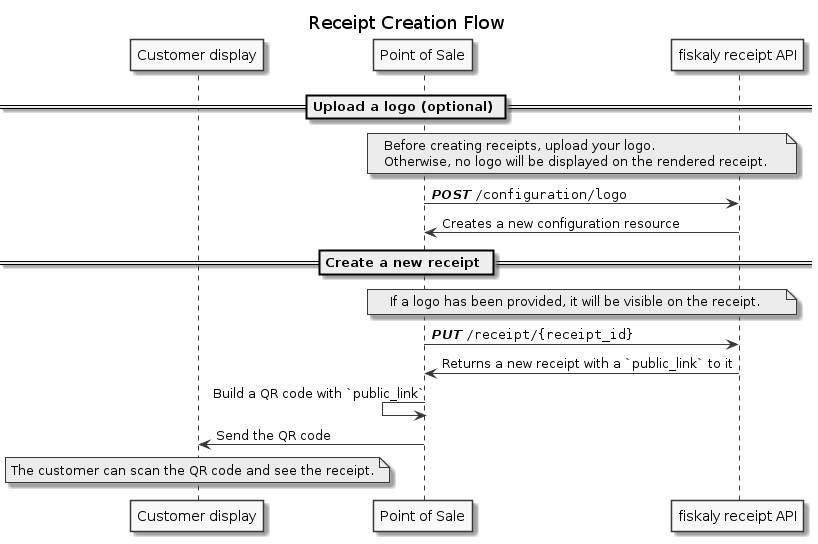
To issue a receipt, simply use the create receipt operation to get a public link for the consumer to access. This public link can be provided as either a QR code or whatever other mechanism is available to transfer it to the consumer at the Point of Sale.
The receipt is the core resource of the eReceipt API. It is represented in a schema closely resembling the DFKA EKaBS standard schema.
The receipt resource consists of the following data:
schema: the receipt data modelled as one of the supported schemas (currently only EKaBS)public_link: link that can be provided to the consumerassets: references to static assets (e.g. PDF). Note that those are generated asynchronously and therefore might not be instantly accessible in some cases.user_association: a set of properties that can be used to associate a receipt with an consumer.
The configuration resource keeps the history of updates to the visual state of the receipt. It is a revision-safe resource. Every time, something is changed in the configuration, a new configuration revision is created. For example, when you upload a new logo, the configuration is updated and the revision counter is incremented.
The fiskaly eReceipt API uses standard HTTP status codes to indicate the success or failure of requests:
Status codes in the 400-499 range indicate errors that have been caused by the requesting application (e.g., a malformed request body has been sent).
Retrying such requests with the same request body is pointless and will result in the same status code again.
Some 4xx errors can be handled programmatically. The error response is in JSON format and is structured like this:
{
"status_code": 400,
"error": "Bad Request",
"code": "E_SOME_ERROR",
"message": "Something bad happened"
}
The response will contain an error code or other information that reveals the reason of the error. Change the request accordingly before retrying. Below you can find the most frequent errors and how to fix them.
How to handle 4xx errors
400 Bad Request
E_REQUEST_INVALIDYour request doesn't comply with the defined schema. Fix you request body and parameters according to the error message and run the endpoint again.
E_INVALID_FILTER_VALUESYour request has invalid values in the query params. Expected values are
ASC,DESCfor theorderparam and0-100forlimit.E_RECEIPT_ID_INVALIDThe
receipt_idfrom the request params is not a valid UUID. Retry the request with areceipt_idthat complies to theuuidv4(https://datatracker.ietf.org/doc/html/rfc4122).E_MASKED_CARD_NUMBER_NON_CARD_PAYMENTYou cannot provide
masked_card_numberwhen payment type is notCARD. Provide a different payment type or repeat the request without themasked_card_number.E_REVISION_ID_MISSINGThe request is missing the
revision.E_INVALID_LIMIT_FILTERThe request contains a invalid definition of the
limitfilter. Possibly out of value range.
401 Unauthorized
E_AUTHENTICATIONThe JWT token authentication failed for your request. The error message explains what went wrong. Run the Authenticate API endpoint to get a new token and retry your original request.
E_TOKEN_MISSINGThe JWT token is not present in the request. Retry the request with a valid JWT token.
404 Not Found
E_RECEIPT_NOT_FOUNDNo
Receipthas been found for thereceipt_idyou used in the request. Run the List all receipts endpoint and check that yourReceiptexists in the returned list.E_PDF_NOT_FOUNDThe PDF for the
Receiptyou are trying to access hasn't been created yet. Repeat the request later.E_CONFIGURATION_NOT_FOUNDNo
Configurationhas been found for thereceipt_idyou used in the request. Run the Retrieve Current Configuration endpoint and check aConfigurationexists for your receipts. If it doesn't exist, run the Add Logo endpoint with yourLogoimage. This will create a newConfigurationresource, and the providedLogowill be used to render new receipts.E_LOGO_NOT_FOUNDNo
Logohas been found for the providedreceipt_idyou used in the request. Run the Retrieve Current Configuration endpoint and check aConfiguration.Logoexists for your receipts. If it doesn't exist, run the Add Logo endpoint with yourLogoimage. This will create a newConfigurationresource, and the providedLogowill be used to render new receipts.E_PUBLIC_ACCESS_EXPIREDThe public access of the receipt has expired.
E_ROUTE_NOT_FOUNDThe resource requested is not defined. Check your request if the path is correct.
413 Request Entity to large
The size of the uploaded logo has exceeded the allowed size of 2 Mb.E_LOGO_BODY_LIMIT_EXCEEDED
Status codes in the 500-599 range indicate errors on the server side.
These errors are temporary.
You can safely retry (see Idempotent Requests) the same request after a delay.
We recommend an exponential backoff for your retry logic.
Otherwise you might run into a 429 (Too Many Requests) error.
- If you're experiencing any problems with the fiskaly eReceipt API, please check the fiskaly eReceipt API status page or forward to Developer Support.
For a quick first demo, you may use Postman. We prepared a Postman collection that allows you to step through the most important functions of this API.
Download the Postman application.
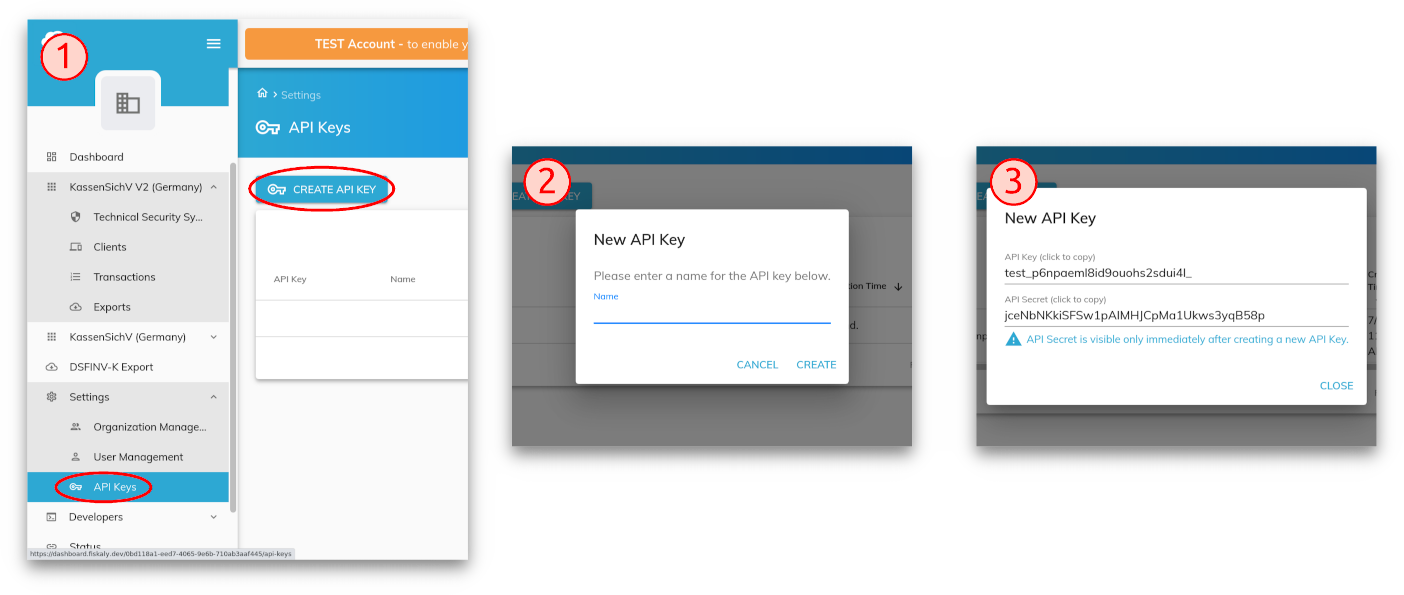
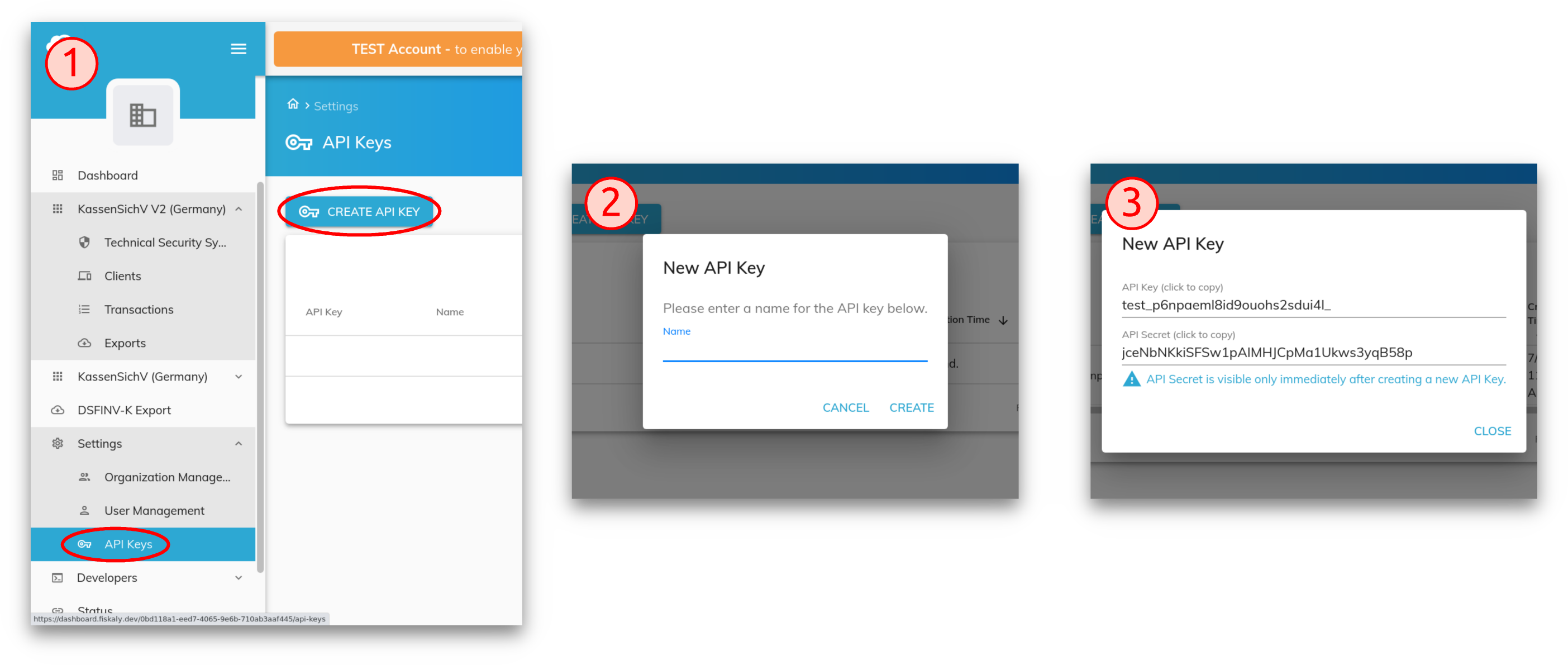
Create an API key and secret via the fiskaly HUB:
Insert your API key and secret to get your personalized Postman environment:
Download the Postman collection.
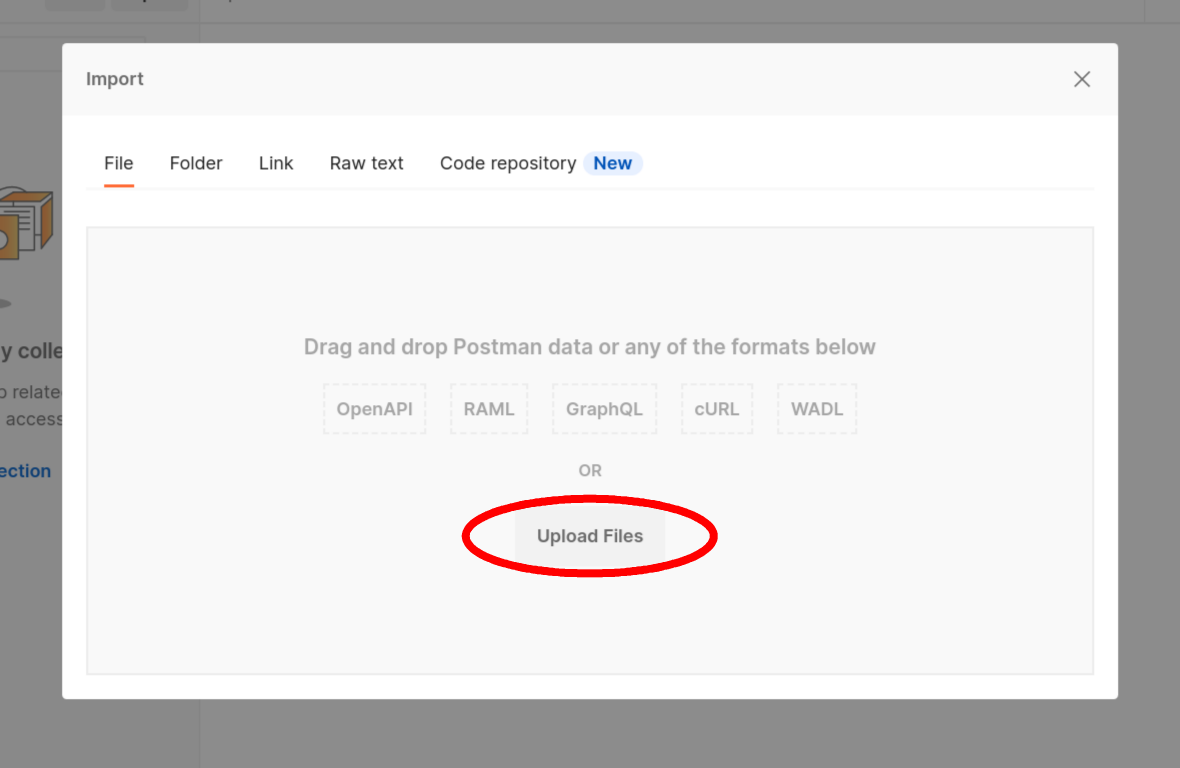
Start Postman and select Upload Files from the Import dialog:
File > Import (Ctrl+O)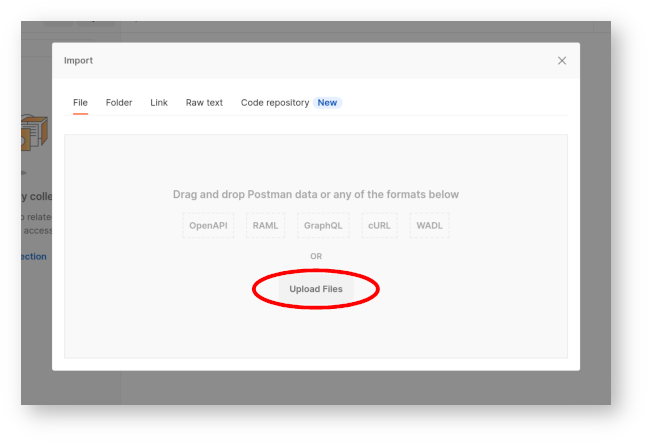
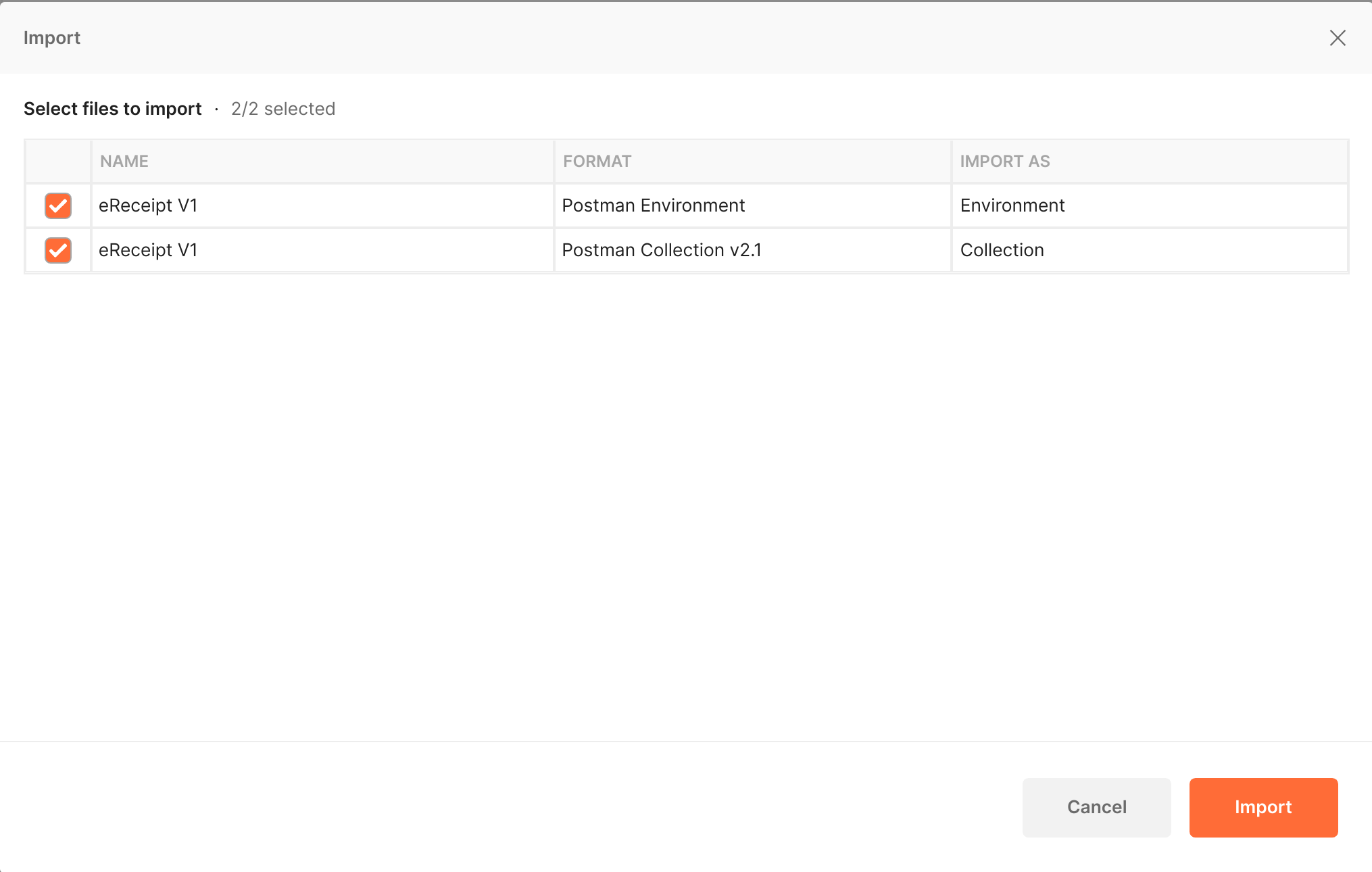
Select the collection and environment files that you downloaded:
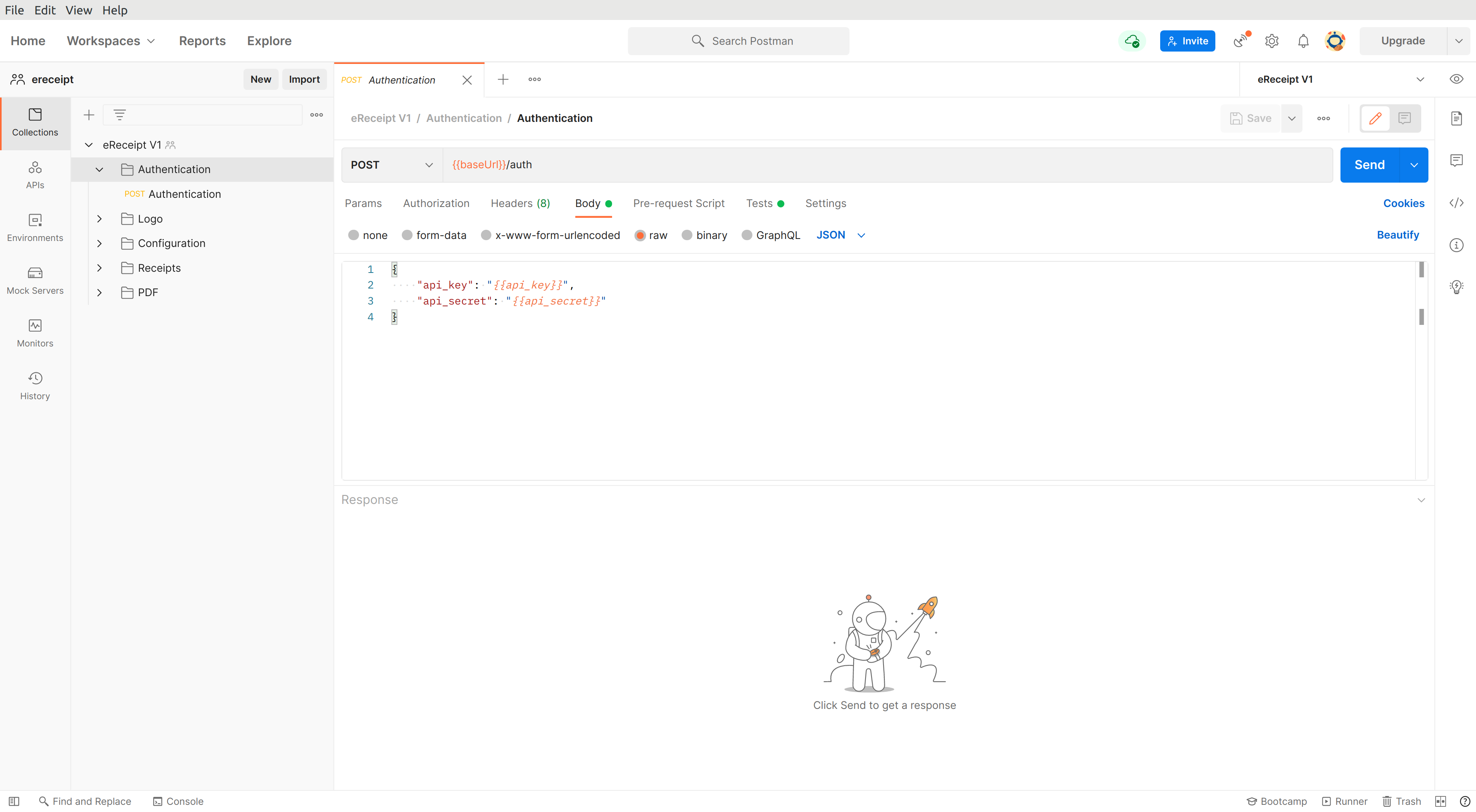
The Postman screen should now look like this:
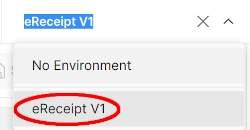
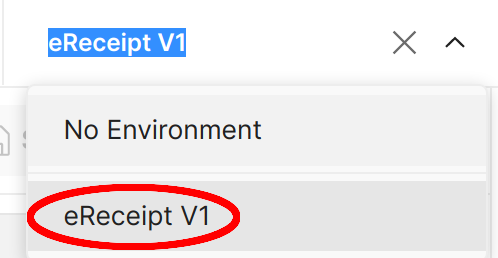
Select the fiskaly receipt environment:
Download the test logo
Select the downloaded test logo in the
Add Logoroute:

- Run the demo:

Authenticate API
To access our API, you need to have a valid JWT token. This endpoint creates the token with your api_key and api_secret.
If you don't have an api_key, you can create one via the fiskaly HUB.
The api_secret will be generated for you after you create the api_key.
The token must be sent with every following request in the Authorization header field using the Bearer authentication scheme.
See details here.
Request Body schema: application/json
| api_key required | string (ApiKeyKey) Key of the API Key and Secret. |
| api_secret required | string (ApiKeySecret) Secret of the API Key and Secret. |
Responses
Request samples
- Payload
{- "api_key": "string",
- "api_secret": "string"
}Response samples
- 200
- 401
{- "access_token": "string",
- "access_token_claims": {
- "env": "TEST",
- "organization_id": "1c81cb86-c2e8-4074-afc3-a0601b2bf063"
}, - "access_token_expires_at": 1577833200,
- "access_token_expires_in": 0,
- "refresh_token": "string",
- "refresh_token_expires_at": 1577833200,
- "refresh_token_expires_in": 0
}List all receipts
This endpoint retrieves a list of receipts for the Merchant. It will include a receipt into the result even after its public access has expired.
Authorizations:
query Parameters
| order | string Default: "ASC" Enum: "ASC" "DESC" Determines the sorting order. |
| limit | integer <= 100 Default: 100 Limits the number of returned results. |
| offset | integer Default: 0 Skips the specified number of results from the result set. |
Responses
Response samples
- 200
{- "_env": "TEST",
- "_type": "RECEIPT_LIST",
- "_version": "1.0.0",
- "count": 9007199254740991,
- "data": [
- {
- "_env": "TEST",
- "_id": "1c81cb86-c2e8-4074-afc3-a0601b2bf063",
- "_type": "RECEIPT",
- "_version": "1.0.0",
- "assets": {
}, - "dictionary": {
- "language": "de",
- "receipt": {
- "cash_register_number": "string",
- "delivery_period": "string",
- "discount_total": "string",
- "forward_email": "string",
- "get_pdf": "string",
- "line_item_price_per_unit": "string",
- "line_item_quantity": "string",
- "line_item_quantity_measure": "string",
- "line_item_text": "string",
- "line_item_vat_amount": "string",
- "line_items_full_amount": "string",
- "line_items_title": "string",
- "number": "string",
- "payment_change": "string",
- "payment_foreign_amount": "string",
- "payment_foreign_currency": "string",
- "payment_identifier": "string",
- "payment_method": "string",
- "payment_remaining_balance": "string",
- "payment_type_card": "string",
- "payment_type_cash": "string",
- "payment_type_other": "string",
- "security_at_receipt_number": "string",
- "security_at_serial_number": "string",
- "store_number": "string",
- "sum": "string",
- "sum_total": "string",
- "tax": "string",
- "tax_gross": "string",
- "tax_net": "string",
- "tax_sales": "string",
- "tax_vat": "string",
- "thanks": "string",
- "time_creation": "string",
- "title": "string",
- "transaction_AID": "string",
- "transaction_acquirer_id": "string",
- "transaction_amount": "string",
- "transaction_authorization_code": "string",
- "transaction_id": "string",
- "transaction_payment_credit": "string",
- "transaction_payment_debit": "string",
- "transaction_payment_refund": "string",
- "transaction_response_accepted": "string",
- "transaction_response_cancelled": "string",
- "transaction_response_declined": "string",
- "transaction_response_voided": "string",
- "transaction_terminal_id": "string",
- "transaction_time": "string",
- "transaction_type": "string",
- "transaction_type_atm": "string",
- "transaction_type_online": "string",
- "transaction_type_payment": "string",
- "transaction_type_pos": "string"
}
}, - "hospitality_link": {
- "href": "string"
}, - "public_link": {
- "href": "string"
}, - "schema": {
- "ekabs_v0": {
- "custom_elements": [
- {
- "alignment": "LEFT",
- "content": {
- "data": "<p>Formatted text with a <b>bold</b> insert</p>",
- "encoding": "CODE128",
- "type": "TEXT"
}, - "orientation": "BEFORE",
- "position": "LINES",
- "sort_order": 0
}
], - "data": {
- "currency": "EUR",
- "discounts": [
- {
- "discount_value": "123.45",
- "name": "string",
- "sort_order": 0
}
], - "full_amount_incl_vat": "123.45",
- "full_amount_incl_vat_before_discount": "123.45",
- "lines": [
- {
- "additional_text": "string",
- "delivery_period_end": 1577833200,
- "delivery_period_start": 1577833200,
- "discounts": [
- {
- "discount_value": null,
- "name": null,
- "sort_order": null
}
], - "item": {
- "full_amount": "123.45",
- "gtin": "string",
- "number": "string",
- "price_per_unit": "123.45",
- "quantity": "123.45",
- "quantity_measure": "string"
}, - "sort_order": 0,
- "text": "string",
- "vat_amounts": [
- {
- "incl_vat": null,
- "percentage": null
}
]
}
], - "payment_types": [
- {
- "amount": "123.45",
- "change": "123.45",
- "display_name": "VISA",
- "foreign_amount": "123.45",
- "foreign_currency": "EUR",
- "name": "CASH",
- "payment_identifier": "************1234",
- "raw_data": "string",
- "remaining_balance": "123.45",
- "sort_order": 0,
- "transaction_details": {
- "AID": "string",
- "ARN": "string",
- "acquirer_id": "string",
- "authorization_code": "string",
- "cryptogram": "string",
- "id": "string",
- "local_date_time": 1577833200,
- "payment_network": "VISA",
- "payment_type": "DEBIT",
- "response": "ACCEPTED",
- "sequence_number": "string",
- "technology": "string",
- "terminal_id": "string",
- "type": "PAYMENT"
}
}
], - "total_discount_value": "123.45",
- "vat_amounts": [
- {
- "excl_vat": "123.45",
- "incl_vat": "123.45",
- "percentage": "123.45",
- "vat": "123.45"
}
]
}, - "head": {
- "_id": "string",
- "buyer": {
- "address": {
- "city": "string",
- "country_code": "ALA",
- "postal_code": "string",
- "street": "string"
}, - "customer_number": "string",
- "name": "string",
- "tax_number": "string"
}, - "cash_register_number": "string",
- "cashier_name": "string",
- "date": 1577833200,
- "delivery_period_end": 1577833200,
- "delivery_period_start": 1577833200,
- "number": "string",
- "seller": {
- "address": {
- "city": "string",
- "country_code": "ALA",
- "postal_code": "string",
- "street": "string"
}, - "name": "string",
- "phone": "string",
- "tax_exemption": false,
- "tax_exemption_note": "string",
- "tax_number": "string"
}, - "store_number": "string"
}, - "language": "de",
- "misc": {
- "conformity_text": "string",
- "footer_text": "string"
}, - "security": {
- "rksv": {
- "cash_register_serial_number": "string",
- "hints": [
- "Sicherheitseinrichtung ausgefallen"
], - "qr_code_data": "string",
- "receipt_number": "42",
- "time_signature": 1577833200
}
}
}
}, - "user_association": {
- "masked_card_number": "string",
- "pending_receipt_id": "string"
}
}
]
}Retrieve a receipt
This endpoint retrieves a receipt for the Merchant. It will return the receipt even after the public access to the receipt has expired.
Authorizations:
path Parameters
| receipt_id required | string Example: 1c81cb86-c2e8-4074-afc3-a0601b2bf063 Identifies a Receipt. |
Responses
Response samples
- 200
{- "_env": "TEST",
- "_id": "1c81cb86-c2e8-4074-afc3-a0601b2bf063",
- "_type": "RECEIPT",
- "_version": "1.0.0",
- "assets": {
}, - "dictionary": {
- "language": "de",
- "receipt": {
- "cash_register_number": "string",
- "delivery_period": "string",
- "discount_total": "string",
- "forward_email": "string",
- "get_pdf": "string",
- "line_item_price_per_unit": "string",
- "line_item_quantity": "string",
- "line_item_quantity_measure": "string",
- "line_item_text": "string",
- "line_item_vat_amount": "string",
- "line_items_full_amount": "string",
- "line_items_title": "string",
- "number": "string",
- "payment_change": "string",
- "payment_foreign_amount": "string",
- "payment_foreign_currency": "string",
- "payment_identifier": "string",
- "payment_method": "string",
- "payment_remaining_balance": "string",
- "payment_type_card": "string",
- "payment_type_cash": "string",
- "payment_type_other": "string",
- "security_at_receipt_number": "string",
- "security_at_serial_number": "string",
- "store_number": "string",
- "sum": "string",
- "sum_total": "string",
- "tax": "string",
- "tax_gross": "string",
- "tax_net": "string",
- "tax_sales": "string",
- "tax_vat": "string",
- "thanks": "string",
- "time_creation": "string",
- "title": "string",
- "transaction_AID": "string",
- "transaction_acquirer_id": "string",
- "transaction_amount": "string",
- "transaction_authorization_code": "string",
- "transaction_id": "string",
- "transaction_payment_credit": "string",
- "transaction_payment_debit": "string",
- "transaction_payment_refund": "string",
- "transaction_response_accepted": "string",
- "transaction_response_cancelled": "string",
- "transaction_response_declined": "string",
- "transaction_response_voided": "string",
- "transaction_terminal_id": "string",
- "transaction_time": "string",
- "transaction_type": "string",
- "transaction_type_atm": "string",
- "transaction_type_online": "string",
- "transaction_type_payment": "string",
- "transaction_type_pos": "string"
}
}, - "hospitality_link": {
- "href": "string"
}, - "public_link": {
- "href": "string"
}, - "schema": {
- "ekabs_v0": {
- "custom_elements": [
- {
- "alignment": "LEFT",
- "content": {
- "data": "<p>Formatted text with a <b>bold</b> insert</p>",
- "encoding": "CODE128",
- "type": "TEXT"
}, - "orientation": "BEFORE",
- "position": "LINES",
- "sort_order": 0
}
], - "data": {
- "currency": "EUR",
- "discounts": [
- {
- "discount_value": "123.45",
- "name": "string",
- "sort_order": 0
}
], - "full_amount_incl_vat": "123.45",
- "full_amount_incl_vat_before_discount": "123.45",
- "lines": [
- {
- "additional_text": "string",
- "delivery_period_end": 1577833200,
- "delivery_period_start": 1577833200,
- "discounts": [
- {
- "discount_value": "123.45",
- "name": "string",
- "sort_order": 0
}
], - "item": {
- "full_amount": "123.45",
- "gtin": "string",
- "number": "string",
- "price_per_unit": "123.45",
- "quantity": "123.45",
- "quantity_measure": "string"
}, - "sort_order": 0,
- "text": "string",
- "vat_amounts": [
- {
- "incl_vat": "123.45",
- "percentage": "123.45"
}
]
}
], - "payment_types": [
- {
- "amount": "123.45",
- "change": "123.45",
- "display_name": "VISA",
- "foreign_amount": "123.45",
- "foreign_currency": "EUR",
- "name": "CASH",
- "payment_identifier": "************1234",
- "raw_data": "string",
- "remaining_balance": "123.45",
- "sort_order": 0,
- "transaction_details": {
- "AID": "string",
- "ARN": "string",
- "acquirer_id": "string",
- "authorization_code": "string",
- "cryptogram": "string",
- "id": "string",
- "local_date_time": 1577833200,
- "payment_network": "VISA",
- "payment_type": "DEBIT",
- "response": "ACCEPTED",
- "sequence_number": "string",
- "technology": "string",
- "terminal_id": "string",
- "type": "PAYMENT"
}
}
], - "total_discount_value": "123.45",
- "vat_amounts": [
- {
- "excl_vat": "123.45",
- "incl_vat": "123.45",
- "percentage": "123.45",
- "vat": "123.45"
}
]
}, - "head": {
- "_id": "string",
- "buyer": {
- "address": {
- "city": "string",
- "country_code": "ALA",
- "postal_code": "string",
- "street": "string"
}, - "customer_number": "string",
- "name": "string",
- "tax_number": "string"
}, - "cash_register_number": "string",
- "cashier_name": "string",
- "date": 1577833200,
- "delivery_period_end": 1577833200,
- "delivery_period_start": 1577833200,
- "number": "string",
- "seller": {
- "address": {
- "city": "string",
- "country_code": "ALA",
- "postal_code": "string",
- "street": "string"
}, - "name": "string",
- "phone": "string",
- "tax_exemption": false,
- "tax_exemption_note": "string",
- "tax_number": "string"
}, - "store_number": "string"
}, - "language": "de",
- "misc": {
- "conformity_text": "string",
- "footer_text": "string"
}, - "security": {
- "rksv": {
- "cash_register_serial_number": "string",
- "hints": [
- "Sicherheitseinrichtung ausgefallen"
], - "qr_code_data": "string",
- "receipt_number": "42",
- "time_signature": 1577833200
}
}
}
}, - "user_association": {
- "masked_card_number": "string",
- "pending_receipt_id": "string"
}
}Create a receipt
This endpoint creates a receipt.
Authorizations:
path Parameters
| receipt_id required | string Example: 1c81cb86-c2e8-4074-afc3-a0601b2bf063 Identifies a Receipt. |
Request Body schema: application/json
required | object (SchemaObject) |
object (UserAssociation) |
Responses
Request samples
- Payload
{- "schema": {
- "ekabs_v0": {
- "custom_elements": [
- {
- "alignment": "LEFT",
- "content": {
- "data": "<p>Formatted text with a <b>bold</b> insert</p>",
- "encoding": "CODE128",
- "type": "TEXT"
}, - "orientation": "BEFORE",
- "position": "LINES",
- "sort_order": 0
}
], - "data": {
- "currency": "EUR",
- "discounts": [
- {
- "discount_value": "123.45",
- "name": "string",
- "sort_order": 0
}
], - "full_amount_incl_vat": "123.45",
- "full_amount_incl_vat_before_discount": "123.45",
- "lines": [
- {
- "additional_text": "string",
- "delivery_period_end": 1577833200,
- "delivery_period_start": 1577833200,
- "discounts": [
- {
- "discount_value": "123.45",
- "name": "string",
- "sort_order": 0
}
], - "item": {
- "full_amount": "123.45",
- "gtin": "string",
- "number": "string",
- "price_per_unit": "123.45",
- "quantity": "123.45",
- "quantity_measure": "string"
}, - "sort_order": 0,
- "text": "string",
- "vat_amounts": [
- {
- "incl_vat": "123.45",
- "percentage": "123.45"
}
]
}
], - "payment_types": [
- {
- "amount": "123.45",
- "change": "123.45",
- "display_name": "VISA",
- "foreign_amount": "123.45",
- "foreign_currency": "EUR",
- "name": "CASH",
- "payment_identifier": "************1234",
- "raw_data": "string",
- "remaining_balance": "123.45",
- "sort_order": 0,
- "transaction_details": {
- "AID": "string",
- "ARN": "string",
- "acquirer_id": "string",
- "authorization_code": "string",
- "cryptogram": "string",
- "id": "string",
- "local_date_time": 1577833200,
- "payment_network": "VISA",
- "payment_type": "DEBIT",
- "response": "ACCEPTED",
- "sequence_number": "string",
- "technology": "string",
- "terminal_id": "string",
- "type": "PAYMENT"
}
}
], - "total_discount_value": "123.45",
- "vat_amounts": [
- {
- "excl_vat": "123.45",
- "incl_vat": "123.45",
- "percentage": "123.45",
- "vat": "123.45"
}
]
}, - "head": {
- "_id": "string",
- "buyer": {
- "address": {
- "city": "string",
- "country_code": "ALA",
- "postal_code": "string",
- "street": "string"
}, - "customer_number": "string",
- "name": "string",
- "tax_number": "string"
}, - "cash_register_number": "string",
- "cashier_name": "string",
- "date": 1577833200,
- "delivery_period_end": 1577833200,
- "delivery_period_start": 1577833200,
- "number": "string",
- "seller": {
- "address": {
- "city": "string",
- "country_code": "ALA",
- "postal_code": "string",
- "street": "string"
}, - "name": "string",
- "phone": "string",
- "tax_exemption": false,
- "tax_exemption_note": "string",
- "tax_number": "string"
}, - "store_number": "string"
}, - "language": "de",
- "misc": {
- "conformity_text": "string",
- "footer_text": "string"
}, - "security": {
- "rksv": {
- "cash_register_serial_number": "string",
- "hints": [
- "Sicherheitseinrichtung ausgefallen"
], - "qr_code_data": "string",
- "receipt_number": "42",
- "time_signature": 1577833200
}
}
}
}, - "user_association": {
- "masked_card_number": "string",
- "pending_receipt_id": "string"
}
}Response samples
- 200
{- "_env": "TEST",
- "_id": "1c81cb86-c2e8-4074-afc3-a0601b2bf063",
- "_type": "RECEIPT",
- "_version": "1.0.0",
- "assets": {
}, - "public_link": {
- "href": "string"
}, - "schema": {
- "ekabs_v0": {
- "custom_elements": [
- {
- "alignment": "LEFT",
- "content": {
- "data": "<p>Formatted text with a <b>bold</b> insert</p>",
- "encoding": "CODE128",
- "type": "TEXT"
}, - "orientation": "BEFORE",
- "position": "LINES",
- "sort_order": 0
}
], - "data": {
- "currency": "EUR",
- "discounts": [
- {
- "discount_value": "123.45",
- "name": "string",
- "sort_order": 0
}
], - "full_amount_incl_vat": "123.45",
- "full_amount_incl_vat_before_discount": "123.45",
- "lines": [
- {
- "additional_text": "string",
- "delivery_period_end": 1577833200,
- "delivery_period_start": 1577833200,
- "discounts": [
- {
- "discount_value": "123.45",
- "name": "string",
- "sort_order": 0
}
], - "item": {
- "full_amount": "123.45",
- "gtin": "string",
- "number": "string",
- "price_per_unit": "123.45",
- "quantity": "123.45",
- "quantity_measure": "string"
}, - "sort_order": 0,
- "text": "string",
- "vat_amounts": [
- {
- "incl_vat": "123.45",
- "percentage": "123.45"
}
]
}
], - "payment_types": [
- {
- "amount": "123.45",
- "change": "123.45",
- "display_name": "VISA",
- "foreign_amount": "123.45",
- "foreign_currency": "EUR",
- "name": "CASH",
- "payment_identifier": "************1234",
- "raw_data": "string",
- "remaining_balance": "123.45",
- "sort_order": 0,
- "transaction_details": {
- "AID": "string",
- "ARN": "string",
- "acquirer_id": "string",
- "authorization_code": "string",
- "cryptogram": "string",
- "id": "string",
- "local_date_time": 1577833200,
- "payment_network": "VISA",
- "payment_type": "DEBIT",
- "response": "ACCEPTED",
- "sequence_number": "string",
- "technology": "string",
- "terminal_id": "string",
- "type": "PAYMENT"
}
}
], - "total_discount_value": "123.45",
- "vat_amounts": [
- {
- "excl_vat": "123.45",
- "incl_vat": "123.45",
- "percentage": "123.45",
- "vat": "123.45"
}
]
}, - "head": {
- "_id": "string",
- "buyer": {
- "address": {
- "city": "string",
- "country_code": "ALA",
- "postal_code": "string",
- "street": "string"
}, - "customer_number": "string",
- "name": "string",
- "tax_number": "string"
}, - "cash_register_number": "string",
- "cashier_name": "string",
- "date": 1577833200,
- "delivery_period_end": 1577833200,
- "delivery_period_start": 1577833200,
- "number": "string",
- "seller": {
- "address": {
- "city": "string",
- "country_code": "ALA",
- "postal_code": "string",
- "street": "string"
}, - "name": "string",
- "phone": "string",
- "tax_exemption": false,
- "tax_exemption_note": "string",
- "tax_number": "string"
}, - "store_number": "string"
}, - "language": "de",
- "misc": {
- "conformity_text": "string",
- "footer_text": "string"
}, - "security": {
- "rksv": {
- "cash_register_serial_number": "string",
- "hints": [
- "Sicherheitseinrichtung ausgefallen"
], - "qr_code_data": "string",
- "receipt_number": "42",
- "time_signature": 1577833200
}
}
}
}, - "user_association": {
- "masked_card_number": "string",
- "pending_receipt_id": "string"
}
}Retrieve current Configuration
This endpoint retrieves the current Configuration.
Authorizations:
Responses
Response samples
- 200
{- "_env": "TEST",
- "_id": {
- "merchant": {
- "id": "1c81cb86-c2e8-4074-afc3-a0601b2bf063"
}, - "revision": 1
}, - "_type": "CONFIGURATION",
- "_version": "1.0.0",
- "custom_sections": [
- {
- "custom_element": {
- "alignment": "LEFT",
- "content": {
- "data": "<p>Formatted text with a <b>bold</b> insert</p>",
- "encoding": "CODE128",
- "type": "TEXT"
}
}, - "id": "1c81cb86-c2e8-4074-afc3-a0601b2bf063",
- "orientation": "BEFORE",
- "position": "LINES",
- "sort_order": 0,
- "valid_from": 1577833200,
- "valid_until": 1577833200
}
], - "dictionary": [
- {
- "language": "de",
- "receipt": {
- "cash_register_number": "string",
- "delivery_period": "string",
- "discount_total": "string",
- "forward_email": "string",
- "get_pdf": "string",
- "line_item_price_per_unit": "string",
- "line_item_quantity": "string",
- "line_item_quantity_measure": "string",
- "line_item_text": "string",
- "line_item_vat_amount": "string",
- "line_items_full_amount": "string",
- "line_items_title": "string",
- "number": "string",
- "payment_change": "string",
- "payment_foreign_amount": "string",
- "payment_foreign_currency": "string",
- "payment_identifier": "string",
- "payment_method": "string",
- "payment_remaining_balance": "string",
- "payment_type_card": "string",
- "payment_type_cash": "string",
- "payment_type_other": "string",
- "security_at_receipt_number": "string",
- "security_at_serial_number": "string",
- "store_number": "string",
- "sum": "string",
- "sum_total": "string",
- "tax": "string",
- "tax_gross": "string",
- "tax_net": "string",
- "tax_sales": "string",
- "tax_vat": "string",
- "thanks": "string",
- "time_creation": "string",
- "title": "string",
- "transaction_AID": "string",
- "transaction_acquirer_id": "string",
- "transaction_amount": "string",
- "transaction_authorization_code": "string",
- "transaction_id": "string",
- "transaction_payment_credit": "string",
- "transaction_payment_debit": "string",
- "transaction_payment_refund": "string",
- "transaction_response_accepted": "string",
- "transaction_response_cancelled": "string",
- "transaction_response_declined": "string",
- "transaction_response_voided": "string",
- "transaction_terminal_id": "string",
- "transaction_time": "string",
- "transaction_type": "string",
- "transaction_type_atm": "string",
- "transaction_type_online": "string",
- "transaction_type_payment": "string",
- "transaction_type_pos": "string"
}
}
], - "language": "de",
- "logo": {
}, - "revision": 1,
- "valid_from": 1577833200
}Set Configuration custom sections
This endpoint sets the default Custom Sections for a configuration.
Authorizations:
Request Body schema: application/json
| custom_section_id required | string <uuid> [a-f0-9]{8}-?[a-f0-9]{4}-?4[a-f0-9]{3}-?[89ab... Identifies the custom section. |
| orientation required | string Enum: "BEFORE" "AFTER" Defines if the custom element will be rendered before or after the given position. If more than one element is defined on this position and orientation, the sort order will be used (if provided). |
| position required | string (Position) Enum: "LINES" "VAT_AMOUNTS" "PAYMENT_TYPES" "HEAD" "MISC" "SECURITY" "ISSUING_INFORMATION" "HOSPITALITY" "FOOTER" Defines where the custom element will be rendered. For more information, visit Which sections exist on a digital receipt by fiskaly? |
| sort_order | integer Optionally, defines the sort order of elements. |
| valid_from | integer (Timestamp) [ 0 .. 9007199254740991 ] A timestamp / point in time measured in seconds since the Unix epoch. |
| valid_until | integer (Timestamp) [ 0 .. 9007199254740991 ] A timestamp / point in time measured in seconds since the Unix epoch. |
Responses
Request samples
- Payload
[- {
- "custom_section_id": "1c81cb86-c2e8-4074-afc3-a0601b2bf063",
- "orientation": "BEFORE",
- "position": "LINES",
- "sort_order": 0,
- "valid_from": 1577833200,
- "valid_until": 1577833200
}
]Response samples
- 200
{- "_env": "TEST",
- "_id": {
- "merchant": {
- "id": "1c81cb86-c2e8-4074-afc3-a0601b2bf063"
}, - "revision": 1
}, - "_type": "CONFIGURATION",
- "_version": "1.0.0",
- "custom_sections": [
- {
- "custom_element": {
- "alignment": "LEFT",
- "content": {
- "data": "<p>Formatted text with a <b>bold</b> insert</p>",
- "encoding": "CODE128",
- "type": "TEXT"
}
}, - "id": "1c81cb86-c2e8-4074-afc3-a0601b2bf063",
- "orientation": "BEFORE",
- "position": "LINES",
- "sort_order": 0,
- "valid_from": 1577833200,
- "valid_until": 1577833200
}
], - "dictionary": [
- {
- "language": "de",
- "receipt": {
- "cash_register_number": "string",
- "delivery_period": "string",
- "discount_total": "string",
- "forward_email": "string",
- "get_pdf": "string",
- "line_item_price_per_unit": "string",
- "line_item_quantity": "string",
- "line_item_quantity_measure": "string",
- "line_item_text": "string",
- "line_item_vat_amount": "string",
- "line_items_full_amount": "string",
- "line_items_title": "string",
- "number": "string",
- "payment_change": "string",
- "payment_foreign_amount": "string",
- "payment_foreign_currency": "string",
- "payment_identifier": "string",
- "payment_method": "string",
- "payment_remaining_balance": "string",
- "payment_type_card": "string",
- "payment_type_cash": "string",
- "payment_type_other": "string",
- "security_at_receipt_number": "string",
- "security_at_serial_number": "string",
- "store_number": "string",
- "sum": "string",
- "sum_total": "string",
- "tax": "string",
- "tax_gross": "string",
- "tax_net": "string",
- "tax_sales": "string",
- "tax_vat": "string",
- "thanks": "string",
- "time_creation": "string",
- "title": "string",
- "transaction_AID": "string",
- "transaction_acquirer_id": "string",
- "transaction_amount": "string",
- "transaction_authorization_code": "string",
- "transaction_id": "string",
- "transaction_payment_credit": "string",
- "transaction_payment_debit": "string",
- "transaction_payment_refund": "string",
- "transaction_response_accepted": "string",
- "transaction_response_cancelled": "string",
- "transaction_response_declined": "string",
- "transaction_response_voided": "string",
- "transaction_terminal_id": "string",
- "transaction_time": "string",
- "transaction_type": "string",
- "transaction_type_atm": "string",
- "transaction_type_online": "string",
- "transaction_type_payment": "string",
- "transaction_type_pos": "string"
}
}
], - "language": "de",
- "logo": {
}, - "revision": 1,
- "valid_from": 1577833200
}GetDefaultDictionary
Endpoint will return default dictionary object for all supported languages
Authorizations:
Responses
Response samples
- 200
{- "dictionary": [
- {
- "language": "de",
- "receipt": {
- "cash_register_number": "string",
- "delivery_period": "string",
- "discount_total": "string",
- "forward_email": "string",
- "get_pdf": "string",
- "line_item_price_per_unit": "string",
- "line_item_quantity": "string",
- "line_item_quantity_measure": "string",
- "line_item_text": "string",
- "line_item_vat_amount": "string",
- "line_items_full_amount": "string",
- "line_items_title": "string",
- "number": "string",
- "payment_change": "string",
- "payment_foreign_amount": "string",
- "payment_foreign_currency": "string",
- "payment_identifier": "string",
- "payment_method": "string",
- "payment_remaining_balance": "string",
- "payment_type_card": "string",
- "payment_type_cash": "string",
- "payment_type_other": "string",
- "security_at_receipt_number": "string",
- "security_at_serial_number": "string",
- "store_number": "string",
- "sum": "string",
- "sum_total": "string",
- "tax": "string",
- "tax_gross": "string",
- "tax_net": "string",
- "tax_sales": "string",
- "tax_vat": "string",
- "thanks": "string",
- "time_creation": "string",
- "title": "string",
- "transaction_AID": "string",
- "transaction_acquirer_id": "string",
- "transaction_amount": "string",
- "transaction_authorization_code": "string",
- "transaction_id": "string",
- "transaction_payment_credit": "string",
- "transaction_payment_debit": "string",
- "transaction_payment_refund": "string",
- "transaction_response_accepted": "string",
- "transaction_response_cancelled": "string",
- "transaction_response_declined": "string",
- "transaction_response_voided": "string",
- "transaction_terminal_id": "string",
- "transaction_time": "string",
- "transaction_type": "string",
- "transaction_type_atm": "string",
- "transaction_type_online": "string",
- "transaction_type_payment": "string",
- "transaction_type_pos": "string"
}
}
]
}Update labels on the receipt
This endpoint is used to update labels on the receipt.
Authorizations:
Request Body schema: application/json
Request body will accept language and labels defined by the schema.
| language required | string (Language) Enum: "de" "fr" "en" "es" "it" Language defines model for Language |
required | object (ReceiptObject) |
Responses
Request samples
- Payload
{- "language": "de",
- "receipt": {
- "cash_register_number": "string",
- "delivery_period": "string",
- "discount_total": "string",
- "forward_email": "string",
- "get_pdf": "string",
- "line_item_price_per_unit": "string",
- "line_item_quantity": "string",
- "line_item_quantity_measure": "string",
- "line_item_text": "string",
- "line_item_vat_amount": "string",
- "line_items_full_amount": "string",
- "line_items_title": "string",
- "number": "string",
- "payment_change": "string",
- "payment_foreign_amount": "string",
- "payment_foreign_currency": "string",
- "payment_identifier": "string",
- "payment_method": "string",
- "payment_remaining_balance": "string",
- "payment_type_card": "string",
- "payment_type_cash": "string",
- "payment_type_other": "string",
- "security_at_receipt_number": "string",
- "security_at_serial_number": "string",
- "store_number": "string",
- "sum": "string",
- "sum_total": "string",
- "tax": "string",
- "tax_gross": "string",
- "tax_net": "string",
- "tax_sales": "string",
- "tax_vat": "string",
- "thanks": "string",
- "time_creation": "string",
- "title": "string",
- "transaction_AID": "string",
- "transaction_acquirer_id": "string",
- "transaction_amount": "string",
- "transaction_authorization_code": "string",
- "transaction_id": "string",
- "transaction_payment_credit": "string",
- "transaction_payment_debit": "string",
- "transaction_payment_refund": "string",
- "transaction_response_accepted": "string",
- "transaction_response_cancelled": "string",
- "transaction_response_declined": "string",
- "transaction_response_voided": "string",
- "transaction_terminal_id": "string",
- "transaction_time": "string",
- "transaction_type": "string",
- "transaction_type_atm": "string",
- "transaction_type_online": "string",
- "transaction_type_payment": "string",
- "transaction_type_pos": "string"
}
}Response samples
- 200
{- "_env": "TEST",
- "_id": {
- "merchant": {
- "id": "1c81cb86-c2e8-4074-afc3-a0601b2bf063"
}, - "revision": 1
}, - "_type": "CONFIGURATION",
- "_version": "1.0.0",
- "custom_sections": [
- {
- "custom_element": {
- "alignment": "LEFT",
- "content": {
- "data": "<p>Formatted text with a <b>bold</b> insert</p>",
- "encoding": "CODE128",
- "type": "TEXT"
}
}, - "id": "1c81cb86-c2e8-4074-afc3-a0601b2bf063",
- "orientation": "BEFORE",
- "position": "LINES",
- "sort_order": 0,
- "valid_from": 1577833200,
- "valid_until": 1577833200
}
], - "dictionary": [
- {
- "language": "de",
- "receipt": {
- "cash_register_number": "string",
- "delivery_period": "string",
- "discount_total": "string",
- "forward_email": "string",
- "get_pdf": "string",
- "line_item_price_per_unit": "string",
- "line_item_quantity": "string",
- "line_item_quantity_measure": "string",
- "line_item_text": "string",
- "line_item_vat_amount": "string",
- "line_items_full_amount": "string",
- "line_items_title": "string",
- "number": "string",
- "payment_change": "string",
- "payment_foreign_amount": "string",
- "payment_foreign_currency": "string",
- "payment_identifier": "string",
- "payment_method": "string",
- "payment_remaining_balance": "string",
- "payment_type_card": "string",
- "payment_type_cash": "string",
- "payment_type_other": "string",
- "security_at_receipt_number": "string",
- "security_at_serial_number": "string",
- "store_number": "string",
- "sum": "string",
- "sum_total": "string",
- "tax": "string",
- "tax_gross": "string",
- "tax_net": "string",
- "tax_sales": "string",
- "tax_vat": "string",
- "thanks": "string",
- "time_creation": "string",
- "title": "string",
- "transaction_AID": "string",
- "transaction_acquirer_id": "string",
- "transaction_amount": "string",
- "transaction_authorization_code": "string",
- "transaction_id": "string",
- "transaction_payment_credit": "string",
- "transaction_payment_debit": "string",
- "transaction_payment_refund": "string",
- "transaction_response_accepted": "string",
- "transaction_response_cancelled": "string",
- "transaction_response_declined": "string",
- "transaction_response_voided": "string",
- "transaction_terminal_id": "string",
- "transaction_time": "string",
- "transaction_type": "string",
- "transaction_type_atm": "string",
- "transaction_type_online": "string",
- "transaction_type_payment": "string",
- "transaction_type_pos": "string"
}
}
], - "language": "de",
- "logo": {
}, - "revision": 1,
- "valid_from": 1577833200
}Add or Update language configuration
This endpoint creates a new revision of the Configuration with the provided Language.
Authorizations:
Request Body schema: application/json
Selected language
| language required | string (Language) Enum: "de" "fr" "en" "es" "it" Language defines model for Language |
Responses
Request samples
- Payload
{- "language": "de"
}Response samples
- 200
{- "_env": "TEST",
- "_id": {
- "merchant": {
- "id": "1c81cb86-c2e8-4074-afc3-a0601b2bf063"
}, - "revision": 1
}, - "_type": "CONFIGURATION",
- "_version": "1.0.0",
- "custom_sections": [
- {
- "custom_element": {
- "alignment": "LEFT",
- "content": {
- "data": "<p>Formatted text with a <b>bold</b> insert</p>",
- "encoding": "CODE128",
- "type": "TEXT"
}
}, - "id": "1c81cb86-c2e8-4074-afc3-a0601b2bf063",
- "orientation": "BEFORE",
- "position": "LINES",
- "sort_order": 0,
- "valid_from": 1577833200,
- "valid_until": 1577833200
}
], - "dictionary": [
- {
- "language": "de",
- "receipt": {
- "cash_register_number": "string",
- "delivery_period": "string",
- "discount_total": "string",
- "forward_email": "string",
- "get_pdf": "string",
- "line_item_price_per_unit": "string",
- "line_item_quantity": "string",
- "line_item_quantity_measure": "string",
- "line_item_text": "string",
- "line_item_vat_amount": "string",
- "line_items_full_amount": "string",
- "line_items_title": "string",
- "number": "string",
- "payment_change": "string",
- "payment_foreign_amount": "string",
- "payment_foreign_currency": "string",
- "payment_identifier": "string",
- "payment_method": "string",
- "payment_remaining_balance": "string",
- "payment_type_card": "string",
- "payment_type_cash": "string",
- "payment_type_other": "string",
- "security_at_receipt_number": "string",
- "security_at_serial_number": "string",
- "store_number": "string",
- "sum": "string",
- "sum_total": "string",
- "tax": "string",
- "tax_gross": "string",
- "tax_net": "string",
- "tax_sales": "string",
- "tax_vat": "string",
- "thanks": "string",
- "time_creation": "string",
- "title": "string",
- "transaction_AID": "string",
- "transaction_acquirer_id": "string",
- "transaction_amount": "string",
- "transaction_authorization_code": "string",
- "transaction_id": "string",
- "transaction_payment_credit": "string",
- "transaction_payment_debit": "string",
- "transaction_payment_refund": "string",
- "transaction_response_accepted": "string",
- "transaction_response_cancelled": "string",
- "transaction_response_declined": "string",
- "transaction_response_voided": "string",
- "transaction_terminal_id": "string",
- "transaction_time": "string",
- "transaction_type": "string",
- "transaction_type_atm": "string",
- "transaction_type_online": "string",
- "transaction_type_payment": "string",
- "transaction_type_pos": "string"
}
}
], - "language": "de",
- "logo": {
}, - "revision": 1,
- "valid_from": 1577833200
}Retrieve all revisions of the Configuration
This endpoint retrieves all revisions of the Configuration.
Authorizations:
query Parameters
| order | string Default: "ASC" Enum: "ASC" "DESC" Determines the sorting order. |
| limit | integer <= 100 Default: 100 Limits the number of returned results. |
| offset | integer Default: 0 Skips the specified number of results from the result set. |
Responses
Response samples
- 200
{- "_env": "TEST",
- "_type": "CONFIGURATION_LIST",
- "_version": "1.0.0",
- "count": 9007199254740991,
- "data": [
- {
- "_env": "TEST",
- "_id": {
- "merchant": {
- "id": "1c81cb86-c2e8-4074-afc3-a0601b2bf063"
}, - "revision": 1
}, - "_type": "CONFIGURATION",
- "_version": "1.0.0",
- "custom_sections": [
- {
- "custom_element": {
- "alignment": "LEFT",
- "content": {
- "data": "<p>Formatted text with a <b>bold</b> insert</p>",
- "encoding": "CODE128",
- "type": "TEXT"
}
}, - "id": "1c81cb86-c2e8-4074-afc3-a0601b2bf063",
- "orientation": "BEFORE",
- "position": "LINES",
- "sort_order": 0,
- "valid_from": 1577833200,
- "valid_until": 1577833200
}
], - "dictionary": [
- {
- "language": "de",
- "receipt": {
- "cash_register_number": "string",
- "delivery_period": "string",
- "discount_total": "string",
- "forward_email": "string",
- "get_pdf": "string",
- "line_item_price_per_unit": "string",
- "line_item_quantity": "string",
- "line_item_quantity_measure": "string",
- "line_item_text": "string",
- "line_item_vat_amount": "string",
- "line_items_full_amount": "string",
- "line_items_title": "string",
- "number": "string",
- "payment_change": "string",
- "payment_foreign_amount": "string",
- "payment_foreign_currency": "string",
- "payment_identifier": "string",
- "payment_method": "string",
- "payment_remaining_balance": "string",
- "payment_type_card": "string",
- "payment_type_cash": "string",
- "payment_type_other": "string",
- "security_at_receipt_number": "string",
- "security_at_serial_number": "string",
- "store_number": "string",
- "sum": "string",
- "sum_total": "string",
- "tax": "string",
- "tax_gross": "string",
- "tax_net": "string",
- "tax_sales": "string",
- "tax_vat": "string",
- "thanks": "string",
- "time_creation": "string",
- "title": "string",
- "transaction_AID": "string",
- "transaction_acquirer_id": "string",
- "transaction_amount": "string",
- "transaction_authorization_code": "string",
- "transaction_id": "string",
- "transaction_payment_credit": "string",
- "transaction_payment_debit": "string",
- "transaction_payment_refund": "string",
- "transaction_response_accepted": "string",
- "transaction_response_cancelled": "string",
- "transaction_response_declined": "string",
- "transaction_response_voided": "string",
- "transaction_terminal_id": "string",
- "transaction_time": "string",
- "transaction_type": "string",
- "transaction_type_atm": "string",
- "transaction_type_online": "string",
- "transaction_type_payment": "string",
- "transaction_type_pos": "string"
}
}
], - "language": "de",
- "logo": {
}, - "revision": 1,
- "valid_from": 1577833200
}
]
}Retrieve Configuration by revision
This endpoint retrieves a Configuration with the provided revision number.
Authorizations:
path Parameters
| revision required | string Revision number |
Responses
Response samples
- 200
{- "_env": "TEST",
- "_id": {
- "merchant": {
- "id": "1c81cb86-c2e8-4074-afc3-a0601b2bf063"
}, - "revision": 1
}, - "_type": "CONFIGURATION",
- "_version": "1.0.0",
- "custom_sections": [
- {
- "custom_element": {
- "alignment": "LEFT",
- "content": {
- "data": "<p>Formatted text with a <b>bold</b> insert</p>",
- "encoding": "CODE128",
- "type": "TEXT"
}
}, - "id": "1c81cb86-c2e8-4074-afc3-a0601b2bf063",
- "orientation": "BEFORE",
- "position": "LINES",
- "sort_order": 0,
- "valid_from": 1577833200,
- "valid_until": 1577833200
}
], - "dictionary": [
- {
- "language": "de",
- "receipt": {
- "cash_register_number": "string",
- "delivery_period": "string",
- "discount_total": "string",
- "forward_email": "string",
- "get_pdf": "string",
- "line_item_price_per_unit": "string",
- "line_item_quantity": "string",
- "line_item_quantity_measure": "string",
- "line_item_text": "string",
- "line_item_vat_amount": "string",
- "line_items_full_amount": "string",
- "line_items_title": "string",
- "number": "string",
- "payment_change": "string",
- "payment_foreign_amount": "string",
- "payment_foreign_currency": "string",
- "payment_identifier": "string",
- "payment_method": "string",
- "payment_remaining_balance": "string",
- "payment_type_card": "string",
- "payment_type_cash": "string",
- "payment_type_other": "string",
- "security_at_receipt_number": "string",
- "security_at_serial_number": "string",
- "store_number": "string",
- "sum": "string",
- "sum_total": "string",
- "tax": "string",
- "tax_gross": "string",
- "tax_net": "string",
- "tax_sales": "string",
- "tax_vat": "string",
- "thanks": "string",
- "time_creation": "string",
- "title": "string",
- "transaction_AID": "string",
- "transaction_acquirer_id": "string",
- "transaction_amount": "string",
- "transaction_authorization_code": "string",
- "transaction_id": "string",
- "transaction_payment_credit": "string",
- "transaction_payment_debit": "string",
- "transaction_payment_refund": "string",
- "transaction_response_accepted": "string",
- "transaction_response_cancelled": "string",
- "transaction_response_declined": "string",
- "transaction_response_voided": "string",
- "transaction_terminal_id": "string",
- "transaction_time": "string",
- "transaction_type": "string",
- "transaction_type_atm": "string",
- "transaction_type_online": "string",
- "transaction_type_payment": "string",
- "transaction_type_pos": "string"
}
}
], - "language": "de",
- "logo": {
}, - "revision": 1,
- "valid_from": 1577833200
}Create a static link
This endpoint creates a static link which can be used to generate a QR- or Bar-Code to be scanned by a customer if no direct way to display the receipt QR-Code directly.
Authorizations:
path Parameters
| static_id required | string Example: 1c81cb86-c2e8-4074-afc3-a0601b2bf063 Identifies a the static link. |
Request Body schema: application/json
| label required | string <= 256 characters |
| mode required | string (StaticLinkMode) Default: "QR_CODE" Enum: "QR_CODE" "BAR_CODE" |
Responses
Request samples
- Payload
{- "label": "string",
- "mode": "QR_CODE"
}Response samples
- 200
{- "label": "string",
- "mode": "QR_CODE",
- "static_public_link": "string"
}Add a Logo
This endpoint creates a new revision of the Configuration with the provided Logo.
The response contains the revision number, valid_from timestamp that denotes when you updated the configuration, and the logo object with a link to the logo.
To add a logo, upload the raw image data using POST with the image as the request body. The MIME type of the request body should correspond to the format of your image data.
Authorizations:
Request Body schema:
Logo image data
Logo image data
Responses
Response samples
- 200
{- "_env": "TEST",
- "_id": {
- "merchant": {
- "id": "1c81cb86-c2e8-4074-afc3-a0601b2bf063"
}, - "revision": 1
}, - "_type": "CONFIGURATION",
- "_version": "1.0.0",
- "custom_sections": [
- {
- "custom_element": {
- "alignment": "LEFT",
- "content": {
- "data": "<p>Formatted text with a <b>bold</b> insert</p>",
- "encoding": "CODE128",
- "type": "TEXT"
}
}, - "id": "1c81cb86-c2e8-4074-afc3-a0601b2bf063",
- "orientation": "BEFORE",
- "position": "LINES",
- "sort_order": 0,
- "valid_from": 1577833200,
- "valid_until": 1577833200
}
], - "dictionary": [
- {
- "language": "de",
- "receipt": {
- "cash_register_number": "string",
- "delivery_period": "string",
- "discount_total": "string",
- "forward_email": "string",
- "get_pdf": "string",
- "line_item_price_per_unit": "string",
- "line_item_quantity": "string",
- "line_item_quantity_measure": "string",
- "line_item_text": "string",
- "line_item_vat_amount": "string",
- "line_items_full_amount": "string",
- "line_items_title": "string",
- "number": "string",
- "payment_change": "string",
- "payment_foreign_amount": "string",
- "payment_foreign_currency": "string",
- "payment_identifier": "string",
- "payment_method": "string",
- "payment_remaining_balance": "string",
- "payment_type_card": "string",
- "payment_type_cash": "string",
- "payment_type_other": "string",
- "security_at_receipt_number": "string",
- "security_at_serial_number": "string",
- "store_number": "string",
- "sum": "string",
- "sum_total": "string",
- "tax": "string",
- "tax_gross": "string",
- "tax_net": "string",
- "tax_sales": "string",
- "tax_vat": "string",
- "thanks": "string",
- "time_creation": "string",
- "title": "string",
- "transaction_AID": "string",
- "transaction_acquirer_id": "string",
- "transaction_amount": "string",
- "transaction_authorization_code": "string",
- "transaction_id": "string",
- "transaction_payment_credit": "string",
- "transaction_payment_debit": "string",
- "transaction_payment_refund": "string",
- "transaction_response_accepted": "string",
- "transaction_response_cancelled": "string",
- "transaction_response_declined": "string",
- "transaction_response_voided": "string",
- "transaction_terminal_id": "string",
- "transaction_time": "string",
- "transaction_type": "string",
- "transaction_type_atm": "string",
- "transaction_type_online": "string",
- "transaction_type_payment": "string",
- "transaction_type_pos": "string"
}
}
], - "language": "de",
- "logo": {
}, - "revision": 1,
- "valid_from": 1577833200
}Retrieve hospitality receipt information (public)
Retrieve the hospitality information for a given receipt.
path Parameters
| env required | string Enum: "test" "live" Environment of the API. |
| receipt_id required | string Example: 1c81cb86-c2e8-4074-afc3-a0601b2bf063 Identifies a Receipt. |
Responses
Response samples
- 200
{- "created_at": 1577833200,
- "finalized_at": 1577833200,
- "modified_at": 1577833200,
- "schema": {
- "customer": {
- "address": {
- "city": "string",
- "country_code": "ALA",
- "postal_code": "string",
- "street": "string"
}, - "customer_number": "string",
- "name": "string",
- "tax_number": "string"
}, - "date": 1577833200,
- "host": {
- "address": {
- "city": "string",
- "country_code": "ALA",
- "postal_code": "string",
- "street": "string"
}, - "name": "string",
- "phone": "string",
- "tax_exemption": false,
- "tax_exemption_note": "string",
- "tax_number": "string"
}, - "location": "string",
- "participants": [
- "string"
], - "reason": "string",
- "tip": "123.45"
}
}Create or update hospitality receipt information (public)
Update or create the hospitality information for a given receipt.
path Parameters
| env required | string Enum: "test" "live" Environment of the API. |
| receipt_id required | string Example: 1c81cb86-c2e8-4074-afc3-a0601b2bf063 Identifies a Receipt. |
Request Body schema: application/json
| finalized_at | integer (Timestamp) [ 0 .. 9007199254740991 ] A timestamp / point in time measured in seconds since the Unix epoch. |
required | object (HospitalitySchema) |
Responses
Request samples
- Payload
{- "finalized_at": 1577833200,
- "schema": {
- "customer": {
- "address": {
- "city": "string",
- "country_code": "ALA",
- "postal_code": "string",
- "street": "string"
}, - "customer_number": "string",
- "name": "string",
- "tax_number": "string"
}, - "date": 1577833200,
- "host": {
- "address": {
- "city": "string",
- "country_code": "ALA",
- "postal_code": "string",
- "street": "string"
}, - "name": "string",
- "phone": "string",
- "tax_exemption": false,
- "tax_exemption_note": "string",
- "tax_number": "string"
}, - "location": "string",
- "participants": [
- "string"
], - "reason": "string",
- "tip": "123.45"
}
}Response samples
- 200
{- "created_at": 1577833200,
- "finalized_at": 1577833200,
- "modified_at": 1577833200,
- "schema": {
- "customer": {
- "address": {
- "city": "string",
- "country_code": "ALA",
- "postal_code": "string",
- "street": "string"
}, - "customer_number": "string",
- "name": "string",
- "tax_number": "string"
}, - "date": 1577833200,
- "host": {
- "address": {
- "city": "string",
- "country_code": "ALA",
- "postal_code": "string",
- "street": "string"
}, - "name": "string",
- "phone": "string",
- "tax_exemption": false,
- "tax_exemption_note": "string",
- "tax_number": "string"
}, - "location": "string",
- "participants": [
- "string"
], - "reason": "string",
- "tip": "123.45"
}
}Upload media.
This endpoint creates a new media of the given type. To add a media, multipart/form-data request is done to upload the raw image data using POST. The raw image is part of the request body. The MIME type of the request body should correspond to the format of your media data.
Authorizations:
Request Body schema: multipart/form-data
Media type data
| alt_text | string The alt text will be used if image cannot be displayed. |
| data required | string <binary> Media type data blob in binary format. Maximum size is 2mb. |
| media_type required | string Value: "image" |
Responses
Response samples
- 200
{- "alt_text": "string",
- "id": "1c81cb86-c2e8-4074-afc3-a0601b2bf063",
- "mediaType": "image",
- "media_location": "string"
}List all custom section
This endpoint retrieves a list of custom sections for the owner.
Authorizations:
Responses
Response samples
- 200
{- "_type": "CUSTOM_SECTION_LIST",
- "_version": "1.0.0",
- "count": 9007199254740991,
- "data": [
- {
- "custom_content": {
- "alignment": "LEFT",
- "content": {
- "data": "<p>Formatted text with a <b>bold</b> insert</p>",
- "encoding": "CODE128",
- "type": "TEXT"
}
}, - "custom_type": "IMAGE",
- "id": "1c81cb86-c2e8-4074-afc3-a0601b2bf063",
- "label": "string"
}
]
}Retrieve a customSection
This endpoint retrieves a custom section for the Merchant.
Authorizations:
path Parameters
| custom_section_id required | string Example: 1c81cb86-c2e8-4074-afc3-a0601b2bf063 Identifies a Custom Section. |
Responses
Response samples
- 200
{- "custom_content": {
- "alignment": "LEFT",
- "content": {
- "data": "<p>Formatted text with a <b>bold</b> insert</p>",
- "encoding": "CODE128",
- "type": "TEXT"
}
}, - "custom_type": "IMAGE",
- "id": "1c81cb86-c2e8-4074-afc3-a0601b2bf063",
- "label": "string"
}Create or update custom section.
This endpoint creates or update a new custom section of the given content type.
Authorizations:
path Parameters
| custom_section_id required | string Example: 1c81cb86-c2e8-4074-afc3-a0601b2bf063 Identifies a custom section. |
Request Body schema: application/json
required | object (BaseCustomElement) Defines a basic custom element with its content and content alignment. |
| custom_type required | string Enum: "IMAGE" "BAR_CODE" "QR_CODE" "TEXT" |
| label | string |
Responses
Request samples
- Payload
{- "custom_content": {
- "alignment": "LEFT",
- "content": {
- "data": "<p>Formatted text with a <b>bold</b> insert</p>",
- "encoding": "CODE128",
- "type": "TEXT"
}
}, - "custom_type": "IMAGE",
- "label": "string"
}Response samples
- 200
{- "custom_content": {
- "alignment": "LEFT",
- "content": {
- "data": "<p>Formatted text with a <b>bold</b> insert</p>",
- "encoding": "CODE128",
- "type": "TEXT"
}
}, - "custom_type": "IMAGE",
- "id": "1c81cb86-c2e8-4074-afc3-a0601b2bf063",
- "label": "string"
}