List all Signature Creation Units

fiskaly SIGN AT (1.2.5)
Download OpenAPI specification:
Imprint: fiskaly.com/impressum | Privacy Policy: fiskaly.com/datenschutz
The fiskaly SIGN AT is a RESTful API. The fiskaly SIGN AT is compliant with the Austrian RKSV (Registrierkassensicherheitsverordnung).
The fiskaly SIGN AT is a platform-independent and software-only solution. The only thing you need to integrate the fiskaly SIGN AT is a stable Internet connection.
The fiskaly SIGN AT:
The fiskaly SIGN AT implements a set of legal requirements and technical guidelines.
The current version 1.2.5 of this API is based on the following regulations:
- Gesamte Rechtsvorschrift für Registrierkassensicherheitsverordnung (RKSV) (2021-12)
- Festlegungen des BMF zu Detailfragen der Registrierkassensicherheitsverordnung (2016-02)
- Erlass zur Einzelaufzeichnungs-, Registrierkassen- und Belegerteilungspflicht (2016-08)
- Gesamte Rechtsvorschrift für Barumsatzverordnung 2015 (2021-12)
- Kassenrichtlinie 2012 (2012-01)
- Cash Register Security Regulation (English translation RKSV)
- Detailed Specification Cash Register Security Regulation
The fiskaly SIGN AT follows Semantic Versioning.
The version number has a pattern of MAJOR.MINOR.PATCH. We increment the
MAJORversion when we make incompatible API changes,MINORversion when we add functionality in a backwards-compatible manner, andPATCHversion when we make backwards-compatible bug fixes.
The current MAJOR version 1 is reflected in the API's base URL: https://rksv.fiskaly.com/api/v1.
The fiskaly SIGN AT is idempotent. Idempotence means you can send the same request several times safely. The result will be the same as if you have sent it only once.
For example, if you request to sign a Receipt but don't receive a response, you can send the request again with the same request body. The receipt is guaranteed to be signed only once.
This API uses UUIDv4. Requests like Create a Cash Register and Create a Signature Creation Unit create new resources. To run such requests, generate a random UUIDv4. Then pass the UUIDv4 in the request body. This UUIDv4 will be assigned to the newly created resource.
A good way to generate a UUIDv4 is to use a library in your programming language of choice (like this) or an online generator (like this). A UUIDv4 created this way will be random and unique throughout the system.
The fiskaly SIGN AT associates a unique identifier with each request. You will find this request identifier in the response headers, under request-id.
If you need help with a request you have issued, please provide the request identifier. We will find your request and help you faster.
Most resources in the API (e.g. Cash Registers) have a metadata property. You can store any additional information in the metadata.
For example, in the metadata of a Receipt you can store an ID of a receipt or invoice from your system.
You can specify up to 20 key-value pairs in the metadata object. A key can be up to 40 characters long. A value can be up to 500 characters long.
Each response contains the following meta properties:
_idis the ID of the resource._typeis the type of the resource (e.g.RECEIPT)._envis eitherLIVEorTEST._versionis the API version.
v1.2.5
Changes added
CREATEDSCUs can now be directly transitioned to theDECOMMISSIONNEDstate using the updateSignatureCreationUnit endpoint.
v1.2.4
Changes added
Error with code
B13from FON is now being handled. This error means that the resource being patched is already in the desired status. e.g. the transition/synchronisation of a cash register to a state in which it is already in FON.- When reporting ending of
OUTAGEfor a Cash Register, if this error happens the API will try to synchronize the Cash Register state toINITIALIZED - Any other scenario will throw an error with code
E_FON_REQUEST_FAILEDas it previously did, with a more specific message instead
- When reporting ending of
Please take into account that desynchronizations between resources in our end and FON should be fixed automatically by the changes provided in v.1.2.2
v1.2.3
Breaking changes
(POST) /api/v1/authendpoint has been refactored:- From now on,
refresh_tokenvalue will be validated accordingly to JSON Web Token (JWT) standards before being sent to the authorization service. If validation fails, API will respond with a401 Unauthorizederror with a descriptive error with codeE_AUTHENTICATION_ERRORinstead of the previousE_CLIENT_ERROR
- From now on,
Changed added
(POST) /api/v1/auth:- From now on, if
refresh_tokenvalue is expired or invalid in the authorization service's side, API will respond with a401 Unauthorizederror with a descriptive error message from the authorization service. The error code provided will beE_CLIENT_ERROR.
- From now on, if
v1.2.2
- The response from patching SignatureCreationUnits (SCU) in the endpoint updateSignatureCreationUnit and Cash Registers in the endpoint updateCashRegister has been changed.
- From now on, all
statechanges that involve an interaction within FinanzOnline (FON) may return a new504 Gateway Timeoutresponse instead of the usual408 Request Timeout - This
504 Gateway Timeoutresponse is triggered when the request against FON fails due to a timeout error on their side. In this case, the request may or may not be processed by FON - For more information about the HTTP
504 Gateway Timeoutcode, please refer to this page
- From now on, all
Features added
To address the FON timeout issue explained above, a new synchronization flow has been developed to synchronize SCUs and cash registers.
Once a FON timeout is detected, a background process to synchronize the resource is started
This process follows these steps:
- Fetches the resource against FON
- Compares the state of the resource in the FON service and in the fiskaly system
- When an inconsistency is detected, the resource is automatically patched in the fiskaly system to ensure that the state of the resource is the same as it is in FON
The state of the resources can then be retrieved via the endpoints retrieveSignatureCreationUnit for SCUs and retrieveCashRegister for cash registers
v1.2.1
- Bug fixing: negative
offsetandlimitquery parameters now throw a400 Bad Requestvalidation error to the client
v1.2.0
- Added Organization Configuration resource. In this version this Configuration will be responsible of enabling/disabling monthly and yearly receipt validations. By default these options are enabled, just as how it previously worked
- Added Update Configuration route in order to update current Organization's configuration
- Added Retrieve Configuration route in order to retrieve current Organization's configuration
v1.1.1
- the version
3.0.3of OpenAPI is used now instead of3.1.0 - the incorrect usage of the
allOfproperty in the OpenAPI specification is replaced with inline schema definitions - the
404errors are now referenced byNotFoundErrorResponsein the OpenAPI schema
v1.1.0
- Added Validate receipt route in order to validate a single Cash Register's Receipt
v1.0.3
- OpenAPI specification now uses the
Environmentschema consistently instead of theEnvschema - The
TurnoverCounterproperty is now accessible on theCashRegisterResponse
v1.0.2
- The Export a Cash Register route now has a more specific response schema.
- Schema for errors has been added and endpoints have been extended by possible error status codes.
- Introduced schemas for request / response objects in various endpoints and referenced them from there.
- Unused schemas were removed.
v1.0.1
- Made schema compliant to the FON Web Service specification
- the minimum length of
fon_user_pinis now 5 characters - the
fon_participant_idshould now be between 8 and 12 characters long and adhere to the defined pattern - the
fon_user_idshould now be between 5 and 12 characters long
- the minimum length of
v1.0.0
- Feature-complete and stable API specification.
v0.0.1-draft
- First draft version.
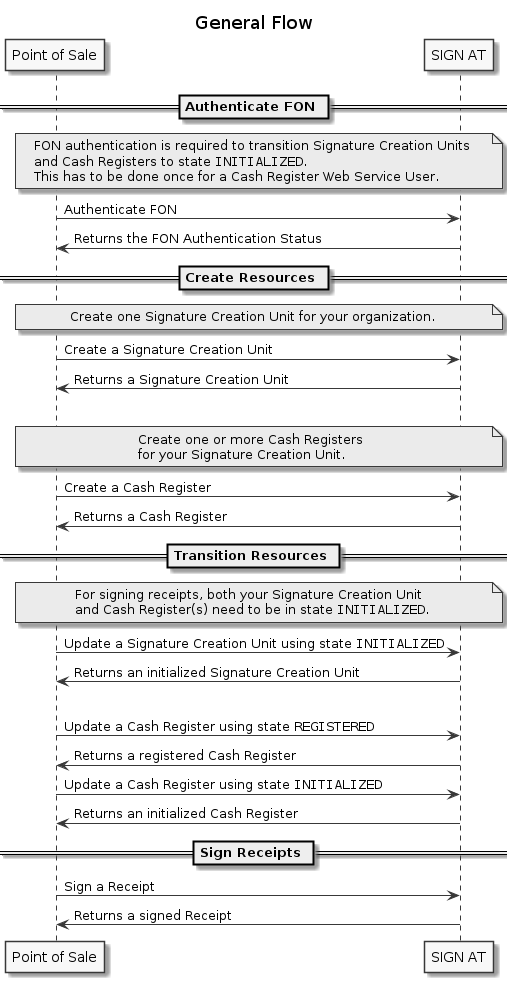
Before you can fiscalize receipts, a few steps have to be performed.
Create Organizations
Make sure that each taxpayer (= your customers) has set up at least one managed organization through the Management API. Then you can create a Signature Creation Unit and all the needed Cash Registers for the managed organization.
Before You Create Resources
Each Signature Creation Unit and Cash Register has to be reported to the fiscal authorities through FinanzOnline. During the initialization of a Cash Register, a zero-valued receipt is created. This receipt is then validated through FinanzOnline. This is done to make sure that the financial authorities can verify the signatures created during the fiscalization process.
The interactions with the fiscal authorities happen automatically when the states of the Signature Creation Unit and Cash Register resources change. All you need to do is create the resources through our API and perform the state transitions in the correct order.
We need you to collect and provide a set of credentials from your customers. Your customers can generate those credentials through FinanzOnline as the users of RKSV (= "Registrierkassen Web-Service Benutzer"). You can provide the credentials to us through the Authenticate FON endpoint. If the credentials are correct, the endpoint will return with the 200 status code and the authentication_status of AUTHENTICATED. We will then securely store the credentials.
Creating The Resources
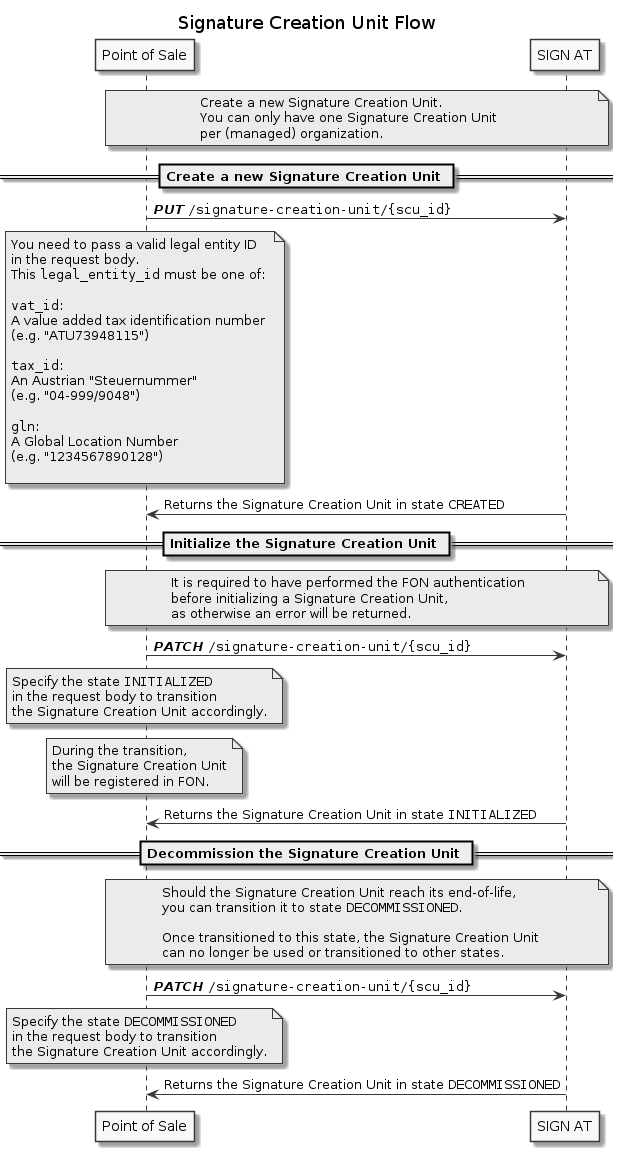
After the interactions with FinanzOnline are done, you will have to create a Signature Creation Unit. To do that, use the Create Signature Creation Unit Operation. A Signature Creation Unit is responsible for signing receipts.
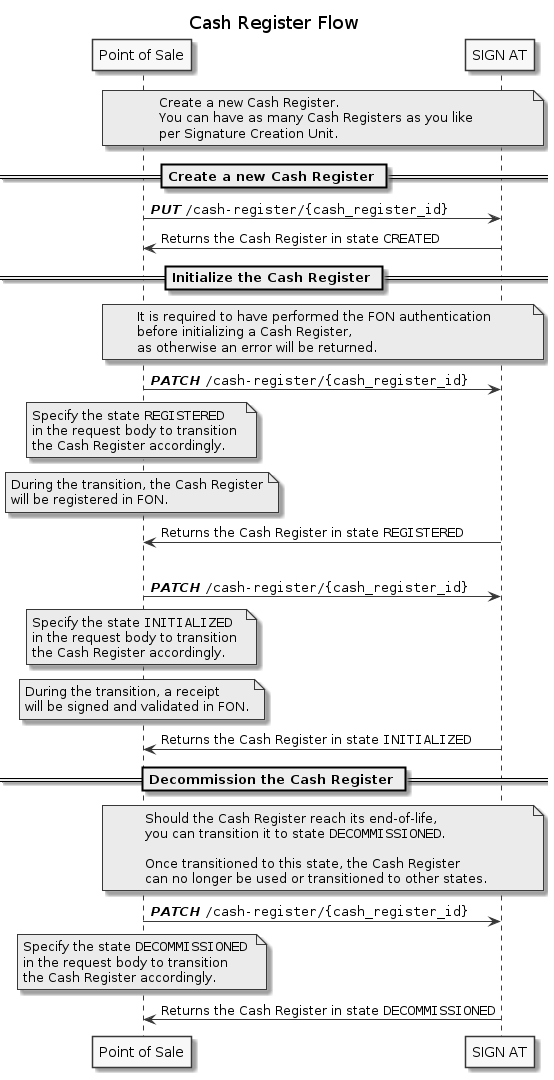
When your Signature Creation Unit is set up, you can create Cash Registers. They represent physical cash registers and are responsible for managing the DEP7 and recording of receipts. The recording of the receipts includes the creation of machine readable codes, signing, and cryptographic chaining. The Cash Registers have to be reported to FinanzOnline. You should only create as many Cash Registers as there are in a given store. Otherwise, problems could arise during an audit.
Fiscalizing receipts
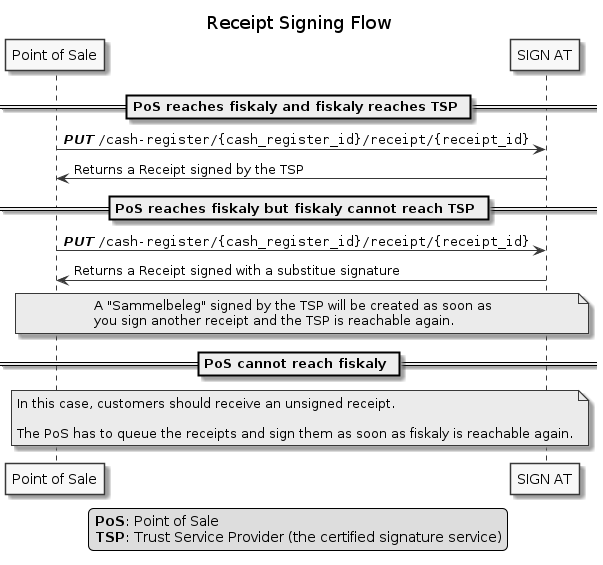
After the setup has been completed, the daily operations start. The key operation for that is the Sign Receipt Operation. It is used to fiscalize a receipt and retrieve the QR Code Data. The QR Code Data has to be printed on the receipt given to a customer.
Decommissioning Cash Registers
A Cash Register needs to be decommissioned in two cases:
- Planned decommissioning: A cash register has reached its planned end of life. Transition the Cash Register to state
DECOMMISSIONED. - Decommissioning due to non-repairable defect. Transition the Cash Register to state
DEFECTIVE.
Both state transitions will trigger a report to the financial authorities through FinanzOnline.
Decommissioning Signature Creation Units
A Signature Creation Unit needs to be decommissioned in two cases:
- You no longer want to use the fiskaly system. Transition the Signature Creation Unit to state
DECOMMISSIONED. - Decommissioning due to non-repairable defect. Transition the Signature Creation Unit to state
DEFECTIVE.
Both state transitions will trigger a report to the financial authorities through FinanzOnline.
Outage & Failure Handling
We handle the outage of SCUs ourselves. This involves detecting outages, reporting them to FinanzOnline, and creating the neccessary zero-valued receipts. The zero-valued receipts signal to the fiscal authorities that the outage is over.
We cannot monitor the state of Cash Registers. Handling outages of the Cash Registers is a shared responsibility of the API integrator and the taxpayer (= operator of ERS / PoS). If a Cash Register is temporarily not usable, it has to be transitioned into the state OUTAGE. It has to be done at most 48 hours after the defect was detected. This gets reported to FinanzOnline. When the cash register is usable again, transition it back into INITIALIZED. This reports a fault clearance to the fiscal authorities.
Special Cases During Signing Receipts
The RKSV has two subsystems:
- Security System ("Sicherheitseinrichtung")
- Signature Creation Unit ("Siegelerstellungseinheit")
The Signature Creation Unit provides the signatures.
The Security System includes the Signature Creation Unit and has additional functions. It manages the DEP, creates the machine readable codes signed by the SCU, and performs cryptographic chaining.
We handle an outage of the Signature Creation Unit ourselves. We detect outages, report them (including state changes for the affected API resource) and try to bring the SCU into normal operations again. If an outage has occured, the hints field of the receipt will contain Sicherheitseinrichtung ausgefallen (German from "SCU unavailable").
If the Security System is unavailable, you have to queue the receipts on your end. They will be signed once SIGN AT is available again.
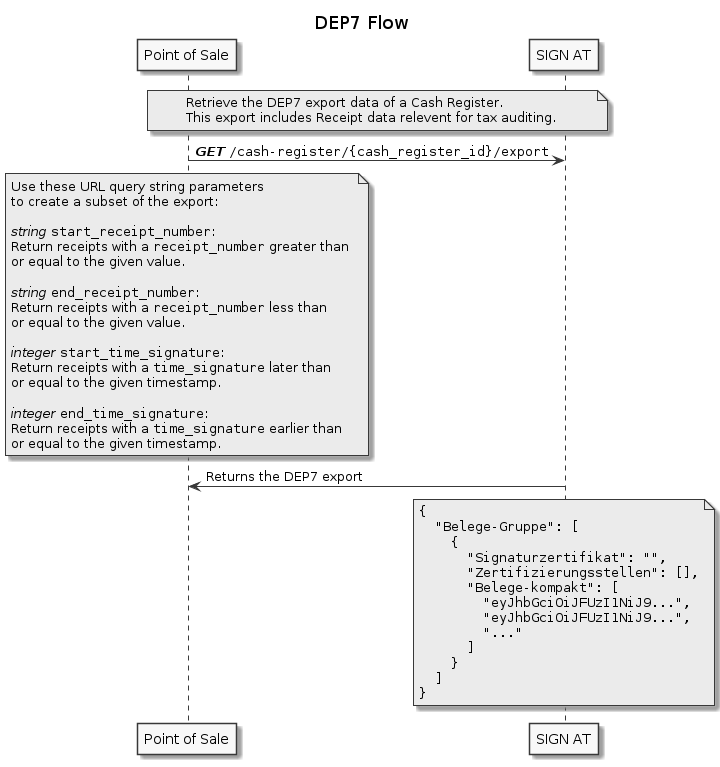
An auditor can ask you to provide an export of all your fiscalization activities. This export is called DEP7 (pursuant to paragraph 7 of the RKSV). To retrieve this export run the Export a Cash Register endpoint with the relevant cash_register_id.
The auditor can also request an export for a specific time period or a range of receipt numbers. You can retrieve an export adjusted to the required parameters. To do this, set filters as query parameters in the Export a Cash Register request.
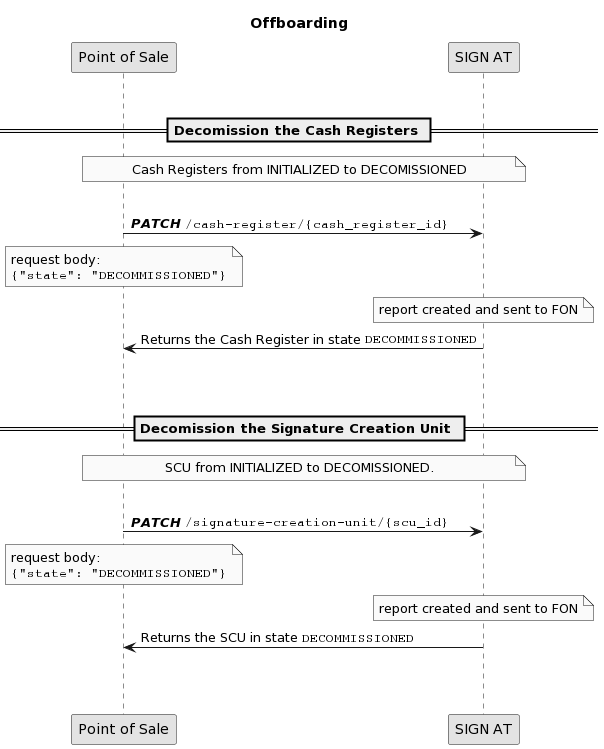
As part of the offboarding process, there are a few essential actions we would kindly ask you to undertake. These actions are intended to align with FinanzOnline and to prevent billing for unused fiskaly SIGN AT products.
The first step is to set all the cash registers from the state
INITIALIZEDto the stateDECOMMISSIONED.
To do this, you need to use the updateCashRegister endpoint and specify in the request body that the state should be set toDECOMMISSIONED.
When a cash register is decommissioned, a decommissioning receipt is created on our side and validated by FinanzOnline. We also report to FinanzOnline theDECOMMISSIONEDstate of the cash register.
Please note that a cash register can only beDECOMMISSIONEDfrom theINITIALIZEDorOUTAGEstate.The second step is to set the Signature Creation Unit in state
INITIALIZEDto theDECOMMISSIONEDstate.
To do this, you need to use the updateSignatureCreationUnit endpoint and specify in the request body that the state should be set toDECOMMISSIONED.
We report to FinanzOnline theDECOMMISSIONEDstate of the Signature Creation Unit.
The Cash Register resource is a representation of a physical cash register.
This resource manages the lifecycle of a cash register in RKSV and fiscalizes the receipts.
It reports the changes in its lifecycle states to FinanzOnline.
To start fiscalizing receipts with a Cash Register, you have to go through the following steps.
- Create a Cash Register with the Create Cash Register Operation. The Cash Register gets assigned the state
CREATED. - Run Update Cash Register Operation with the
statefield of the payload set toREGISTERED. It reports the new Cash Register to FinanzOnline. Thestateof the Cash Register is nowREGISTERED. - Run the Update Cash Register Operation with a
stateofINITIALIZED. It fiscalizes and validates the initial receipt with FinanzOnline. The Cash Register moves into thestateINITIALIZED. Now it can fiscalize receipts.
The third step requires at least one Signature Creation Unit (SCU) to be in the state INITIALIZED.
A Signature Creation Unit provides the signatures, which are required to fiscalize the receipts. During fiscalization, every receipt is brought into a special format and gets signed using the SCU.
Before a Signature Creation Unit can provide signatures, two steps have to be performed:
- Certificate & Key Pair creation: This is done internally by creating the resource on our side (=
CREATED). - FinanzOnline registration: Every SCU has to be registered with FinanzOnline. This can be done by running Update Signature Creation Unit Operation with the
statefield of the payload set toINITIALIZED.
FinanzOnline is a web application of the Austrian Ministry of Finance. Our API interacts with FinanzOnline during the fiscalization process. FinanzOnline provides a service called "Registrierkassenwebservice" (cash register web service). Your customers (= the taxpayers) have to create a user with this service and give you their credentials. Then you have to perform the Authenticate FON Operation with these credentials.
This operation usually only has to be performed once.
This operation has to be redone when:
- the taxpayer deletes their FON web service user. In that case, another user has to be created and you will have to authenticate with the new credentials.
The Receipt resource represents a fiscalized receipt within the RKSV. It includes the machine-readable code and the schema you provided when fiscalizing the receipt. The machine-readable code gets printed on the physical receipt. Some receipts (e.g. a yearly receipt) also include the result of the FinanzOnline validation.
Validation and reporting of such receipts will be performed automatically by fiskaly SIGN AT whenever required (e.g. at the beginning of a new year).
The fiskaly SIGN AT uses standard HTTP status codes to indicate the success or failure of requests:
Status codes in the 400-499 range indicate errors that have been caused by the requesting application (e.g., a malformed request body has been sent).
Retrying such requests with the same request body is pointless and will result in the same status code again.
Some 4xx errors can be handled programmatically. The error response is in JSON format and is structured like this:
{
"status_code": 400,
"error": "Bad Request",
"code": "E_SOME_ERROR",
"message": "Something bad happened"
}
The response will contain an error code or other information that reveals the reason of the error. Change the request accordingly before retrying. Below you can find the most frequent errors and how to fix them.
How to handle 4xx errors
400 Bad Request
E_FAILED_SCHEMA_VALIDATIONYour request doesn't comply with the defined schema. Fix you request body and parameters according to the error message and run the endpoint again.
E_SCU_ALREADY_EXISTSThere already exists an
SCUwith thescu_idyou passed with the request. Run the Retrieve SCU endpoint with thescu_idyou tried to use. If you tried to make an idempotent request, make sure that theSCUhas the samelegal_entity_nameandlegal_entity_idas you passed in the oridinal request payload and itsstateis eitherPENDINGorCREATED.E_SCU_LIMIT_REACHEDYou are only allowed to have one active
SCU. An activeSCUis anSCUin the states ofINITIALIZEDorOUTAGE. Run the List SCUs endpoint. Check how manySCUsare active. If you want to replace anSCU, run the Update SCU endpoint for thisSCUwith thestateproperty of the payload set toDECOMMISSIONED. Then create a new SCU with the Create SCU endpoint.E_INVALID_VAT_IDThe
VatIdyou tried to use as thelegal_entity_idhas an incorrect format. Follow the instructions in the error message and retry the request with a validVatId.E_INVALID_AUSTRIAN_TAX_ID,The
TaxIdyou tried to use as thelegal_entity_idhas an incorrect format. Follow the instructions in the error message and retry the request with a validTaxId.E_INVALID_GLNThe
Glnyou tried to use as thelegal_entity_idhas an incorrect format. Follow the instructions in the error message and retry the request with a validGln.E_INVALID_LEGAL_ENTITY_IDThe
legal_entity_idyou provided has an incorrect format. Follow the instructions in the error message and retry the request with a validlegal_entity_id.E_CASH_REGISTER_ALREADY_EXISTSThere already exists a Cash Register with the
cash_register_idyou passed. This error is returned if the state of the Cash Register with thiscash_register_idis notCREATED. Run the Retrieve a Cash Register endpoint with thecash_register_idand check the state of the returned Cash Register.E_ILLEGAL_CASH_REGISTER_STATE_TRANSITIONThe
Cash Registerstate transition you are trying to make is not allowed. The error message explains why this state transition is invalid. The Cash Register part of the Resources section describes the correct lifecycle of aCash Register.E_INITIAL_RECEIPT_MISSINGYou tried to sign receipts with a
Cash Registerthat is not in a state ofINITIALIZED. Run the Retrieve a Cash Register endpoint with thecash_register_idof the Cash Register you are using. Check that thestatefield of the Cash Register isINITIALIZED. If it is in the stateCREATEDfollow the instructions for the Initialize Cash Register endpoint to initialize it.E_FILTER_LIMIT_EXCEEDEDThe limit for the number of
Cash Registersto fetch you set is too high. Set a limit below 100 and retry the request.
401 Unauthorized
E_MISSING_FON_CREDENTIALSYou need to authenticate the taxpayer with FON with before using this endpoint. Run the Authenticate FON with the taxpayer credentials and retry the request.
E_FON_AUTH_FAILEDThe FON authentication request failed. The error message contains the response and reason for failure returned by FON. Fix the FON authentication request payload according to the response and retry the request.
E_AUTHENTICATIONThe JWT token authentication failed for your request. The error message explains what went wrong. Run the Authenticate API enpoint to get a new token and retry your original request.
404 Not Found
E_SCU_NOT_FOUNDNo
SCUwith thescu_idyou provided was found. Run the Retrieve SCU endpoint with thescu_idyou used to see if thisSCUexists.E_NO_INITIALIZED_SCUYou need to have an
SCUin the stateINITIALIZEDto use this endpoint. Run the List SCU request to see whichSCUsyou have. Then use the Update SCU endpoint to initialize one of yourSCUs.E_RECEIPT_NOT_FOUNDNo
Receiptwas found for thereceipt_id_or_numberyou provided. Run the Retrieve a Receipt request with thereceipt_id_or_numberyou used to see if such aReceiptexists.E_CASH_REGISTER_NOT_FOUNDNo
Cash Registerwith thecash_register_idyou provided was found. Run the Retrieve a Cash Register endpoint with thecash_register_idyou used to see if thisCash Registerexists.
408 Request Timeout
The FON request timed out. Run your request again.E_FON_REQUEST_TIMEOUT
Status codes in the 500-599 range indicate errors on the server side.
These errors are temporary.
You can safely retry (see Idempotent Requests) the same request after a delay.
We recommend an exponential backoff for your retry logic.
Otherwise you might run into a 429 (Too Many Requests) error.
- If you're experiencing any problems with the fiskaly SIGN AT, please check the fiskaly SIGN AT status page or forward to Developer Support.
For a quick first demo, you may use Postman. We prepared a Postman collection that allows you to step through the most important functions of this API.
Download the Postman application.
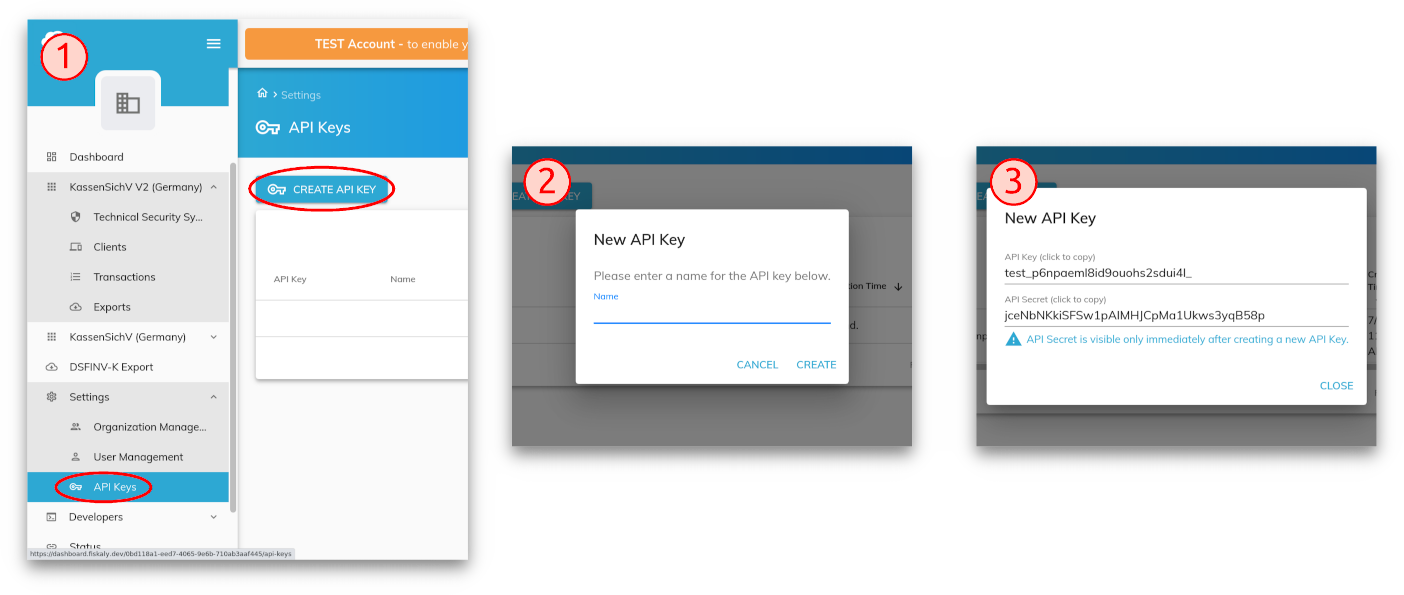
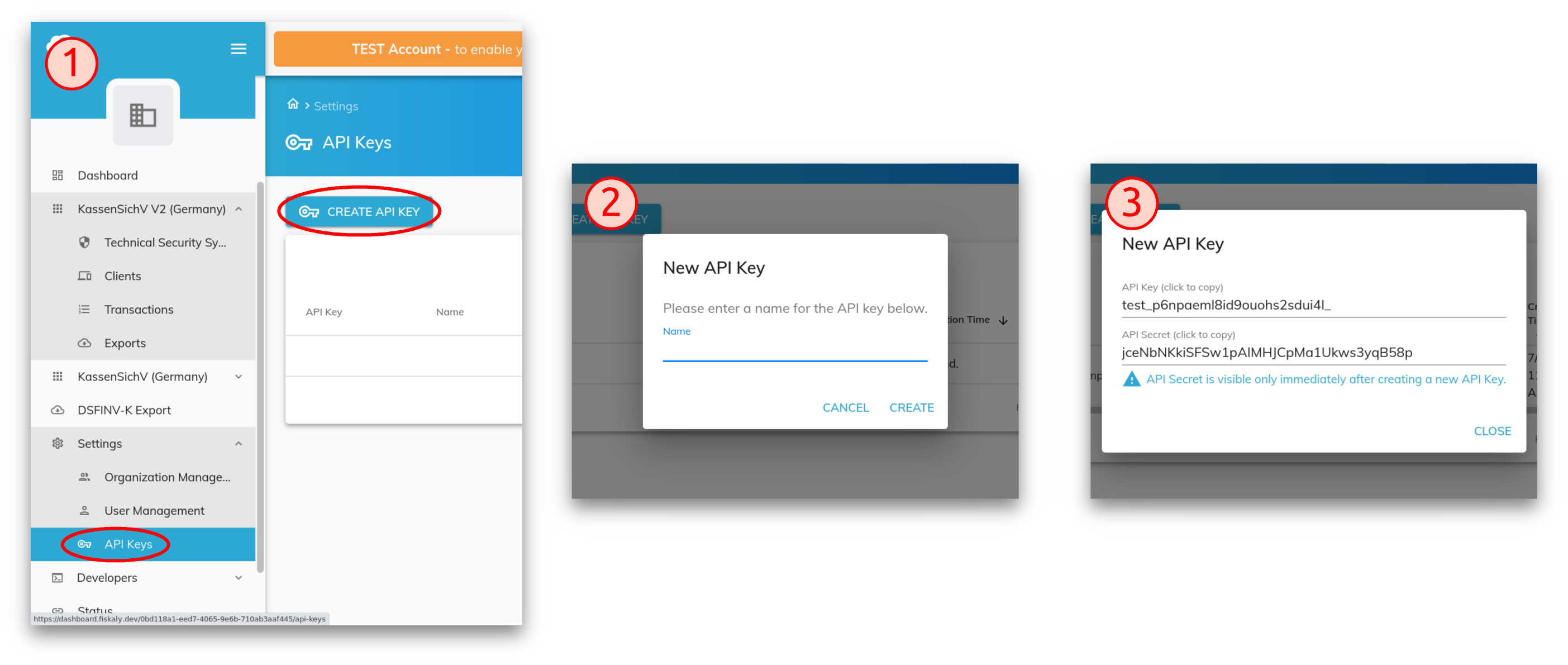
Create an API key and secret via the fiskaly dashboard:
Insert your API key and secret to get your personalized Postman environment:
Download the Postman collection.
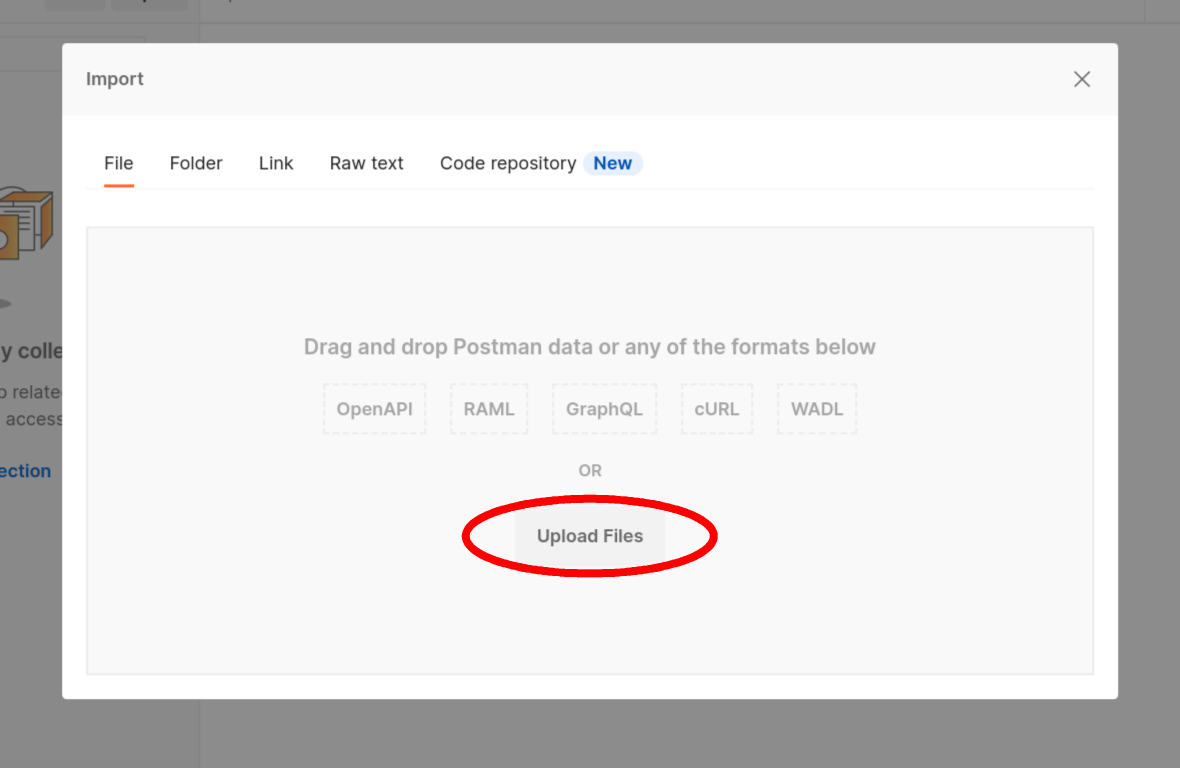
Start Postman and select Upload Files from the Import dialog:
File > Import (Ctrl+O)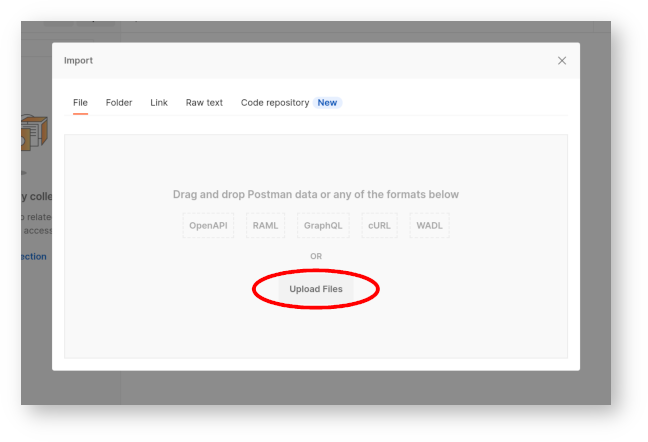
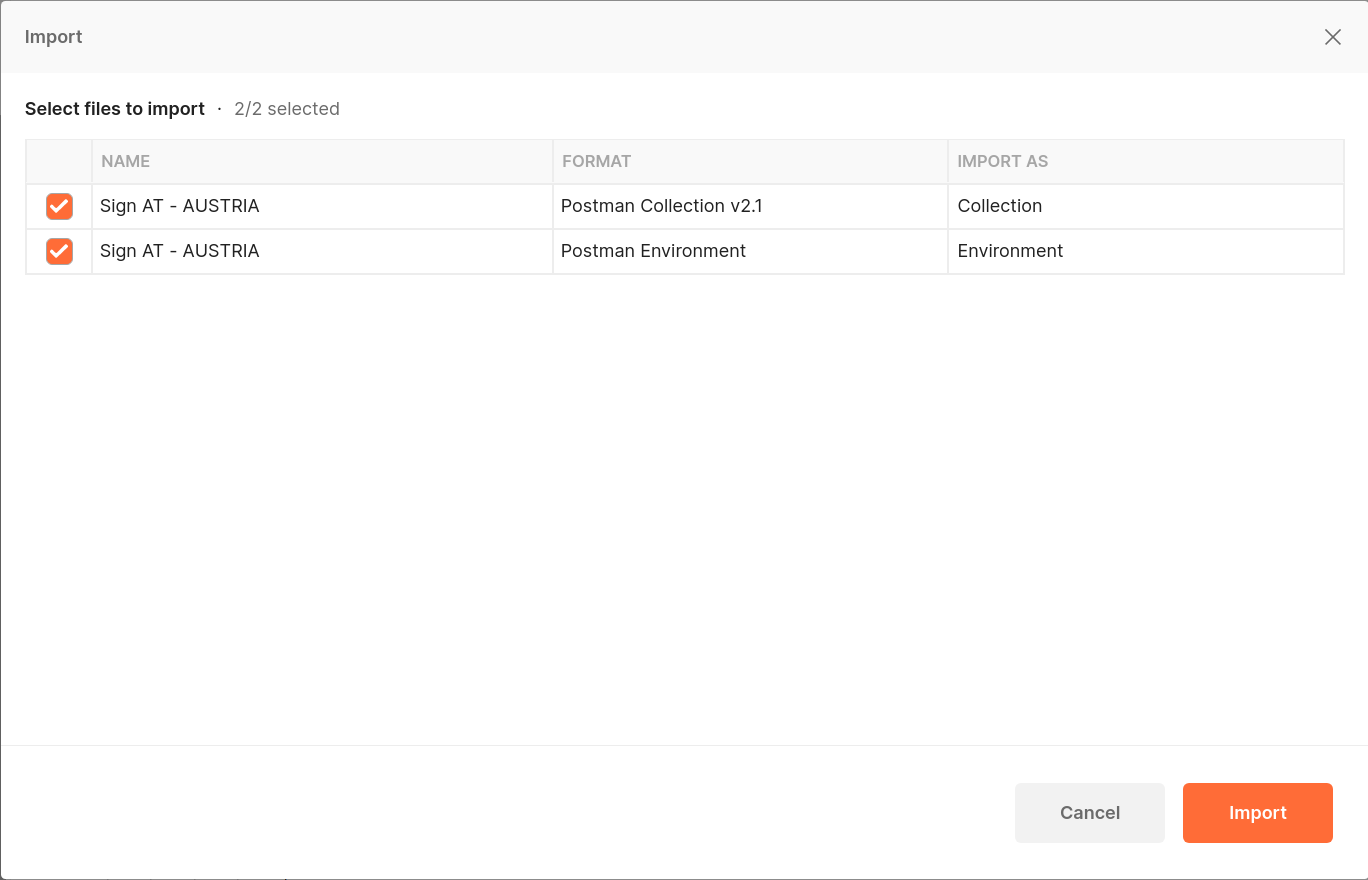
Select the collection and environment files that you downloaded:
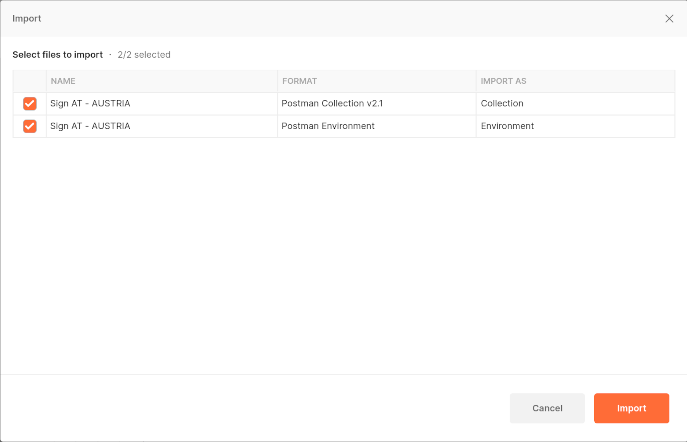
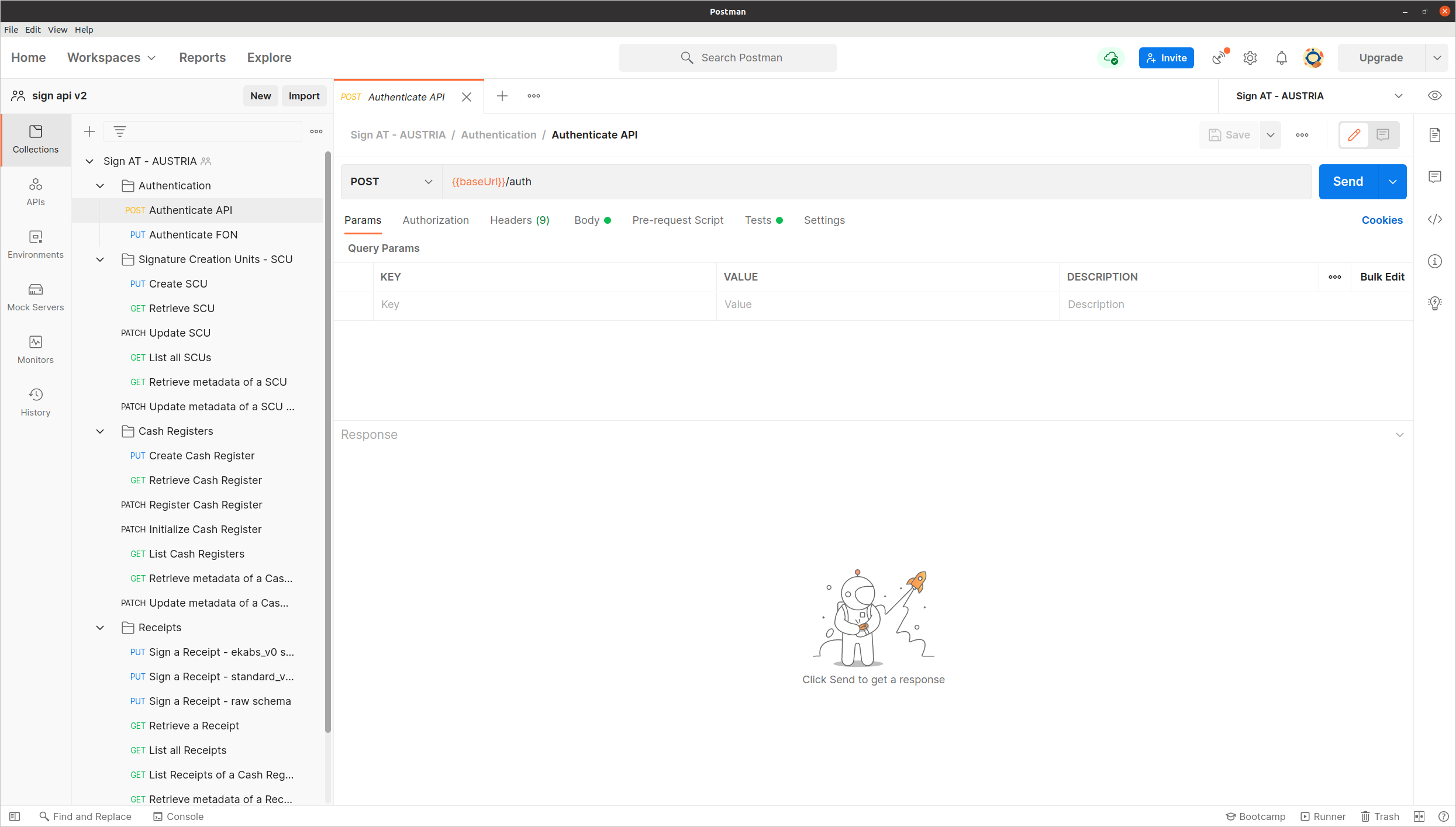
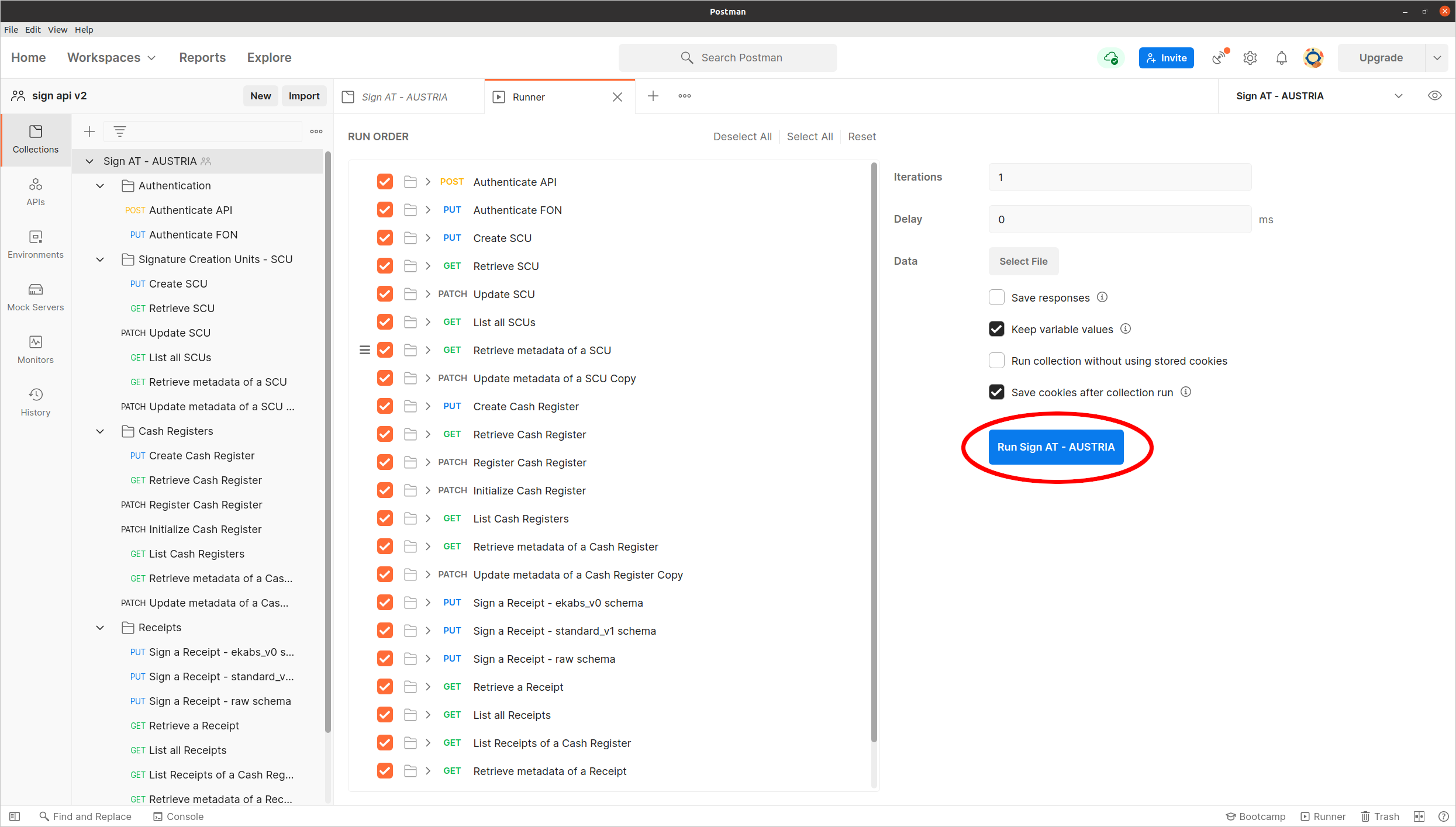
The Postman screen should now look like this:
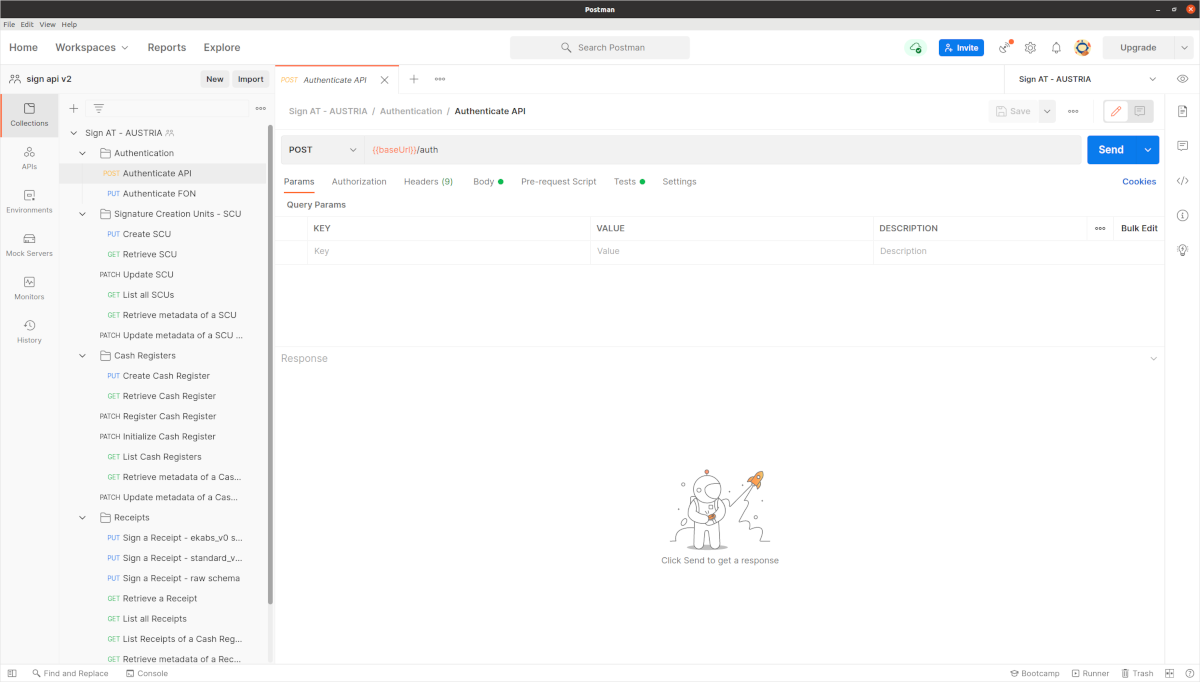
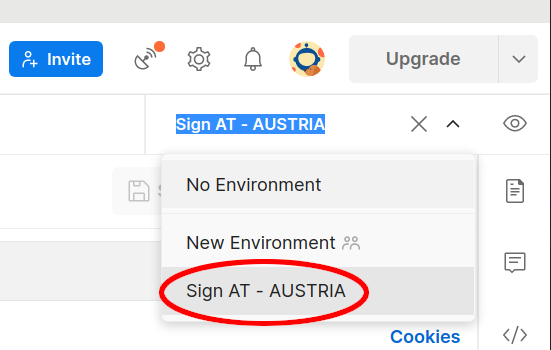
Select the SIGN AT environment:
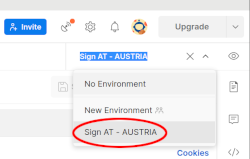
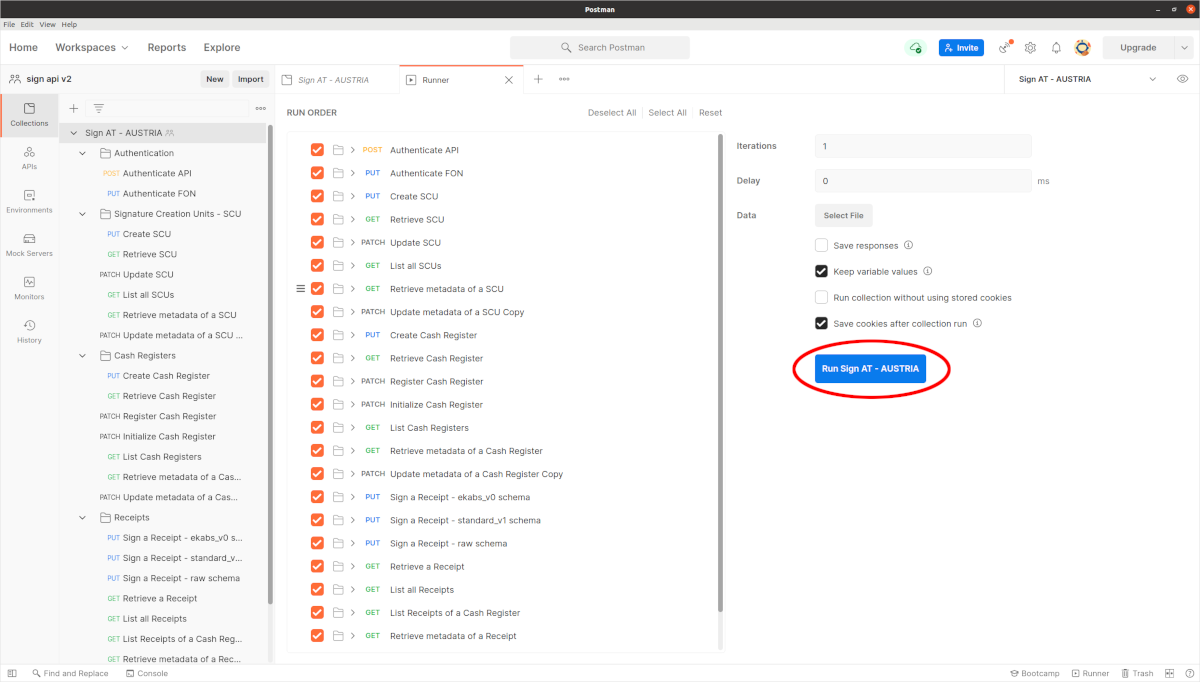
Run the demo:
The FAQs have been migrated to a new location: support.fiskaly.com
Authenticate API
To access our API, you need to have a valid JWT token. This endpoint creates the token with your api_key and api_secret.
If you don't have an api_key, you can create one via the fiskaly dashboard.
The api_secret will be generated for you after you create the api_key.
The token must be sent with every following request in the Authorization header field using the Bearer authentication scheme.
See details here.
Request Body schema: application/json
| api_key required | string (ApiKeyKey) non-empty Key of the API Key and Secret. |
| api_secret required | string (ApiKeySecret) non-empty Secret of the API Key and Secret. |
Responses
Request samples
- Payload
{- "api_key": "string",
- "api_secret": "string"
}Response samples
- 200
- 401
{- "access_token": "string",
- "access_token_claims": {
- "env": "TEST",
- "organization_id": "1c81cb86-c2e8-4074-afc3-a0601b2bf063"
}, - "access_token_expires_in": 0,
- "access_token_expires_at": 1577833200,
- "refresh_token": "string",
- "refresh_token_expires_in": 0,
- "refresh_token_expires_at": 1577833200
}Authenticate FON
The fiscalization process requires interactions with FinanzOnline (FON). This includes registering Cash Registers and Signature Creation Units, validating Receipts, etc. The fiskaly SIGN AT automates all those steps.
Our system communicates with FinanzOnline (FON) in the name of the taxpayer. The taxpayer must create a FinanzOnline Cash Register web service user ("Registrierkassen-Webservice-Benutzer", pages 60-63). Then you must use those credentials to authenticate the taxpayer with FON through this endpoint.
Note: The credentials of this Cash Register Web Service User must be provided only once for authenticating with FON. The Cash Register web service user remains authenticated with FON indefinitely.
Note:
You must authenticate with FON before transitioning Signature Creation Units and Cash Registers to INITIALIZED.
Note: For requests requiring our system to communicate with FinanzOnline (FON), any downtime or unavailability of the FinanzOnline (FON) service may impact such requests.
Authorizations:
Request Body schema: application/json
| fon_participant_id required | string (FonParticipantId) [ 8 .. 12 ] characters [0-9A-Za-z]{8,12} The "Teilnehmer-Identifikation" part of the FinanzOnline Cash Register Web Service User ("Registrierkassen-Webservice-Benutzer") credential triplet to be provided by the taxpayer. |
| fon_user_id required | string (FonUserId) [ 5 .. 12 ] characters The "Benutzer-Identifikation" part of the FinanzOnline Cash Register Web Service User ("Registrierkassen-Webservice-Benutzer") credential triplet to be provided by the taxpayer. |
| fon_user_pin required | string (FonUserPin) [ 5 .. 128 ] characters The "PIN" part of the FinanzOnline Cash Register Web Service User ("Registrierkassen-Webservice-Benutzer") credential triplet to be provided by the taxpayer. |
Responses
Request samples
- Payload
{- "fon_participant_id": "stringst",
- "fon_user_id": "string",
- "fon_user_pin": "string"
}Response samples
- 200
{- "fon_participant_id": "stringst",
- "fon_user_id": "string",
- "authentication_status": "AUTHENTICATED",
- "time_authentication": 1577833200
}Create a Signature Creation Unit
This endpoint creates a Signature Creation Unit.
The Signature Creation Unit is identified by a signature_creation_unit_id.
The signature_creation_unit_id must comply with the UUIDv4 standard and should be generated on your side.
When you create a Signature Creation Unit, its state is usually set to CREATED.
In some rare cases it may happen that the Signature Creation Unit can not be created immediately.
This will be reflected by a transient PENDING state that will eventually change to CREATED at a later point in time.
Simply retry the request or use the Retrieve a Signature Creation Unit endpoint to regularly check the state of the Signature Creation Unit.
Use the Update a Signature Creation Unit endpoint to transition a Signature Creation Unit to the state INITIALIZED in order to be able to use it for signing Receipts.
Authorizations:
path Parameters
| signature_creation_unit_id required | string <uuid> (SignatureCreationUnitId) [a-f0-9]{8}-?[a-f0-9]{4}-?4[a-f0-9]{3}-?[89ab... Example: 1c81cb86-c2e8-4074-afc3-a0601b2bf063 Identifies a Signature Creation Unit. |
Request Body schema: application/json
object (MetadataRequest) <= 20 properties You can use this parameter to attach custom key-value data to an object. Metadata is useful for storing additional, structured information on an object. Note: You can specify up to 20 keys, with key names up to 40 characters long and values up to 500 characters long. | |
required | VatId (object) or TaxId (object) or Gln (object) (LegalEntityId) A unique identifier of the legal entity that operates the Signature Creation Unit. |
| legal_entity_name | string (LegalEntityName) The name of the legal entity that is bound to the Signature Creation Unit. |
Responses
Request samples
- Payload
{- "metadata": {
- "my_property_1": "1234",
}, - "legal_entity_id": {
- "vat_id": "ATU73948115"
}, - "legal_entity_name": "string"
}Response samples
- 200
{- "_id": "1c81cb86-c2e8-4074-afc3-a0601b2bf063",
- "_type": "SIGNATURE_CREATION_UNIT",
- "_env": "TEST",
- "_version": "1.2.5",
- "state": "CREATED",
- "legal_entity_id": {
- "vat_id": "ATU73948115"
}, - "legal_entity_name": "string",
- "certificate_serial_number": "5c8e5",
- "time_pending": 1577833200,
- "time_creation": 1577833200,
- "metadata": {
- "my_property_1": "1234",
}
}Retrieve a Signature Creation Unit
This endpoint returns information about a specific Signature Creation Unit.
Authorizations:
path Parameters
| signature_creation_unit_id required | string <uuid> (SignatureCreationUnitId) [a-f0-9]{8}-?[a-f0-9]{4}-?4[a-f0-9]{3}-?[89ab... Example: 1c81cb86-c2e8-4074-afc3-a0601b2bf063 Identifies a Signature Creation Unit. |
Responses
Response samples
- 200
- 404
{- "_id": "1c81cb86-c2e8-4074-afc3-a0601b2bf063",
- "_type": "SIGNATURE_CREATION_UNIT",
- "_env": "TEST",
- "_version": "1.2.5",
- "state": "PENDING",
- "legal_entity_id": {
- "vat_id": "ATU73948115"
}, - "legal_entity_name": "string",
- "certificate_serial_number": "5c8e5",
- "time_pending": 1577833200,
- "time_creation": 1577833200,
- "metadata": {
- "my_property_1": "1234",
}, - "time_initialization": 1577833200,
- "time_decommission": 1577833200,
- "time_outage": 1577833200,
- "time_defect": 1577833200
}Update a Signature Creation Unit
This endpoint updates a Signature Creation Unit.
In order to be able to use a Signature Creation Unit for signing Receipts it needs to be transitioned to the state INITIALIZED.
Once a Signature Creation Unit has eventually reached its end-of-life this has to be reflected by setting its state to DECOMMISSIONED.
Authorizations:
path Parameters
| signature_creation_unit_id required | string <uuid> (SignatureCreationUnitId) [a-f0-9]{8}-?[a-f0-9]{4}-?4[a-f0-9]{3}-?[89ab... Example: 1c81cb86-c2e8-4074-afc3-a0601b2bf063 Identifies a Signature Creation Unit. |
Request Body schema: application/json
| state required | string Enum: "INITIALIZED" "DECOMMISSIONED" |
Responses
Request samples
- Payload
{- "state": "INITIALIZED"
}Response samples
- 200
- 404
{- "_id": "1c81cb86-c2e8-4074-afc3-a0601b2bf063",
- "_type": "SIGNATURE_CREATION_UNIT",
- "_env": "TEST",
- "_version": "1.2.5",
- "state": "PENDING",
- "legal_entity_id": {
- "vat_id": "ATU73948115"
}, - "legal_entity_name": "string",
- "certificate_serial_number": "5c8e5",
- "time_pending": 1577833200,
- "time_creation": 1577833200,
- "metadata": {
- "my_property_1": "1234",
}, - "time_initialization": 1577833200,
- "time_decommission": 1577833200,
- "time_outage": 1577833200,
- "time_defect": 1577833200
}List all Signature Creation Units
This endpoint lists all available Signature Creation Units.
Authorizations:
query Parameters
| order | string Default: "ASC" Enum: "ASC" "DESC" Determines the sorting order. |
| limit | integer [ 1 .. 100 ] Default: 100 Limits the number of returned results. |
| offset | integer >= 0 Default: 0 Skips the specified number of results from the result set. |
Responses
Response samples
- 200
{- "data": [
- {
- "_id": "1c81cb86-c2e8-4074-afc3-a0601b2bf063",
- "_type": "SIGNATURE_CREATION_UNIT",
- "_env": "TEST",
- "_version": "1.2.5",
- "state": "PENDING",
- "legal_entity_id": {
- "vat_id": "ATU73948115"
}, - "legal_entity_name": "string",
- "certificate_serial_number": "5c8e5",
- "time_pending": 1577833200,
- "time_creation": 1577833200,
- "metadata": {
- "my_property_1": "1234",
}, - "time_initialization": 1577833200,
- "time_decommission": 1577833200,
- "time_outage": 1577833200,
- "time_defect": 1577833200
}
], - "count": 9007199254740991,
- "_type": "SIGNATURE_CREATION_UNIT_LIST",
- "_env": "TEST",
- "_version": "1.2.5"
}Retrieve metadata of a Signature Creation Unit
This endpoint retrieves additional structured information about a Signature Creation Unit.
Authorizations:
path Parameters
| signature_creation_unit_id required | string <uuid> (SignatureCreationUnitId) [a-f0-9]{8}-?[a-f0-9]{4}-?4[a-f0-9]{3}-?[89ab... Example: 1c81cb86-c2e8-4074-afc3-a0601b2bf063 Identifies a Signature Creation Unit. |
Responses
Response samples
- 200
- 404
{- "my_property_1": "1234",
}Update metadata of a Signature Creation Unit
This endpoint creates or updates additional structured information about a Signature Creation Unit.
Authorizations:
path Parameters
| signature_creation_unit_id required | string <uuid> (SignatureCreationUnitId) [a-f0-9]{8}-?[a-f0-9]{4}-?4[a-f0-9]{3}-?[89ab... Example: 1c81cb86-c2e8-4074-afc3-a0601b2bf063 Identifies a Signature Creation Unit. |
Request Body schema: application/json
<= 20 properties| property name* additional property | string <= 500 characters |
Responses
Request samples
- Payload
{- "my_property_1": "1234",
}Response samples
- 200
- 404
{- "my_property_1": "1234",
}Create a Cash Register
This endpoint creates a Cash Register.
The Cash Register is identified by a cash_register_id.
The cash_register_id must comply with the UUIDv4 standard and should be generated on your side.
When you create a Cash Register, its state is set to CREATED.
Use the Update a Cash Register endpoint to transition a Cash Register to the state INITIALIZED in order to be able to use it for signing Receipts.
Authorizations:
path Parameters
| cash_register_id required | string <uuid> (CashRegisterId) [a-f0-9]{8}-?[a-f0-9]{4}-?4[a-f0-9]{3}-?[89ab... Example: 1c81cb86-c2e8-4074-afc3-a0601b2bf063 Identifies a Cash Register. |
Request Body schema: application/json
object (MetadataRequest) <= 20 properties You can use this parameter to attach custom key-value data to an object. Metadata is useful for storing additional, structured information on an object. Note: You can specify up to 20 keys, with key names up to 40 characters long and values up to 500 characters long. | |
| description | string (CashRegisterDescription) Description of the Cash Register. |
Responses
Request samples
- Payload
{- "metadata": {
- "my_property_1": "1234",
}, - "description": "My Cash Register 1"
}Response samples
- 200
{- "_id": "1c81cb86-c2e8-4074-afc3-a0601b2bf063",
- "_type": "CASH_REGISTER",
- "_env": "TEST",
- "_version": "1.2.5",
- "state": "CREATED",
- "serial_number": "1",
- "turnover_counter": "-123.45",
- "description": "My Cash Register 1",
- "time_creation": 1577833200,
- "metadata": {
- "my_property_1": "1234",
}
}Retrieve a Cash Register
This endpoint returns information about a specific Cash Register.
Authorizations:
path Parameters
| cash_register_id required | string <uuid> (CashRegisterId) [a-f0-9]{8}-?[a-f0-9]{4}-?4[a-f0-9]{3}-?[89ab... Example: 1c81cb86-c2e8-4074-afc3-a0601b2bf063 Identifies a Cash Register. |
Responses
Response samples
- 200
- 404
{- "_id": "1c81cb86-c2e8-4074-afc3-a0601b2bf063",
- "_type": "CASH_REGISTER",
- "_env": "TEST",
- "_version": "1.2.5",
- "state": "CREATED",
- "serial_number": "1",
- "turnover_counter": "-123.45",
- "description": "My Cash Register 1",
- "time_creation": 1577833200,
- "metadata": {
- "my_property_1": "1234",
}, - "time_registration": 1577833200,
- "time_initialization": 1577833200,
- "initialization_receipt_id": "1c81cb86-c2e8-4074-afc3-a0601b2bf063",
- "time_decommission": 1577833200,
- "decommission_receipt_id": "1c81cb86-c2e8-4074-afc3-a0601b2bf063",
- "time_outage": 1577833200,
- "time_defect": 1577833200
}Update a Cash Register
This endpoint updates a Cash Register.
In order to be able to use a Cash Register for signing Receipts it needs to be transitioned to the state INITIALIZED.
Once a Cash Register has eventually reached its end-of-life this has to be reflected by setting its state to DECOMMISSIONED.
Authorizations:
path Parameters
| cash_register_id required | string <uuid> (CashRegisterId) [a-f0-9]{8}-?[a-f0-9]{4}-?4[a-f0-9]{3}-?[89ab... Example: 1c81cb86-c2e8-4074-afc3-a0601b2bf063 Identifies a Cash Register. |
Request Body schema: application/json
| state required | string Enum: "REGISTERED" "INITIALIZED" "DECOMMISSIONED" "DEFECTIVE" "OUTAGE" |
Responses
Request samples
- Payload
{- "state": "INITIALIZED"
}Response samples
- 200
- 404
{- "_id": "1c81cb86-c2e8-4074-afc3-a0601b2bf063",
- "_type": "CASH_REGISTER",
- "_env": "TEST",
- "_version": "1.2.5",
- "state": "CREATED",
- "serial_number": "1",
- "turnover_counter": "-123.45",
- "description": "My Cash Register 1",
- "time_creation": 1577833200,
- "metadata": {
- "my_property_1": "1234",
}, - "time_registration": 1577833200,
- "time_initialization": 1577833200,
- "initialization_receipt_id": "1c81cb86-c2e8-4074-afc3-a0601b2bf063",
- "time_decommission": 1577833200,
- "decommission_receipt_id": "1c81cb86-c2e8-4074-afc3-a0601b2bf063",
- "time_outage": 1577833200,
- "time_defect": 1577833200
}List Cash Registers
This endpoint lists available Cash Registers.
Authorizations:
query Parameters
| order | string Default: "ASC" Enum: "ASC" "DESC" Determines the sorting order. |
| limit | integer [ 1 .. 100 ] Default: 100 Limits the number of returned results. |
| offset | integer >= 0 Default: 0 Skips the specified number of results from the result set. |
Responses
Response samples
- 200
{- "data": [
- {
- "_id": "1c81cb86-c2e8-4074-afc3-a0601b2bf063",
- "_type": "CASH_REGISTER",
- "_env": "TEST",
- "_version": "1.2.5",
- "state": "CREATED",
- "serial_number": "1",
- "turnover_counter": "-123.45",
- "description": "My Cash Register 1",
- "time_creation": 1577833200,
- "metadata": {
- "my_property_1": "1234",
}, - "time_registration": 1577833200,
- "time_initialization": 1577833200,
- "initialization_receipt_id": "1c81cb86-c2e8-4074-afc3-a0601b2bf063",
- "time_decommission": 1577833200,
- "decommission_receipt_id": "1c81cb86-c2e8-4074-afc3-a0601b2bf063",
- "time_outage": 1577833200,
- "time_defect": 1577833200
}
], - "count": 9007199254740991,
- "_type": "CASH_REGISTER_LIST",
- "_env": "TEST",
- "_version": "1.2.5"
}Retrieve metadata of a Cash Register
This endpoint retrieves additional structured information about a Cash Register.
Authorizations:
path Parameters
| cash_register_id required | string <uuid> (CashRegisterId) [a-f0-9]{8}-?[a-f0-9]{4}-?4[a-f0-9]{3}-?[89ab... Example: 1c81cb86-c2e8-4074-afc3-a0601b2bf063 Identifies a Cash Register. |
Responses
Response samples
- 200
- 404
{- "my_property_1": "1234",
}Update metadata of a Cash Register
This endpoint creates or updates additional structured information about a Cash Register.
Authorizations:
path Parameters
| cash_register_id required | string <uuid> (CashRegisterId) [a-f0-9]{8}-?[a-f0-9]{4}-?4[a-f0-9]{3}-?[89ab... Example: 1c81cb86-c2e8-4074-afc3-a0601b2bf063 Identifies a Cash Register. |
Request Body schema: application/json
<= 20 properties| property name* additional property | string <= 500 characters |
Responses
Request samples
- Payload
{- "my_property_1": "1234",
}Response samples
- 200
- 404
{- "my_property_1": "1234",
}Authenticate FON
The fiscalization process requires interactions with FinanzOnline (FON). This includes registering Cash Registers and Signature Creation Units, validating Receipts, etc. The fiskaly SIGN AT automates all those steps.
Our system communicates with FinanzOnline (FON) in the name of the taxpayer. The taxpayer must create a FinanzOnline Cash Register web service user ("Registrierkassen-Webservice-Benutzer", pages 60-63). Then you must use those credentials to authenticate the taxpayer with FON through this endpoint.
Note: The credentials of this Cash Register Web Service User must be provided only once for authenticating with FON. The Cash Register web service user remains authenticated with FON indefinitely.
Note:
You must authenticate with FON before transitioning Signature Creation Units and Cash Registers to INITIALIZED.
Note: For requests requiring our system to communicate with FinanzOnline (FON), any downtime or unavailability of the FinanzOnline (FON) service may impact such requests.
Authorizations:
Request Body schema: application/json
| fon_participant_id required | string (FonParticipantId) [ 8 .. 12 ] characters [0-9A-Za-z]{8,12} The "Teilnehmer-Identifikation" part of the FinanzOnline Cash Register Web Service User ("Registrierkassen-Webservice-Benutzer") credential triplet to be provided by the taxpayer. |
| fon_user_id required | string (FonUserId) [ 5 .. 12 ] characters The "Benutzer-Identifikation" part of the FinanzOnline Cash Register Web Service User ("Registrierkassen-Webservice-Benutzer") credential triplet to be provided by the taxpayer. |
| fon_user_pin required | string (FonUserPin) [ 5 .. 128 ] characters The "PIN" part of the FinanzOnline Cash Register Web Service User ("Registrierkassen-Webservice-Benutzer") credential triplet to be provided by the taxpayer. |
Responses
Request samples
- Payload
{- "fon_participant_id": "stringst",
- "fon_user_id": "string",
- "fon_user_pin": "string"
}Response samples
- 200
{- "fon_participant_id": "stringst",
- "fon_user_id": "string",
- "authentication_status": "AUTHENTICATED",
- "time_authentication": 1577833200
}Retrieve FON Status
This endpoint can be used to check the status of the FON authentication.
If authentication_status is not
AUTHENTICATED then it is necessary that the user reauthenticates with FON using the Authenticate FON endpoint.
Authorizations:
Responses
Response samples
- 200
{- "fon_participant_id": "stringst",
- "fon_user_id": "string",
- "authentication_status": "AUTHENTICATED",
- "time_authentication": 1577833200
}Validate a Receipt
This endpoint validates a Receipt.
This returns a status representing the outcome of the validation against FinanzOnline, as well as a message explaining the validation result. The validation is performed in a sychronous manner, meaning if FinanzOnline is not available the request might time out.
Authorizations:
path Parameters
| cash_register_id required | string <uuid> (CashRegisterId) [a-f0-9]{8}-?[a-f0-9]{4}-?4[a-f0-9]{3}-?[89ab... Example: 1c81cb86-c2e8-4074-afc3-a0601b2bf063 Identifies a Cash Register. |
| receipt_id required | string <uuid> (ReceiptId) [a-f0-9]{8}-?[a-f0-9]{4}-?4[a-f0-9]{3}-?[89ab... Example: 1c81cb86-c2e8-4074-afc3-a0601b2bf063 Identifies a Receipt. |
Responses
Response samples
- 200
- 404
{- "validation_result": "SUCCESS",
- "time_validation": 1577833200
}Sign a Receipt
This endpoint signs a Receipt. Hence, it is the single most important endpoint for day-to-day operations.
The response contains all information that is necessary for augmenting the final receipt which is handed out to the customer:
qr_code_data, which contains the data for the RKSV QR Code to be displayed in a graphical representation,- as well as information that needs to be displayed in textual form:
receipt_number,time_signatureandcash_register_serial_number, - all raw gross amounts.
Authorizations:
path Parameters
| cash_register_id required | string <uuid> (CashRegisterId) [a-f0-9]{8}-?[a-f0-9]{4}-?4[a-f0-9]{3}-?[89ab... Example: 1c81cb86-c2e8-4074-afc3-a0601b2bf063 Identifies a Cash Register. |
| receipt_id required | string <uuid> (ReceiptId) [a-f0-9]{8}-?[a-f0-9]{4}-?4[a-f0-9]{3}-?[89ab... Example: 1c81cb86-c2e8-4074-afc3-a0601b2bf063 Identifies a Receipt. |
Request Body schema: application/json
| receipt_type required | string Default: "NORMAL" Enum: "NORMAL" "CANCELLATION" "TRAINING" Specifies the type of receipt to be signed:
|
required | object or object or object (ReceiptSchema) = 1 properties The receipt data to be signed. |
object (MetadataRequest) <= 20 properties You can use this parameter to attach custom key-value data to an object. Metadata is useful for storing additional, structured information on an object. Note: You can specify up to 20 keys, with key names up to 40 characters long and values up to 500 characters long. |
Responses
Request samples
- Payload
{- "receipt_type": "NORMAL",
- "schema": {
- "ekabs_v0": {
- "head": {
- "id": "string",
- "number": "string",
- "date": "2019-08-24T14:15:22Z",
- "delivery_period_start": "2019-08-24T14:15:22Z",
- "delivery_period_end": "2019-08-24T14:15:22Z",
- "seller": {
- "name": "string",
- "tax_number": "string",
- "tax_exemption": false,
- "tax_exemption_note": "string",
- "address": {
- "street": "string",
- "postal_code": "string",
- "city": "string",
- "country_code": "ALA"
}
}, - "buyer_text": "Erika Mustermann\nHeidestrasse 17\n51147 Köln",
- "buyer": {
- "customer_number": "string",
- "name": "string",
- "tax_number": "string",
- "address": {
- "street": "string",
- "postal_code": "string",
- "city": "string",
- "country_code": "ALA"
}
}
}, - "data": {
- "currency": "AED",
- "full_amount_incl_vat": "-123.45",
- "payment_types": [
- {
- "name": "string",
- "amount": 0,
- "foreign_amount": 0,
- "foreign_currency": "AED"
}
], - "vat_amounts": [
- {
- "vat_rate": "STANDARD",
- "percentage": 100,
- "incl_vat": "-123.45",
- "excl_vat": "-123.45",
- "vat": "-123.45"
}
], - "lines": [
- {
- "text": "string",
- "additional_text": "string",
- "vat_amounts": [
- {
- "percentage": 100,
- "incl_vat": 0
}
], - "item": {
- "number": "string",
- "gtin": "string",
- "quantity": 0,
- "quantity_measure": "string",
- "price_per_unit": 0
}, - "delivery_period_start": "2019-08-24T14:15:22Z",
- "delivery_period_end": "2019-08-24T14:15:22Z"
}
]
}, - "misc": {
- "footer_text": "string"
}
}
}, - "metadata": {
- "my_property_1": "1234",
}
}Response samples
- 200
- 404
{- "_id": "1c81cb86-c2e8-4074-afc3-a0601b2bf063",
- "_type": "RECEIPT",
- "_env": "TEST",
- "_version": "1.2.5",
- "receipt_type": "NORMAL",
- "receipt_number": "42",
- "time_signature": 1577833200,
- "cash_register_serial_number": "1",
- "qr_code_data": "_R1-AT3_dGxx_19_2017-10-24T11:07:32_0,00_0,00_0,00_0,00_0,00_7eti9M9dETz2_5474185F_M8LJDeWizNY=_4CtUHTuHoWvNfY0Ty+K8SuUVPYfZHjkM70/ZzATkb7Oj6G8PNWR6K1vsFWTXg2YsMyYHxVXpGJYEiAn0Uojfzw==",
- "signed": true,
- "schema": {
- "raw": {
- "gross_amount_standard": "-123.45",
- "gross_amount_reduced_1": "-123.45",
- "gross_amount_reduced_2": "-123.45",
- "gross_amount_special": "-123.45",
- "gross_amount_zero": "-123.45"
}, - "standard_v1": {
- "amounts_per_vat_rate": [
- {
- "vat_rate": "STANDARD",
- "amount": "0.12"
}
], - "amounts_per_payment_type": [
- {
- "payment_type": "CASH",
- "amount": "0.12",
- "currency_code": "USD"
}
], - "line_items": [
- {
- "quantity": "10.982374598",
- "text": "Eisbecher “Himbeere“",
- "price_per_unit": "20.25"
}
]
}, - "ekabs_v0": {
- "head": {
- "id": "string",
- "number": "string",
- "date": "2019-08-24T14:15:22Z",
- "delivery_period_start": "2019-08-24T14:15:22Z",
- "delivery_period_end": "2019-08-24T14:15:22Z",
- "seller": {
- "name": "string",
- "tax_number": "string",
- "tax_exemption": false,
- "tax_exemption_note": "string",
- "address": {
- "street": "string",
- "postal_code": "string",
- "city": "string",
- "country_code": "ALA"
}
}, - "buyer_text": "Erika Mustermann\nHeidestrasse 17\n51147 Köln",
- "buyer": {
- "customer_number": "string",
- "name": "string",
- "tax_number": "string",
- "address": {
- "street": "string",
- "postal_code": "string",
- "city": "string",
- "country_code": "ALA"
}
}
}, - "data": {
- "currency": "AED",
- "full_amount_incl_vat": "-123.45",
- "payment_types": [
- {
- "name": "string",
- "amount": 0,
- "foreign_amount": 0,
- "foreign_currency": "AED"
}
], - "vat_amounts": [
- {
- "vat_rate": "STANDARD",
- "percentage": 100,
- "incl_vat": "-123.45",
- "excl_vat": "-123.45",
- "vat": "-123.45"
}
], - "lines": [
- {
- "text": "string",
- "additional_text": "string",
- "vat_amounts": [
- {
- "percentage": 100,
- "incl_vat": 0
}
], - "item": {
- "number": "string",
- "gtin": "string",
- "quantity": 0,
- "quantity_measure": "string",
- "price_per_unit": 0
}, - "delivery_period_start": "2019-08-24T14:15:22Z",
- "delivery_period_end": "2019-08-24T14:15:22Z"
}
]
}, - "misc": {
- "footer_text": "string"
}
}
}, - "metadata": {
- "my_property_1": "1234",
}, - "cash_register_id": "1c81cb86-c2e8-4074-afc3-a0601b2bf063",
- "signature_creation_unit_id": "1c81cb86-c2e8-4074-afc3-a0601b2bf063",
- "hints": [
- "Sicherheitseinrichtung ausgefallen"
]
}Retrieve a Receipt
This endpoint returns information about a specific Receipt.
The Receipt is identified by the receipt_id_or_number path parameter.
Authorizations:
path Parameters
| cash_register_id required | string <uuid> (CashRegisterId) [a-f0-9]{8}-?[a-f0-9]{4}-?4[a-f0-9]{3}-?[89ab... Example: 1c81cb86-c2e8-4074-afc3-a0601b2bf063 Identifies a Cash Register. |
| receipt_id_or_number required | string (ReceiptIdOrNumber) ([a-f0-9]{8}-?[a-f0-9]{4}-?4[a-f0-9]{3}-?[89a... Identifies a Receipt either by its
|
Responses
Response samples
- 200
- 404
{- "_id": "1c81cb86-c2e8-4074-afc3-a0601b2bf063",
- "_type": "RECEIPT",
- "_env": "TEST",
- "_version": "1.2.5",
- "receipt_type": "NORMAL",
- "receipt_number": "42",
- "time_signature": 1577833200,
- "cash_register_serial_number": "1",
- "qr_code_data": "_R1-AT3_dGxx_19_2017-10-24T11:07:32_0,00_0,00_0,00_0,00_0,00_7eti9M9dETz2_5474185F_M8LJDeWizNY=_4CtUHTuHoWvNfY0Ty+K8SuUVPYfZHjkM70/ZzATkb7Oj6G8PNWR6K1vsFWTXg2YsMyYHxVXpGJYEiAn0Uojfzw==",
- "signed": true,
- "schema": {
- "raw": {
- "gross_amount_standard": "-123.45",
- "gross_amount_reduced_1": "-123.45",
- "gross_amount_reduced_2": "-123.45",
- "gross_amount_special": "-123.45",
- "gross_amount_zero": "-123.45"
}, - "standard_v1": {
- "amounts_per_vat_rate": [
- {
- "vat_rate": "STANDARD",
- "amount": "0.12"
}
], - "amounts_per_payment_type": [
- {
- "payment_type": "CASH",
- "amount": "0.12",
- "currency_code": "USD"
}
], - "line_items": [
- {
- "quantity": "10.982374598",
- "text": "Eisbecher “Himbeere“",
- "price_per_unit": "20.25"
}
]
}, - "ekabs_v0": {
- "head": {
- "id": "string",
- "number": "string",
- "date": "2019-08-24T14:15:22Z",
- "delivery_period_start": "2019-08-24T14:15:22Z",
- "delivery_period_end": "2019-08-24T14:15:22Z",
- "seller": {
- "name": "string",
- "tax_number": "string",
- "tax_exemption": false,
- "tax_exemption_note": "string",
- "address": {
- "street": "string",
- "postal_code": "string",
- "city": "string",
- "country_code": "ALA"
}
}, - "buyer_text": "Erika Mustermann\nHeidestrasse 17\n51147 Köln",
- "buyer": {
- "customer_number": "string",
- "name": "string",
- "tax_number": "string",
- "address": {
- "street": "string",
- "postal_code": "string",
- "city": "string",
- "country_code": "ALA"
}
}
}, - "data": {
- "currency": "AED",
- "full_amount_incl_vat": "-123.45",
- "payment_types": [
- {
- "name": "string",
- "amount": 0,
- "foreign_amount": 0,
- "foreign_currency": "AED"
}
], - "vat_amounts": [
- {
- "vat_rate": "STANDARD",
- "percentage": 100,
- "incl_vat": "-123.45",
- "excl_vat": "-123.45",
- "vat": "-123.45"
}
], - "lines": [
- {
- "text": "string",
- "additional_text": "string",
- "vat_amounts": [
- {
- "percentage": 100,
- "incl_vat": 0
}
], - "item": {
- "number": "string",
- "gtin": "string",
- "quantity": 0,
- "quantity_measure": "string",
- "price_per_unit": 0
}, - "delivery_period_start": "2019-08-24T14:15:22Z",
- "delivery_period_end": "2019-08-24T14:15:22Z"
}
]
}, - "misc": {
- "footer_text": "string"
}
}
}, - "metadata": {
- "my_property_1": "1234",
}, - "cash_register_id": "1c81cb86-c2e8-4074-afc3-a0601b2bf063",
- "signature_creation_unit_id": "1c81cb86-c2e8-4074-afc3-a0601b2bf063",
- "hints": [
- "Sicherheitseinrichtung ausgefallen"
], - "fon_validations": [
- {
- "validation_result": "SUCCESS",
- "time_validation": 1577833200
}
]
}List all Receipts
This endpoint lists Receipts of all available Cash Registers.
Authorizations:
query Parameters
| order_by | string Default: "receipt_number" Value: "receipt_number" Specifies the property to sort by |
| receipt_types | Array of strings (ReceiptType) Items Enum: "NORMAL" "CANCELLATION" "TRAINING" "INITIALIZATION" "DECOMMISSION" "MONTHLY_CLOSE" "YEARLY_CLOSE" "SIGNATURE_CREATION_UNIT_FAULT_CLEARANCE" Filter to include only specific receipt types. |
| order | string Default: "ASC" Enum: "ASC" "DESC" Determines the sorting order. |
| limit | integer [ 1 .. 100 ] Default: 100 Limits the number of returned results. |
| offset | integer >= 0 Default: 0 Skips the specified number of results from the result set. |
Responses
Response samples
- 200
{- "data": [
- {
- "_id": "1c81cb86-c2e8-4074-afc3-a0601b2bf063",
- "_type": "RECEIPT",
- "_env": "TEST",
- "_version": "1.2.5",
- "receipt_type": "NORMAL",
- "receipt_number": "42",
- "time_signature": 1577833200,
- "cash_register_serial_number": "1",
- "qr_code_data": "_R1-AT3_dGxx_19_2017-10-24T11:07:32_0,00_0,00_0,00_0,00_0,00_7eti9M9dETz2_5474185F_M8LJDeWizNY=_4CtUHTuHoWvNfY0Ty+K8SuUVPYfZHjkM70/ZzATkb7Oj6G8PNWR6K1vsFWTXg2YsMyYHxVXpGJYEiAn0Uojfzw==",
- "signed": true,
- "schema": {
- "raw": {
- "gross_amount_standard": "-123.45",
- "gross_amount_reduced_1": "-123.45",
- "gross_amount_reduced_2": "-123.45",
- "gross_amount_special": "-123.45",
- "gross_amount_zero": "-123.45"
}, - "standard_v1": {
- "amounts_per_vat_rate": [
- {
- "vat_rate": "STANDARD",
- "amount": "0.12"
}
], - "amounts_per_payment_type": [
- {
- "payment_type": "CASH",
- "amount": "0.12",
- "currency_code": "USD"
}
], - "line_items": [
- {
- "quantity": "10.982374598",
- "text": "Eisbecher “Himbeere“",
- "price_per_unit": "20.25"
}
]
}, - "ekabs_v0": {
- "head": {
- "id": "string",
- "number": "string",
- "date": "2019-08-24T14:15:22Z",
- "delivery_period_start": "2019-08-24T14:15:22Z",
- "delivery_period_end": "2019-08-24T14:15:22Z",
- "seller": {
- "name": "string",
- "tax_number": "string",
- "tax_exemption": false,
- "tax_exemption_note": "string",
- "address": {
- "street": "string",
- "postal_code": "string",
- "city": "string",
- "country_code": "ALA"
}
}, - "buyer_text": "Erika Mustermann\nHeidestrasse 17\n51147 Köln",
- "buyer": {
- "customer_number": "string",
- "name": "string",
- "tax_number": "string",
- "address": {
- "street": "string",
- "postal_code": "string",
- "city": "string",
- "country_code": "ALA"
}
}
}, - "data": {
- "currency": "AED",
- "full_amount_incl_vat": "-123.45",
- "payment_types": [
- {
- "name": "string",
- "amount": 0,
- "foreign_amount": 0,
- "foreign_currency": "AED"
}
], - "vat_amounts": [
- {
- "vat_rate": "STANDARD",
- "percentage": 100,
- "incl_vat": "-123.45",
- "excl_vat": "-123.45",
- "vat": "-123.45"
}
], - "lines": [
- {
- "text": "string",
- "additional_text": "string",
- "vat_amounts": [
- {
- "percentage": null,
- "incl_vat": null
}
], - "item": {
- "number": "string",
- "gtin": "string",
- "quantity": 0,
- "quantity_measure": "string",
- "price_per_unit": 0
}, - "delivery_period_start": "2019-08-24T14:15:22Z",
- "delivery_period_end": "2019-08-24T14:15:22Z"
}
]
}, - "misc": {
- "footer_text": "string"
}
}
}, - "metadata": {
- "my_property_1": "1234",
}, - "cash_register_id": "1c81cb86-c2e8-4074-afc3-a0601b2bf063",
- "signature_creation_unit_id": "1c81cb86-c2e8-4074-afc3-a0601b2bf063",
- "hints": [
- "Sicherheitseinrichtung ausgefallen"
], - "fon_validations": [
- {
- "validation_result": "SUCCESS",
- "time_validation": 1577833200
}
]
}
], - "count": 9007199254740991,
- "_type": "RECEIPT_LIST",
- "_env": "TEST",
- "_version": "1.2.5"
}List Receipts of a Cash Register
This endpoint lists the Receipts of a specific Cash Register.
Authorizations:
path Parameters
| cash_register_id required | string <uuid> (CashRegisterId) [a-f0-9]{8}-?[a-f0-9]{4}-?4[a-f0-9]{3}-?[89ab... Example: 1c81cb86-c2e8-4074-afc3-a0601b2bf063 Identifies a Cash Register. |
query Parameters
| order_by | string Default: "receipt_number" Value: "receipt_number" Specifies the property to sort by |
| receipt_types | Array of strings (ReceiptType) Items Enum: "NORMAL" "CANCELLATION" "TRAINING" "INITIALIZATION" "DECOMMISSION" "MONTHLY_CLOSE" "YEARLY_CLOSE" "SIGNATURE_CREATION_UNIT_FAULT_CLEARANCE" Filter to include only specific receipt types. |
| order | string Default: "ASC" Enum: "ASC" "DESC" Determines the sorting order. |
| limit | integer [ 1 .. 100 ] Default: 100 Limits the number of returned results. |
| offset | integer >= 0 Default: 0 Skips the specified number of results from the result set. |
Responses
Response samples
- 200
{- "data": [
- {
- "_id": "1c81cb86-c2e8-4074-afc3-a0601b2bf063",
- "_type": "RECEIPT",
- "_env": "TEST",
- "_version": "1.2.5",
- "receipt_type": "NORMAL",
- "receipt_number": "42",
- "time_signature": 1577833200,
- "cash_register_serial_number": "1",
- "qr_code_data": "_R1-AT3_dGxx_19_2017-10-24T11:07:32_0,00_0,00_0,00_0,00_0,00_7eti9M9dETz2_5474185F_M8LJDeWizNY=_4CtUHTuHoWvNfY0Ty+K8SuUVPYfZHjkM70/ZzATkb7Oj6G8PNWR6K1vsFWTXg2YsMyYHxVXpGJYEiAn0Uojfzw==",
- "signed": true,
- "schema": {
- "raw": {
- "gross_amount_standard": "-123.45",
- "gross_amount_reduced_1": "-123.45",
- "gross_amount_reduced_2": "-123.45",
- "gross_amount_special": "-123.45",
- "gross_amount_zero": "-123.45"
}, - "standard_v1": {
- "amounts_per_vat_rate": [
- {
- "vat_rate": "STANDARD",
- "amount": "0.12"
}
], - "amounts_per_payment_type": [
- {
- "payment_type": "CASH",
- "amount": "0.12",
- "currency_code": "USD"
}
], - "line_items": [
- {
- "quantity": "10.982374598",
- "text": "Eisbecher “Himbeere“",
- "price_per_unit": "20.25"
}
]
}, - "ekabs_v0": {
- "head": {
- "id": "string",
- "number": "string",
- "date": "2019-08-24T14:15:22Z",
- "delivery_period_start": "2019-08-24T14:15:22Z",
- "delivery_period_end": "2019-08-24T14:15:22Z",
- "seller": {
- "name": "string",
- "tax_number": "string",
- "tax_exemption": false,
- "tax_exemption_note": "string",
- "address": {
- "street": "string",
- "postal_code": "string",
- "city": "string",
- "country_code": "ALA"
}
}, - "buyer_text": "Erika Mustermann\nHeidestrasse 17\n51147 Köln",
- "buyer": {
- "customer_number": "string",
- "name": "string",
- "tax_number": "string",
- "address": {
- "street": "string",
- "postal_code": "string",
- "city": "string",
- "country_code": "ALA"
}
}
}, - "data": {
- "currency": "AED",
- "full_amount_incl_vat": "-123.45",
- "payment_types": [
- {
- "name": "string",
- "amount": 0,
- "foreign_amount": 0,
- "foreign_currency": "AED"
}
], - "vat_amounts": [
- {
- "vat_rate": "STANDARD",
- "percentage": 100,
- "incl_vat": "-123.45",
- "excl_vat": "-123.45",
- "vat": "-123.45"
}
], - "lines": [
- {
- "text": "string",
- "additional_text": "string",
- "vat_amounts": [
- {
- "percentage": null,
- "incl_vat": null
}
], - "item": {
- "number": "string",
- "gtin": "string",
- "quantity": 0,
- "quantity_measure": "string",
- "price_per_unit": 0
}, - "delivery_period_start": "2019-08-24T14:15:22Z",
- "delivery_period_end": "2019-08-24T14:15:22Z"
}
]
}, - "misc": {
- "footer_text": "string"
}
}
}, - "metadata": {
- "my_property_1": "1234",
}, - "cash_register_id": "1c81cb86-c2e8-4074-afc3-a0601b2bf063",
- "signature_creation_unit_id": "1c81cb86-c2e8-4074-afc3-a0601b2bf063",
- "hints": [
- "Sicherheitseinrichtung ausgefallen"
], - "fon_validations": [
- {
- "validation_result": "SUCCESS",
- "time_validation": 1577833200
}
]
}
], - "count": 9007199254740991,
- "_type": "RECEIPT_LIST",
- "_env": "TEST",
- "_version": "1.2.5"
}Retrieve metadata of a Receipt
This endpoint retrieves additional structured information about a Receipt.
Authorizations:
path Parameters
| cash_register_id required | string <uuid> (CashRegisterId) [a-f0-9]{8}-?[a-f0-9]{4}-?4[a-f0-9]{3}-?[89ab... Example: 1c81cb86-c2e8-4074-afc3-a0601b2bf063 Identifies a Cash Register. |
| receipt_id_or_number required | string (ReceiptIdOrNumber) ([a-f0-9]{8}-?[a-f0-9]{4}-?4[a-f0-9]{3}-?[89a... Identifies a Receipt either by its
|
Responses
Response samples
- 200
- 404
{- "my_property_1": "1234",
}Update metadata of a Receipt
This endpoint creates or updates additional structured information about a Receipt.
Authorizations:
path Parameters
| cash_register_id required | string <uuid> (CashRegisterId) [a-f0-9]{8}-?[a-f0-9]{4}-?4[a-f0-9]{3}-?[89ab... Example: 1c81cb86-c2e8-4074-afc3-a0601b2bf063 Identifies a Cash Register. |
| receipt_id_or_number required | string (ReceiptIdOrNumber) ([a-f0-9]{8}-?[a-f0-9]{4}-?4[a-f0-9]{3}-?[89a... Identifies a Receipt either by its
|
Request Body schema: application/json
<= 20 properties| property name* additional property | string <= 500 characters |
Responses
Request samples
- Payload
{- "my_property_1": "1234",
}Response samples
- 200
- 404
{- "my_property_1": "1234",
}Export a Cash Register
This endpoint returns the DEP7 export data.
You need to provide this data to the authorities during an audit.
Usually a complete DEP7 (i.e., from the first signed receipt to the last signed receipt) needs to be exported. The auditors can also request a subset of the complete export. This partial export can be parametrized with the query parameters.
Authorizations:
path Parameters
| cash_register_id required | string <uuid> (CashRegisterId) [a-f0-9]{8}-?[a-f0-9]{4}-?4[a-f0-9]{3}-?[89ab... Example: 1c81cb86-c2e8-4074-afc3-a0601b2bf063 Identifies a Cash Register. |
query Parameters
| start_receipt_number | string[0-9]+ Example: start_receipt_number=42 Only return receipts with a |
| end_receipt_number | string[0-9]+ Example: end_receipt_number=42 Only return receipts with a |
| start_time_signature | integer [ 0 .. 9007199254740991 ] Example: start_time_signature=1577833200 Only return receipts with a |
| end_time_signature | integer [ 0 .. 9007199254740991 ] Example: end_time_signature=1577833200 Only return receipts with a |
Responses
Response samples
- 200
- 404
{- "Belege-Gruppe": [
- {
- "Signaturzertifikat": "string",
- "Zertifizierungsstellen": [
- "string"
], - "Belege-kompakt": [
- "string"
]
}
]
}Update organization's configuration
This endpoint updates current Configuration for an Organization
Authorizations:
Request Body schema: application/json
| yearly_receipt_validation_enabled | boolean |
| monthly_receipt_validation_enabled | boolean |
Responses
Request samples
- Payload
{- "yearly_receipt_validation_enabled": true,
- "monthly_receipt_validation_enabled": true
}Response samples
- 200
{- "_env": "TEST",
- "_version": "1.2.5",
- "yearly_receipt_validation_enabled": true,
- "monthly_receipt_validation_enabled": true,
- "revision": 0
}Retrieve organization's configuration
This endpoint retrieves the current Configuration for an Organization.
Authorizations:
Responses
Response samples
- 200
{- "_env": "TEST",
- "_version": "1.2.5",
- "yearly_receipt_validation_enabled": true,
- "monthly_receipt_validation_enabled": true,
- "revision": 0
}Was this page helpful?