Encuentre respuestas a 18 preguntas frecuentes sobre SIGN AT, organizadas por tema.
Receipts (6)
Which data must be printed on a receipt issued in Austria?
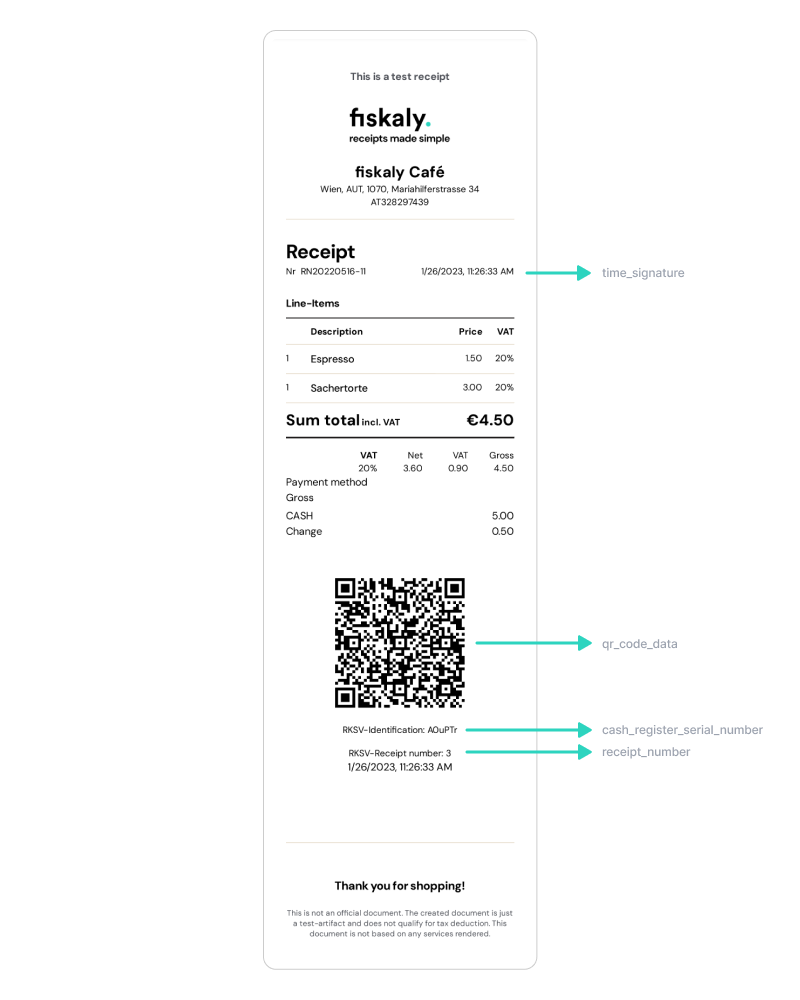
Pursuant to the Austrian Cash Register Security Regulation (RKSV), receipts issued in Austria must at least include the following data:
-
till identification number (corresponds to
cash_register_serial_number) -
date and time of receipt issuing (corresponds to
time_signature) -
amount of cash payment per tax rate (corresponds to e.g.
gross_amount_standard, depending on the vat rate) - this data must be included in the QR code -
content of the machine-readable code (corresponds to
qr_code_data)
This data is provided directly through the SIGN AT API and are highlighted in the following example receipt:
Pursuant to the Austrian Federal Tax Code (BAO), the following data additionally have to be indicated on the receipt:
-
A unique identifier of the supplying company
-
A subsequent number (including one or more series of numbers) uniquely identifying the business transaction
-
Date of issue of the receipt
-
Amount and commercial name of supplied items, or nature and scope of services provided
-
Amount of cash payment
Please note: fiskaly is not allowed to provide tax advice. Please contact your tax advisor, tax auditor or lawyer for tax-related questions.
What is the meaning of the receipt_type DECOMMISSION?
The receipt_type ‘DECOMMISSION’ is generated on our side if a cash register has been set to DECOMMISSIONED.
Once a cash register has eventually reached its end-of-life this has to be reflected by setting its state to DECOMMISSIONED. Decommissioning a cash register creates a final receipt / decommission receipt (‘Schlussbeleg’) and a message to FinanzOnline (FON) with the information that this cash register is now decommissioned.
What is a zero-value receipt (‘Nullbeleg’) and when does it need to be created?
A zero-value receipt (‘Nullbeleg’) is a receipt without any items with the sum zero (0). It may be required by the financial auditor during an audit.
This receipt must be signed and printed like any other receipt.
As for the receipt_type, 'NORMAL' should be used here.
Where do the receipt types (receipt_type) MONTHLY_CLOSE and YEARLY_CLOSE come from?
In the list endpoints of the SIGN AT API (listAllReceipts and listReceipts), query parameters can be used to filter by different receipt types (receipt_type).
The receipt types MONTHLY_CLOSE and YEARLY_CLOSE are generated automatically.
Whenever a new transaction is being created, the system checks the date of the previous transaction and, in case of a discrepancy in the month/year, a MONTHLY_CLOSE/YEARLY_CLOSE receipt is created before the transaction.
How can I cancel a receipt?
As SIGN AT receipts don’t have states, they cannot be canceled directly.
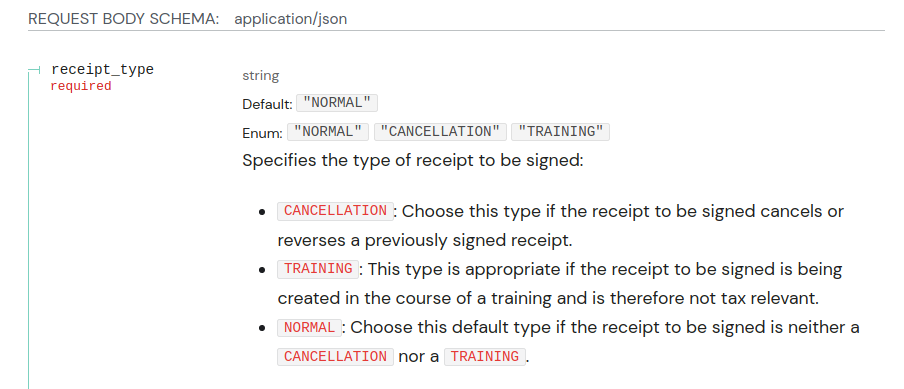
If a mistake happens during the recording of a receipt, you can fix it with a cancellation receipt (“Stornobeleg” in German).
For example, if the cashier enters the incorrect amount of 500 euros, you should create a new receipt*** ***using the type CANCELLATION with the total gross amounts of -500. This will correct the incorrectly recorded receipt. After that, you can create a new receipt with the correct gross amounts.
What is the difference between the receipt schemas?
-
ekabs_v0is an adaptation of the German electronic receipt standard EKaBS (acronym from “Einheitlicher Standard für elektronische Kassenbelege”) for the Austrian legislation -
standard_v1is particularly useful for clients who also use our solution for Germany, as it is compatible with thestandard_v1schema ofSIGN DE -
rawcontains the minimum receipt data required for signing
Exports (2)
What is a DEP7 export and when should it be triggered?
The so-called DEP7 (‘Datenerfassungsprotokoll’ pursuant to §7 RKSV) is a log file continuously recording all cash transactions and receipt contents in real time, with each receipt creation, in sequential order.
DEP7 exports can be created via the SIGN AT API endpoint exportCashRegister. In case of an audit, it is necessary to provide a DEP7 export.
DEP7 exports are not generated automatically. We recommend triggering the export at least once every 3 months.
When do I have to create a DEP7 (RKSV-Datenerfassungsprotokol) export?
During a tax audit, when the tax auditor requests it.
General (3)
Why do I get the same response to the same requests?
The fiskaly SIGN AT is idempotent. Idempotence means you can send the same request several times safely. The result will be the same as if you have sent it only once.
For example, if you request to sign a Receipt but don’t receive a response, you can send the request again with the same request body. The receipt is guaranteed to be signed only once.
LIVE vs. TEST Environment
SIGN AT offers two distinct environments: test and live.
The live environment must be used in production. When your system is in the live environment, it creates real certificates and sends reports to financial authorities.
The certificates created in the live environment are chargeable and reports to the financial authorities are official (!).
The test environment allows you to test your integration against a simulated environment. The API behaves the same as the live environment but no real resources are created. The third party systems are replaced with fake implementations. You can safely test the system without creating reports to the financial authorities or issuing real certificates. You will get the same behavior as in the live environment but with no costs.
Do customers always have to receive a receipt?
Yes, customers should always receive a receipt. These cases have to be considered:
-
If fiskaly can be reached by the PoS and fiskaly can reach the trust service provider, the customer will receive a signed receipt.
-
If fiskaly can be reached by the PoS but fiskaly cannot reach the trust service provider, the customer will receive a receipt signed with a substitute signature.
-
If fiskaly cannot be reached by the PoS, the customer will receive an unsigned receipt.
Signature Units (2)
What validations take place when creating a SCU (Signature Creation Unit)?
When creating a new SCU the VAT ID is verified using the VIES VAT number validation.
Other values are verified syntactically with regular expressions and similar mechanisms.
How many SCUs (Signature Creation Units) can one (managed) organization have?
It is not possible to create more than one SCU for the same organization.
Authentication (1)
Which FON (FinanzOnline) login data should be use in the TEST environment?
You do not need a special FON (FinanzOnline) account in the TEST environment of the SIGN AT API (RKSV), because the communication between FON and fiskaly is only simulated here.
Any data can be used in the fields fon_participant_id, fon_user_id, fon_user_pin in the TEST environment, these will not be validated against FON (FinanzOnline).
Please also read our article about the differences between the LIVE and the TEST environment.
FON (1)
What is FON?
FinanzOnline (FON) is the official information system provided by the Austrian tax authorities (“Finanzamt”). Many actions in the context of the RKSV require the creation and submission of special reports to FON. fiskaly takes care of this for you.
Errors and Status Codes (2)
What happens if I cannot reach the SIGN AT API?
As we are part of the logical cash register by providing the DEP7, turnover counter, receipt numbers, etc. for you this can be viewed as an outage of the cash register itself. Therefore the following scenario applies:
-
Try to fiscalize the receipt
-
Fiscalization failed (e.g. 5xx returned, unreachable, …)
-
Store the request payload including the UUID of the receipt (!)
-
Create a receipt for your customer that omits the fiscal receipt number and fiscal cash register identifier. Instead, print
Sicherheitseinrichtung ausgefallenon the receipt. In addition to that, a QR code containing this information should be printed. -
Make sure you keep a copy of that receipt.
Once you can reach the SIGN AT solution again, replay the failed requests (“Nacherfassung”) with the receipt UUID of the original request. This assures that you do not fiscalize receipts twice by accident.
As it is not unlikely in such a scenario that a lot of receipts queue up while there are new transactions happening, you can replay the requests at the end of a shift for example.
What happens if the trust service provider (TSP) cannot provide signatures to fiskaly?
If SIGN AT cannot request signatures from a certified trust service provider (TSP), receipts will be signed using a substitute signature. The receipts will include the note Sicherheitseinrichtung ausgefallen (German from “SCU unavailable”). These receipts are valid and will be contained in the DEP7 export. When the TSP is reachable again, SIGN AT automatically creates a zero-valued receipt marking the end of the outage.
Cash Registers (1)
How many Cash Registers can one SCU (Signature Creation Unit) have?
The number of Cash Registers per SCU is not limited.