For SIGN ES customers
SIGN PT Integration Guide for SIGN ES Customers
Section titled “SIGN PT Integration Guide for SIGN ES Customers”This guide helps teams that already integrated SIGN ES understand how the same business flow maps into SIGN PT using fiskaly’s Unified API approach.
From SIGN ES to SIGN PT
Section titled “From SIGN ES to SIGN PT”If you already know SIGN ES, many parts of the flow will feel familiar. At the same time, SIGN PT introduces some important differences in endpoint structure, resource naming, and how resources move through their lifecycle.
Comparison overview
Section titled “Comparison overview”| SIGN ES | SIGN PT / Unified API | What it means |
|---|---|---|
| Main organization | Organization::GROUP | Represents the integrator (software providers or merchants with their own billing system). |
| Managed organization | Organization::UNIT | Represents one NIF (merchant or taxpayer). |
| One taxpayer per managed organization | Taxpayer linked to one or more Location::BRANCH resources | One taxpayer can operate from different business locations. Location::BRANCH represents individual shop locations. |
| signer | handled automatically | The signing component is handled automatically in the Unified API flow. No need for the integrator to create this resource. |
| client | System::FISCAL_DEVICE | POS/invoicing terminals are represented as systems instead of client objects. |
| invoice | Record::INTENTION and Record::TRANSACTION | Invoices or receipts are handled as records, with two calls: INTENTION to indicate the intention to issue a receipt or invoice, and TRANSACTION with the final receipt or invoice content. |
| Client-defined UUIDs | Automatically assigned UUIDs plus X-Idempotency-Key | You no longer provide resource UUIDs directly; idempotency protects against duplicates. |
Before you begin
Section titled “Before you begin”You need a fiskaly account and access to the fiskaly HUB. You will also need a tool for making HTTP requests, such as cURL, Postman, or your own application code.
If you already integrated SIGN ES, the business flow will feel familiar, but the setup is more explicit in SIGN PT and uses the Unified API resource model. With this integration, you will unlock several countries with just one integration.
Before starting, it is helpful to think in terms of the resources you will configure:
- Organization — a GROUP for the top-level structure and one or more UNIT organizations for individual merchants or taxpayers.
- API Key and Token — credentials created in HUB and then exchanged for tokens used in the Unified API flow.
- Taxpayer — a COMPANY or INDIVIDUAL resource representing the legal entity that issues fiscal documents.
- Location — a BRANCH resource for each physical store or operating site.
- System — a FISCAL_DEVICE resource representing the POS or fiscal device that issues documents.
- Record — a two-part fiscal flow using INTENTION and TRANSACTION instead of directly creating invoices.
Integration flow
Section titled “Integration flow”| Step | What you do | Why it exists |
|---|---|---|
| 1. Register on HUB | Create your fiskaly account in HUB | This is the entry point for setting up your organization and API credentials. |
| 2. Create your first organization | Create your first Organization::GROUP in HUB | This represents the POS provider or retailer at the top level. After this step, create an API key for that organization in HUB. |
| 3. Create an API Key | Generate an API key and secret for the group in HUB | You need these credentials to authenticate and continue the setup. |
| 4. Create a token | Call createToken | This token is used for the next API requests. |
| 5. Create an organization UNIT | Create one Organization::UNIT per taxpayer | This replaces the old managed organization concept. |
| 6. Create a subject API key | Call createSubject with X-Scope-Identifier | This links an API key to the correct Organization::UNIT. |
| 7. Create a scoped token | Create a second token for the unit scope | This token is then used for taxpayer-level and operational resources. |
| 8. Create the taxpayer | Create a Taxpayer::COMPANY or Taxpayer::INDIVIDUAL | This represents the legal entity issuing the fiscal documents. |
| 9. Create the location | Create a Location::BRANCH for each store or operating site | This makes each business location explicit in the model. |
| 10. Create the system | Create a System::FISCAL_DEVICE and any related POS systems | This replaces signer and client setup. |
| 11. Create the fiscal record | Create the fiscal operation as records | This replaces the invoice-oriented flow from SIGN ES. |
Practical translation
Section titled “Practical translation”For an existing SIGN ES integration, the cleanest way to translate your model is:
- managed organization becomes
Organization::UNIT - taxpayer will have one or more
Location::BRANCHresources connected, depending on the number of business locations - signer is handled automatically by the Unified API flow
- client becomes
System::FISCAL_DEVICE - invoice becomes a Record
Resource behavior
Section titled “Resource behavior”One important difference compared to SIGN ES is how operational resources become usable.
In SIGN ES, key resources are typically ready to use immediately after they are created.
In SIGN PT resources such as Taxpayer, Location, and System follow a lifecycle:
- they are first created in state
ACQUIRED - they must then be updated to
COMMISSIONED - only after that are they ready for operational use
This means the setup flow includes an explicit activation step for resources that are immediately usable in SIGN ES.
Record states and modes
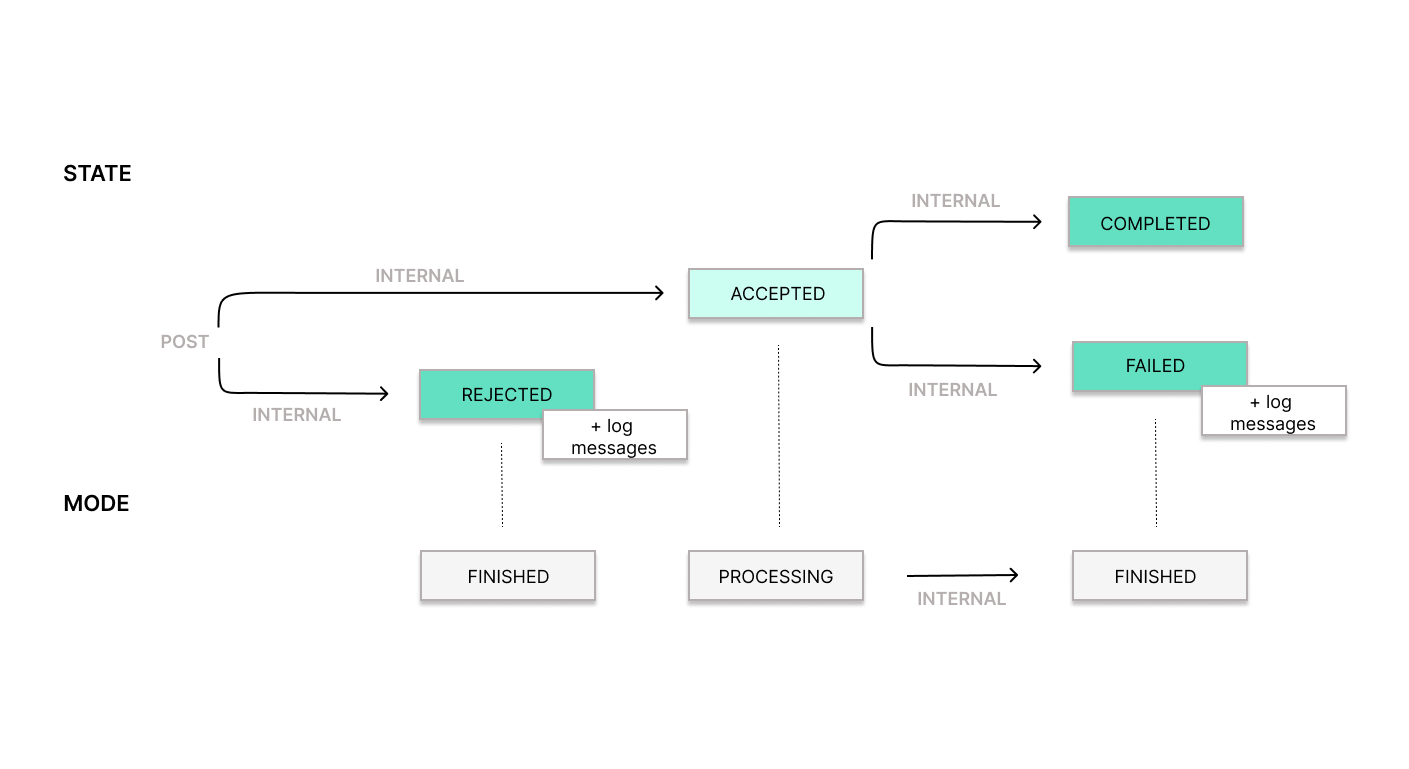
Section titled “Record states and modes”A Record goes through different states and modes during its lifecycle. Some changes happen when you call the API, and others happen automatically while the system processes the Record.
SIGN PT
States
Section titled “States”| UAPI state | Meaning | SIGN ES equivalent |
|---|---|---|
| Accepted | Record was received correctly and is being processed | Invoice successfully created (ISSUED) and ready to be transmitted — equivalent to a 200 OK response in SIGN ES. |
| Rejected | Record failed and will not be processed further | Invoice creation fails, no invoice is stored — equivalent to a 400 or 500 error response in SIGN ES. |
| Completed | Record has been successfully processed by the corresponding authority | Invoice accepted by the tax authority — equivalent to registration status REGISTERED in SIGN ES. |
| Failed | Record could not be processed by the corresponding authority | Invoice sent to but rejected or accepted with errors by the tax authority — equivalent to registration status REQUIRES_INSPECTION or REQUIRES_CORRECTION in SIGN ES. |
| UAPI mode | Meaning | SIGN ES equivalent |
|---|---|---|
| Processing | Record is being processed (between creation and any final state) | Invoice ISSUED and awaiting response from the tax agency — equivalent to registration status PENDING in SIGN ES. |
| Finished | Processing is complete; state is now Completed, Failed, or Rejected | Invoice has a final registration status: REGISTERED, REQUIRES_CORRECTING, or REQUIRES_INSPECTION. |
Was this page helpful?