fiskaly SAFE provides secure and compliant archiving and convenient retrieval of archived fiscal data from your fiskaly products. You first have to activate and configure SAFE for your Account and its associated Units to use it.
We recommend testing your configuration and data archiving in the TEST environment first. This allows you to verify that everything works as expected before going LIVE.
Roles
Who can activate, configure, and access SAFE
Activation & Configuration
Activate SAFE and set your archiving schedule
Auto-archiving Setup
Supported services, file formats, and annotations
Search and Export Data
Search, filter, and download archived data
SAFE and SAFE flex
When to use SAFE vs SAFE flex
SAFE API
Programmatically search, filter, and export archived data
Check your role before starting — activation is restricted to Account Owners.
| Role | Description |
|---|---|
| Owner | You can activate SAFE for your Account and have all Admin rights for SAFE configuration and data access. |
| Admin | You can set and modify the archiving schedule for a Group and Unit, and search and view archived fiscal data. SAFE activation requires the Account Owner role. |
| Regular user | You can search and view archived fiscal data in SAFE. |
Auto-archiving Setup
Section titled “Auto-archiving Setup”Activation and configuration
Section titled “Activation and configuration”Log in to HUB
Log into your account at hub.fiskaly.com.
Access SAFE
Click on “Explore Archiving”.
Open organization configuration
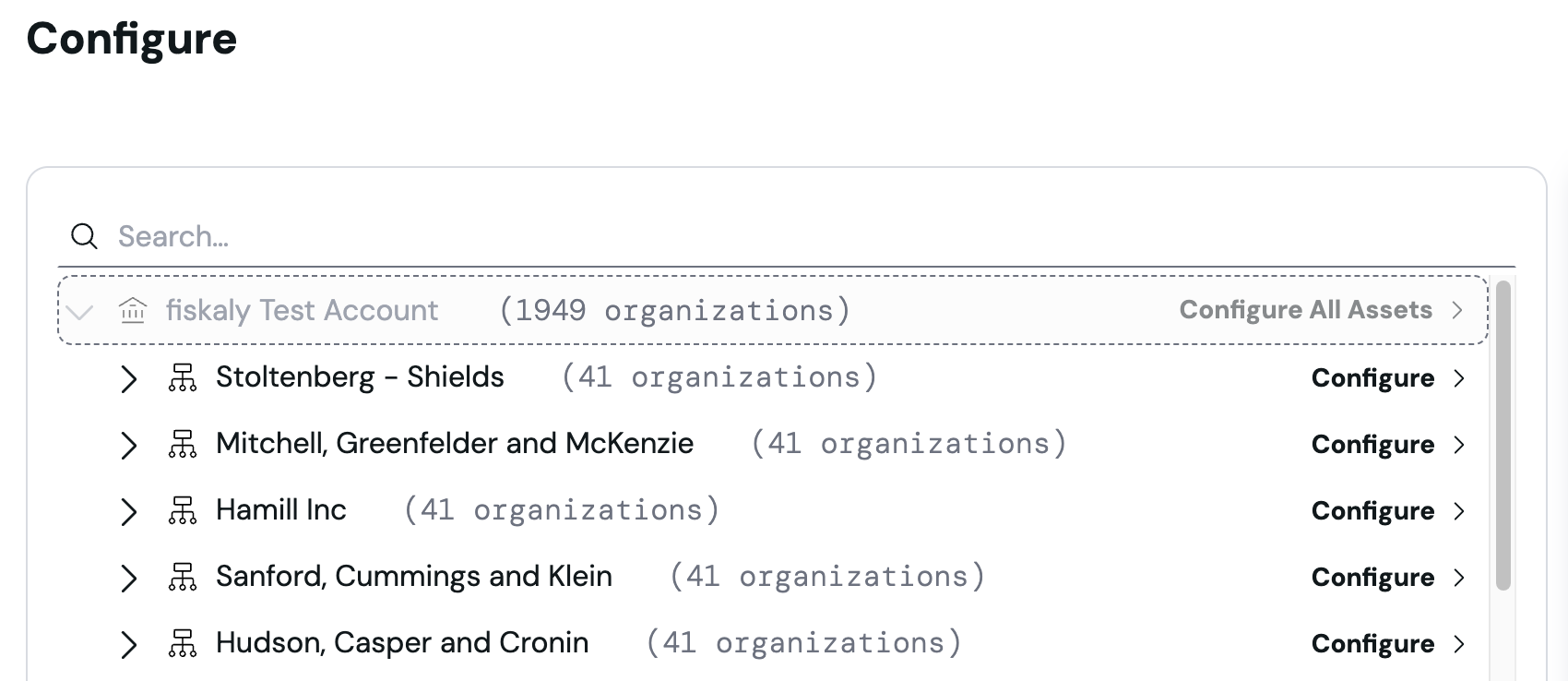
Access your configuration screen by clicking “Configure Organizations”.

Select your scope
Decide if you want to set the configuration for the whole account, a single group with its units, or a single unit.
Set archiving schedule
Set your archiving frequency and time and save the configuration.
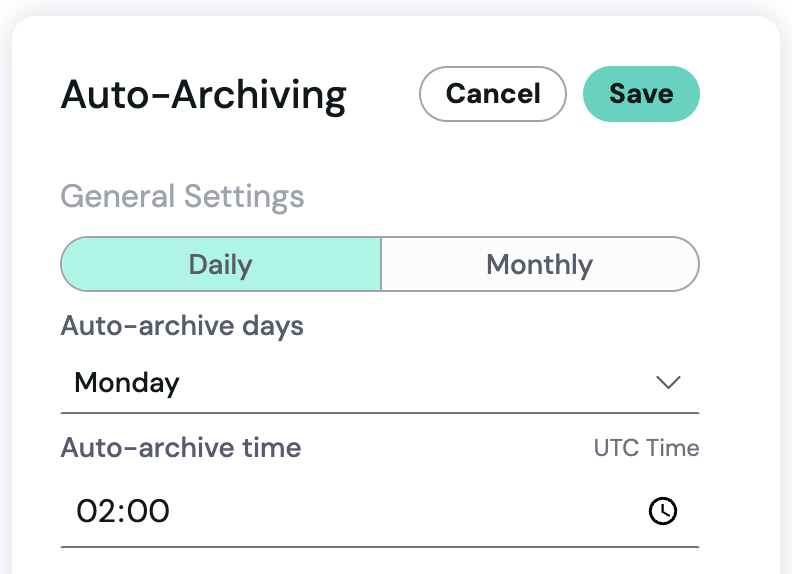
To update your configuration, follow the same process.
After you configure fiskaly SAFE, it scans your connected products according to your schedule and archives the resulting exports. The automation runs continuously until you change the configuration.
Currently, SAFE supports the following products and file formats:
- SIGN DE — TSS exports
- SIGN AT — DEP7 exports
- SIGN FR — XML event log exports (via UAPI)
- DSFinV-K — cash point closing exports
When fiskaly SAFE archives your data, it stores the resulting exports together with key annotations. This lets you quickly identify, filter, and retrieve the data you need in HUB.
Auto-archiving is continuously extended to additional fiskaly products where archiving is a legal requirement.
🇩🇪 SIGN DE
Section titled “🇩🇪 SIGN DE”SAFE archives TSS exports on your configured schedule.
Typical properties you’ll see:
- Document creation date
- Legal retention period
- Start/end date of exported data
- TSS ID
- Client IDs (optional)
🇦🇹 SIGN AT
Section titled “🇦🇹 SIGN AT”SAFE archives DEP7 exports on your configured schedule.
Typical properties you’ll see:
- Document creation date
- Legal retention period
- Start/end date of exported data
- Receipt ID
- Cash register ID
- Receipt type (normal, cancellation, training)
- Signature counter
- Legal entity ID
🇫🇷 SIGN FR
Section titled “🇫🇷 SIGN FR”SAFE archives all event log records tracked by SIGN FR via UAPI, along with an integrity file per record. Archiving is triggered automatically after each daily closing.
Typical properties you’ll see:
- Document creation date
- Legal retention period
- Start/end date of exported data
- POS ID
- Period
- Business activity
🇩🇪 DSFinV-K
Section titled “🇩🇪 DSFinV-K”SAFE archives cash point closings per Unit on a configurable schedule (default: weekly, every Monday).
Typical properties you’ll see:
- Document creation date
- Legal retention period
- Start/end date of exported data
- Client IDs
- Business dates
- Cash point closing IDs
- Revision number
Search and Export Data
Section titled “Search and Export Data”You can search archived data for the Units you are allowed to access, spanning across multiple Groups and Units when permissions allow. Results are displayed in a list view from which you can select and download the desired entries. To access the data, click SAFE in the navigation panel.
Exports are available in formats including TSS-Export, DSFinV-K Export, and DEP7. XML, JSON, PDF, ZIP, TAR, and HTML are supported. Optional auditor access provides standardized Z1–Z3 views directly in HUB.
Exports tab
Section titled “Exports tab”The Exports tab in the SAFE section shows the exports created in the last 7 days, newest first, across all Groups and Units you can access.
Each row gives you the creation time, the status, and the archive format (ZIP or TAR) — enough to pick out a recent export and download it again without running a new search.
The download button becomes active as soon as an export is complete. While an export is still processing, or if it failed, the button stays greyed out. For anything older than 7 days, search the archived files again.
Besides the HUB interface, fiskaly provides the SAFE API, which allows you to search, filter, and programmatically export archived data. Technical details are available in the SAFE API documentation.
Searching Archived Files
Section titled “Searching Archived Files”Our search system for archived files relies on the use of Annotations, Properties, and Values. Here’s a detailed breakdown of each component and how to use them effectively:
- Annotations are collections of properties that provide searchable parameters for files. They help categorize and identify specific details within your documents.
- A property is a single parameter within an annotation, connected to a file, and containing a specific value.
- Search values are the specific criteria you are looking for within the properties.
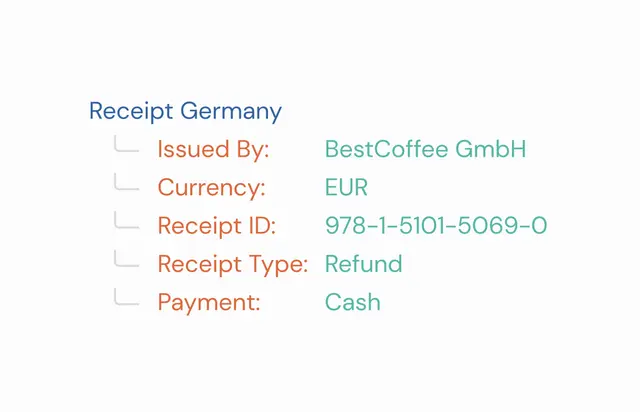
Example of an annotation, its properties and their values
How do I search for a file?
Section titled “How do I search for a file?”Select an Annotation
Begin by choosing an appropriate annotation from the search request builder.
Choose a Property
Once the annotation is selected, pick a property that is relevant to your search.
Specify a Value
Define the exact value you are searching for within the chosen property.
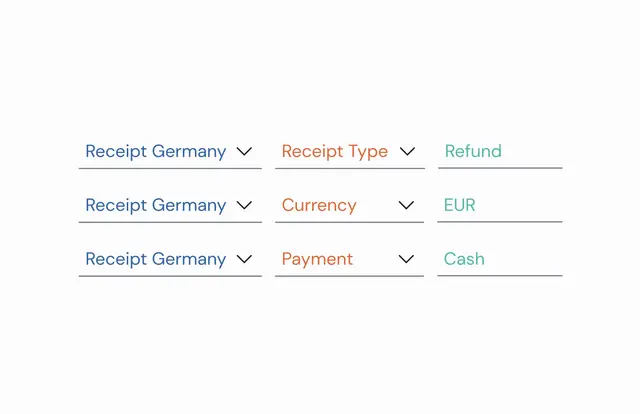
Example of a search request to find all cash refund receipts issued in euro
The search will look for files that match the selected annotation, property, and specified value exactly. If an annotation or property was not attached to a file at the time of upload, that file will not be included in the search results.
Additional Tips
Section titled “Additional Tips”- You can combine up to five different search parameters.
- Multiple search parameters are combined using a logical AND, meaning the search will return only the files that meet all specified criteria.
- Be precise with your search values to avoid missing out on relevant documents.
SAFE and SAFE flex at a glance
Section titled “SAFE and SAFE flex at a glance”In HUB, fiskaly SAFE automates archiving from connected fiskaly products on a schedule without manual uploads. SAFE flex is a separate, independent API — already available for all fiskaly solutions — that gives you full control over what to upload, when to upload, and which annotations to apply, regardless of which services you use. Both can be used separately or together, depending on your workflow. For details on the differences, visit our SAFE Guide.