Stai visualizzando la documentazione per la versione API 2026-05-04. La versione più recente è 2026-06-01.
Questa guida ti accompagna attraverso il processo completo di integrazione dell’API fiskaly SIGN IT per la conformità fiscale italiana, utilizzando una combinazione del fiskaly HUB e richieste API. Al termine, avrai un System completamente funzionante con Record trasmessi all’Agenzia delle Entrate (AdE).
Flusso di integrazione
Sezione intitolata “Flusso di integrazione”Il diagramma seguente illustra il flusso di lavoro e mette in evidenza i passaggi essenziali necessari per completare con successo la tua integrazione. Ogni riquadro collega direttamente alla corrispondente fase di configurazione qui sotto.
I passaggi contrassegnati in giallo devono essere completati direttamente su HUB, mentre i restanti devono essere gestiti tramite l’API SIGN IT. Ogni azione deve essere eseguita nel contesto corretto per garantire il buon esito dell’integrazione.
Prerequisiti
Sezione intitolata “Prerequisiti”Avrai bisogno di uno strumento per effettuare richieste HTTP — come cURL (riga di comando), Postman, o il tuo codice applicativo. È raccomandata una comprensione di base delle API REST e dei flussi di autenticazione.
Puoi anche scaricare la nostra collezione Postman per SIGN IT, che include richieste predefinite per ogni passaggio in questa guida.
Configurazione passo dopo passo
Sezione intitolata “Configurazione passo dopo passo”Registrati su HUB
Inizia registrandoti sul fiskaly HUB.
Per ulteriori indicazioni su come iniziare, vai alla nostra sezione HUB - Primi passi.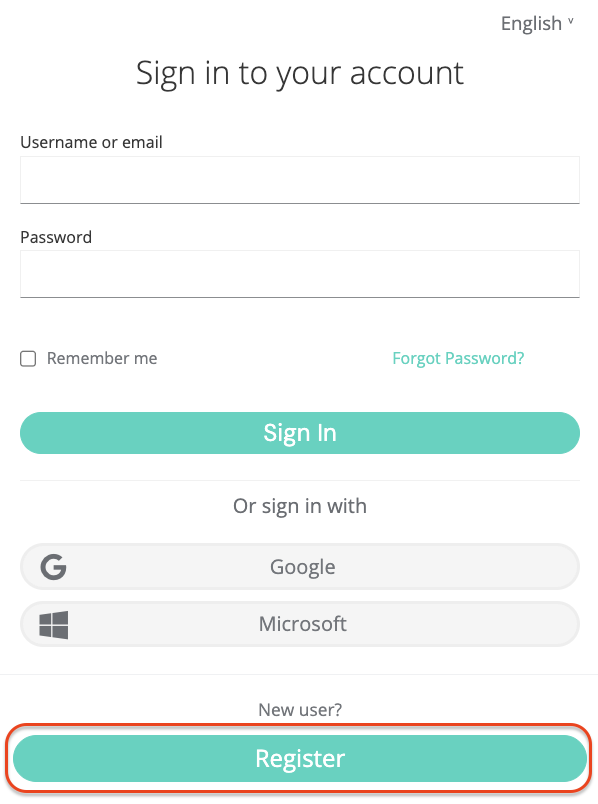
Crea Account e Organization
GROUPLa creazione di un Account fiskaly è il primo passo, dopodiché puoi procedere con la configurazione della prima struttura organizzativa per la tua azienda e la generazione della tua API Key.
L’Account è la struttura di livello superiore in fiskaly. Rappresenta la tua azienda e contiene utenti, organizzazioni, prodotti e fatturazione.
Dopo aver creato il tuo Account fiskaly, verrai portato al Selettore di Organizzazioni dove puoi creare il tuo Group. Un Group è un livello intermedio obbligatorio all’interno di un Account, utilizzato per organizzare più Unit in cluster logici (ad esempio, un Group per paese). Un solo Group per Account è sufficiente se non è necessaria ulteriore strutturazione.
Crea API Key
Il passo successivo è generare una API Key per la tua Organizzazione tramite HUB all’interno del tuo Group.
Riceverai una API Key e un API Secret. Salvali in modo sicuro — ne avrai bisogno per autenticarti nell’API SIGN IT e creare le tue Organization di tipo
UNIT(passaggio 5). L’API Secret viene mostrato solo una volta. Assicurati di salvarlo in modo sicuro prima di chiudere la finestra di dialogo.💡Ambienti TEST e LIVELe API Keys generate nell’ambiente TEST (
https://test.api.fiskaly.com) creeranno risorse TEST, mentre quelle dell’ambiente LIVE (https://live.api.fiskaly.com) creeranno risorse LIVE. Per ulteriori dettagli, fai riferimento al nostro articolo sugli ambienti TEST e LIVE.
Crea Token
A partire da questo passaggio, utilizzerai l’API SIGN IT.
Chiama l’endpoint createToken con l’API Key e il Secret del passaggio 3 per ottenere un token
bearer. Includi questo token nell’headerAuthorizationdei passaggi 5 e 6.curl -X POST https://test.api.fiskaly.com/tokens \ -H "Content-Type: application/json" \ -H "X-Api-Version: 2026-05-04" \ -H "X-Idempotency-Key: $(uuidgen)" \\ -d '{ "content": { "type": "API_KEY", "key": "your_api_key", "secret": "your_api_secret" } }'const response = await fetch( "https://test.api.fiskaly.com/tokens", { method: "POST", headers: { "Content-Type": "application/json", "X-Api-Version": "2026-05-04", "X-Idempotency-Key": crypto.randomUUID(), }, body: JSON.stringify({ content: { type: "API_KEY", key: "your_api_key", secret: "your_api_secret", }, }), } ); const token = await response.json(); const accessToken = token.content.authentication.bearer;Esempio di risposta (200 OK)
{"content": {"id": "6f1c5c9e-3d9c-4f8c-9f20-7de8f3a91b11","authentication": {"type": "JWT","bearer": "eyJhbGciOiJSUzI1NiIsInR5cCI6IkpXVCJ9...","expires_at": "2026-03-02T12:00:00Z"},"organization": {"id": "b7b6f971-5a3c-4e1e-9f58-2f2a8457bb2d"},"subject": {"id": "2d4a0c2a-c2c9-4e3b-a0e8-b8f7e70d6f33"}}}Crea Organization
UNITCrea una Organization di tipo
UNITtramite l’endpoint createOrganization. UnaUNITrappresenta una singola entità giuridica (commerciante). Dovrai creare una OrganizationUNITper ogni rappresentazione di contribuente che gestisci.Utilizzare il token
bearergenerato nel Passaggio 4 con la API Key e il Secret creati per il tuo Group garantisce che laUNITsia correttamente annidata sotto quel Group nella gerarchia.curl -X POST https://test.api.fiskaly.com/organizations \ -H "Content-Type: application/json" \ -H "X-Api-Version: 2026-05-04" \ -H "X-Idempotency-Key: $(uuidgen)" \ -H "Authorization: Bearer ${ACCESS_TOKEN}" \ -d '{ "content": { "type": "UNIT", "name": "My Retail Store" } }'const response = await fetch( "https://test.api.fiskaly.com/organizations", { method: "POST", headers: { "Content-Type": "application/json", "X-Api-Version": "2026-05-04", "X-Idempotency-Key": crypto.randomUUID(), "Authorization": `Bearer ${accessToken}`, }, body: JSON.stringify({ content: { type: "UNIT", name: "My Retail Store", }, }), } ); const organization = await response.json(); const organizationId = organization.content.id;Esempio di risposta (201 Created)
{"content": {"id": "9a746f13-0ef7-4a0f-a7df-8e52089c5f3a","state": "ENABLED","type": "UNIT","name": "My Retail Store","organization": {"id": "d4c7b3d1-71f6-45d6-a289-4adf5d54b9c1"}},"metadata": {"trace_identifier": "trace_abc123","api_version": "2026-05-04"}}Crea Subject (API Key)
Crea un Subject di tipo
API_KEYper la OrganizationUNITtramite l’endpoint createSubject.Per associare il Subject (API Key) alla tua
UNIT, includi l’headerX-Scope-Identifierimpostato sull’iddella OrganizationUNITnella tua richiesta.curl -X POST https://test.api.fiskaly.com/subjects \ -H "Content-Type: application/json" \ -H "X-Api-Version: 2026-05-04" \ -H "X-Idempotency-Key: $(uuidgen)" \ -H "Authorization: Bearer ${ACCESS_TOKEN}" \ -H "X-Scope-Identifier: ${ORGANIZATION_ID}" \ -d '{ "content": { "type": "API_KEY", "name": "my-api-key-03" } }'const response = await fetch( "https://test.api.fiskaly.com/subjects", { method: "POST", headers: { "Content-Type": "application/json", "X-Api-Version": "2026-05-04", "X-Idempotency-Key": crypto.randomUUID(), "Authorization": `Bearer ${accessToken}`, "X-Scope-Identifier": organizationId, }, body: JSON.stringify({ content: { type: "API_KEY", name: "my-api-key-03", }, }), } ); const subject = await response.json(); // Save the returned key and secret for the next stepEsempio di risposta (201 Created)
{"content": {"id": "2d4a0c2a-c2c9-4e3b-a0e8-b8f7e70d6f33","state": "ENABLED","type": "API_KEY","name": "my-api-key-03","credentials": {"key": "fsk_unit_abc123","secret": "secret_only_shown_once"}},"metadata": {"trace_identifier": "trace_abc123","api_version": "2026-05-04"}}Crea Token
Crea un token utilizzando la API Key e il Secret del Subject appena generato. Questo token
bearersarà utilizzato per tutti i passaggi successivi per creare risorse all’interno della OrganizationUNITcorrispondente.curl -X POST https://test.api.fiskaly.com/tokens \ -H "Content-Type: application/json" \ -H "X-Api-Version: 2026-05-04" \ -H "X-Idempotency-Key: $(uuidgen)" \\ -d '{ "content": { "type": "API_KEY", "key": "subject_api_key", "secret": "subject_api_secret" } }'const tokenResponse = await fetch( "https://test.api.fiskaly.com/tokens", { method: "POST", headers: { "Content-Type": "application/json", "X-Api-Version": "2026-05-04", "X-Idempotency-Key": crypto.randomUUID(), }, body: JSON.stringify({ content: { type: "API_KEY", key: "subject_api_key", secret: "subject_api_secret", }, }), } ); const token = await tokenResponse.json(); const unitToken = token.content.authentication.bearer;Esempio di risposta (200 OK)
{"content": {"id": "3a5b4c61-2e8d-4a9d-9ac1-6df5a4e9138d","authentication": {"type": "JWT","bearer": "eyJhbGciOiJSUzI1NiIsInR5cCI6IkpXVCJ9...","expires_at": "2026-03-02T12:00:00Z"},"organization": {"id": "9a746f13-0ef7-4a0f-a7df-8e52089c5f3a"},"subject": {"id": "2d4a0c2a-c2c9-4e3b-a0e8-b8f7e70d6f33"}},"metadata": {"trace_identifier": "trace_abc123","api_version": "2026-05-04"}}Crea Taxpayer
Ora sei pronto per creare le parti operative necessarie per la fiscalizzazione in Italia.
Utilizza l’endpoint createTaxpayer per aggiungere le informazioni del Taxpayer alla Organization
UNITprecedentemente creata:- Imposta il Taxpayer come tipo
COMPANY(persona giuridica) oINDIVIDUAL(persona fisica). In entrambi i casi, devono essere fornitinameeaddress. - All’interno delle informazioni di
fiscalizationitaliane, devono essere forniti i seguenti dati del contribuente:tax_id_number: Codice Fiscale italiano dell’impresavat_id_number: Partita IVA italiana dell’impresacredentials: PIN, password e codice fiscale dell’utente Fisconline necessari per accedere ai servizi dell’AdE
curl -X POST https://test.api.fiskaly.com/taxpayers \
  -H "Content-Type: application/json" \
  -H "X-Api-Version: 2026-05-04" \
  -H "X-Idempotency-Key: $(uuidgen)" \
  -H "Authorization: Bearer ${UNIT_TOKEN}" \
  -d '{
    "content": {
      "type": "COMPANY",
      "name": {
        "legal": "La Pizzeria di Mario S.r.l.",
        "trade": "La Pizzeria di Mario"
      },
      "address": {
        "line": {
          "type": "STREET_NUMBER",
          "street": "Via Roma",
          "number": "123"
        },
        "code": "00100",
        "city": "Rome",
        "country": "IT"
      },
      "fiscalization": {
        "type": "IT",
        "tax_id_number": "12345678901",
        "vat_id_number": "12345678901",
        "credentials": {
          "type": "FISCONLINE",
          "pin": "1234567890",
          "password": "MySecurePassword123",
          "tax_id_number": "RSSMRA85M01H501Z"
        }
      }
    }
  }'
const response = await fetch( "https://test.api.fiskaly.com/taxpayers", { method: "POST", headers: { "Content-Type": "application/json", "X-Api-Version": "2026-05-04", "X-Idempotency-Key": crypto.randomUUID(), "Authorization": `Bearer ${unitToken}`, }, body: JSON.stringify({ content: { type: "COMPANY", name: { legal: "La Pizzeria di Mario S.r.l.", trade: "La Pizzeria di Mario", }, address: { line: { type: "STREET_NUMBER", street: "Via Roma", number: "123", }, code: "00100", city: "Rome", country: "IT", }, fiscalization: { type: "IT", tax_id_number: "12345678901", vat_id_number: "12345678901", credentials: { type: "FISCONLINE", pin: "1234567890", password: "MySecurePassword123", tax_id_number: "RSSMRA85M01H501Z", }, }, }, }), } ); const taxpayer = await response.json(); const taxpayerId = taxpayer.content.id;Esempio di risposta (201 Created)
{"content": {"address": {"city": "Rome","code": "00100","country": "IT","line": {"number": "123","street": "Via Roma","type": "STREET_NUMBER"}},"country": "Italy","created_at": "2026-03-05T14:58:05.729928Z","fiscalization": {"credentials": {"password": "ccf9ac1c","pin": "c775e7b7","tax_id_number": "RSSMRA85M01H501Z","type": "FISCONLINE"},"tax_id_number": "12345678901","type": "IT","vat_id_number": "12345678901"},"id": "019cbe81-8721-7e27-99d9-1bb4a267ba56","locations": [{"description": "Head office location.","type": "HEAD_OFFICE"},{"description": "Branch location.","type": "BRANCH"}],"mode": "INACTIVE","name": {"legal": "La Pizzeria di Mario S.r.l.","trade": "La Pizzeria di Mario"},"state": "ACQUIRED","type": "COMPANY","updated_at": "2026-03-05T14:58:05.729928Z","vat_number": "IT12345678901"}}Una volta creato un Taxpayer, il suo
stateviene impostato suACQUIREDper impostazione predefinita. Per renderlo completamente funzionale, aggiorna lo stato aCOMMISSIONEDutilizzando l’endpoint updateTaxpayer:curl -X PATCH "https://test.api.fiskaly.com/taxpayers/${TAXPAYER_ID}" \ -H "Content-Type: application/json" \ -H "X-Api-Version: 2026-05-04" \ -H "Authorization: Bearer ${UNIT_TOKEN}" \ -d '{ "content": { "state": "COMMISSIONED" } }'await fetch( `https://test.api.fiskaly.com/taxpayers/${taxpayerId}`, { method: "PATCH", headers: { "Content-Type": "application/json", "X-Api-Version": "2026-05-04", "Authorization": `Bearer ${unitToken}`, }, body: JSON.stringify({ content: { state: "COMMISSIONED", }, }), } );Esempio di risposta (200 OK)
{"content": {"address": {"city": "Rome","code": "00100","country": "IT","line": {"number": "123","street": "Via Roma","type": "STREET_NUMBER"}},"country": "Italy","created_at": "2026-03-05T14:58:05.729928Z","fiscalization": {"credentials": {"password": "ccf9ac1c","pin": "c775e7b7","tax_id_number": "RSSMRA85M01H501Z","type": "FISCONLINE"},"tax_id_number": "12345678901","type": "IT","vat_id_number": "12345678901"},"id": "019cbe81-8721-7e27-99d9-1bb4a267ba56","locations": [{"description": "Head office location.","type": "HEAD_OFFICE"},{"description": "Branch location.","type": "BRANCH"}],"mode": "OPERATIVE","name": {"legal": "La Pizzeria di Mario S.r.l.","trade": "La Pizzeria di Mario"},"state": "COMMISSIONED","type": "COMPANY","updated_at": "2026-03-05T15:02:41.223565Z","vat_number": "IT12345678901"}}📘NotaSolo le credenziali Fisconline sono valide per l’utilizzo di SIGN IT lite. Il contribuente deve effettuare manualmente un primo accesso al portale web dell’Agenzia delle Entrate per verificare che le credenziali funzionino correttamente e per accettare i termini, le condizioni e le clausole aggiuntive previste.
⚠️Rinnovo credenziali richiestoLe credenziali Fisconline scadono ogni 90 giorni sul portale AdE, ma si consiglia di rinnovarle ogni 60 giorni come buona pratica. Scopri come in questo articolo: SIGN IT - Come aggiornare le credenziali FISCONLINE
Per ulteriori informazioni, fai riferimento alla nostra sezione Credenziali.
Per una Guida al Commerciante dettagliata su come richiedere le credenziali Fisconline, contatta il nostro team commerciale.
- Imposta il Taxpayer come tipo
Crea Location
Per ogni sede operativa dell’attività, è necessario creare una Location di tipo
BRANCHtramite l’endpoint createLocation.curl -X POST https://test.api.fiskaly.com/locations \ -H "Content-Type: application/json" \ -H "X-Api-Version: 2026-05-04" \ -H "X-Idempotency-Key: $(uuidgen)" \ -H "Authorization: Bearer ${UNIT_TOKEN}" \ -d '{ "content": { "type": "BRANCH", "taxpayer": { "id": "your_taxpayer_id" }, "name": "Roma Centro Branch", "address": { "line": { "type": "STREET_NUMBER", "street": "Via Roma", "number": "1" }, "code": "00100", "city": "Roma", "country": "IT" } }, "metadata": { "store_code": "STORE001" } }'const response = await fetch( "https://test.api.fiskaly.com/locations", { method: "POST", headers: { "Content-Type": "application/json", "X-Api-Version": "2026-05-04", "X-Idempotency-Key": crypto.randomUUID(), "Authorization": `Bearer ${unitToken}`, }, body: JSON.stringify({ content: { type: "BRANCH", taxpayer: { id: taxpayerId, }, name: "Roma Centro Branch", address: { line: { type: "STREET_NUMBER", street: "Via Roma", number: "1", }, code: "00100", city: "Roma", country: "IT", }, }, }), } ); const location = await response.json(); const locationId = location.content.id;Esempio di risposta (201 Created)
{"content": {"address": {"city": "Roma","code": "00100","country": "IT","line": {"number": "1","street": "Via Roma","type": "STREET_NUMBER"}},"created_at": "2026-03-05T15:07:09.776328Z","id": "019cbe89-d450-7501-9928-1e7d94339208","mode": "INACTIVE","name": "Roma Centro Branch","state": "ACQUIRED","systems": [{"description": "Fiscal device (SIGN IT lite).","type": "FISCAL_DEVICE"}],"taxpayer": {"id": "019cbe81-8721-7e27-99d9-1bb4a267ba56"},"type": "BRANCH","updated_at": "2026-03-05T15:07:09.776328Z"},"metadata": {"store_code": "STORE001"}}Una volta creata una Location, il suo
stateviene impostato suACQUIREDper impostazione predefinita. Aggiorna lo stato aCOMMISSIONEDutilizzando l’endpoint updateLocation prima di procedere.📘NotaSe il contribuente opera da un’unica sede che coincide con quella dell’indirizzo legale, la creazione di una
Location::BRANCHnon è obbligatoria. UnaLocation::HEAD_OFFICEviene creata automaticamente alla creazione del Taxpayer e condivide lo stesso UUID del Taxpayer. Quando il Taxpayer viene impostato suCOMMISSIONED, laLocation::HEAD_OFFICEviene automaticamente impostata suCOMMISSIONEDanch’essa.Crea System (
FISCAL_DEVICE)L’endpoint createSystem ti consente di creare un’astrazione di ogni Sistema di Registrazione Elettronico (ERS) utilizzato per le operazioni fiscali. Ogni registratore di cassa o punto vendita deve essere fornito come nuovo System di tipo
FISCAL_DEVICE.- Un System sarà collegato a una specifica Location precedentemente creata.
- Per ogni System, devi fornire informazioni su
produceresoftwareper tracciare quale dispositivo esegue le transazioni fiscali. Per ulteriori informazioni, fai riferimento a questo articolo FAQ.
curl -X POST https://test.api.fiskaly.com/systems \
  -H "Content-Type: application/json" \
  -H "X-Api-Version: 2026-05-04" \
  -H "X-Idempotency-Key: $(uuidgen)" \
  -H "Authorization: Bearer ${UNIT_TOKEN}" \
  -d '{
    "content": {
      "type": "FISCAL_DEVICE",
      "location": {
        "id": "your_location_id"
      },
      "producer": {
        "type": "MPN",
        "number": "FD-001",
        "details": {
          "name": "My Fiscal Device"
        }
      },
      "software": {
        "name": "My POS Software",
        "version": "1.0.0"
      }
    }
  }'
const response = await fetch( "https://test.api.fiskaly.com/systems", { method: "POST", headers: { "Content-Type": "application/json", "X-Api-Version": "2026-05-04", "X-Idempotency-Key": crypto.randomUUID(), "Authorization": `Bearer ${unitToken}`, }, body: JSON.stringify({ content: { type: "FISCAL_DEVICE", location: { id: locationId, }, producer: { type: "MPN", number: "FD-001", details: { name: "My Fiscal Device", }, }, software: { name: "My POS Software", version: "1.0.0", }, }, }), } ); const system = await response.json(); const systemId = system.content.id;Esempio di risposta (201 Created)
{"content": {"compliance": {"software": {"name": "My POS Software","version": "1.0.0"}},"created_at": "2026-03-05T13:57:00.016909Z","id": "019cbe49-97f0-7dde-adae-e10fea9d64c9","journal": {"cryptography": {"certificate": {"expires_at": "2029-03-05T13:57:00Z","serial_number": "7E7D991D5D1768AF224A754A3E815537","x509_pem": "-----BEGIN CERTIFICATE-----\nMIIC8jCCAdqgAwIBAgIQfn2ZHV0XaK8iSnVKPoFVNzANBgkqhkiG9w0BAQsFADAT\nMREwDwYDVQQKEwhmaXNrYWx5LjAeFw0yNjAzMDUxMzU3MDBaFw0yOTAzMDUxMzU3\nMDBaMBMxETAPBgNVBAoTCGZpc2thbHkuMIIBIjANBgkqhkiG9w0BAQEFAAOCAQ8A\nMIIBCgKCAQEAzE++CjP6UrE9d4ftaRU50yWWycU1/ql5iLgpFjjBZdXAuay82ely\n11sMfjlL3RJaIkIF8w9VcrnaCnSJLzSihEPcohFF8B9iX+/GLHA9FNHMpRrNBaC/\nMmXv7iuPkOFZDTxueWtkti0BqEE+H3RoCsOkPxzMMQ0UYCtZx9V5i/bXO+Akb8HC\nuq80+73m/DP1WFQgD6d/vwfqr+eM4jZTUiRPyy9W6yBOj02SbFL6Oeop2yDNo7Ws\nhZLoquNgVe9lEHZV2N62AVe1OEXdDzn2BlNvCnlwb9RJCGTVCMQbOsN84EMhpwOG\nsRNHgezSeGhO7aca+/igmiuSW7Uw3YdWWwIDAQABo0IwQDAOBgNVHQ8BAf8EBAMC\nAoQwDwYDVR0TAQH/BAUwAwEB/zAdBgNVHQ4EFgQUn+BqmtpyTeC4wdZNEMYf96hV\ny78wDQYJKoZIhvcNAQELBQADggEBACXaL/EXGW4PnjC+Dj5ZUySE5vtysPUV0Tkw\n4+EtLJUs86itNZgyhQpXfwzvpgj/wL7XA+GAnPqpUbrMOXLawsWGtID8BZHrQRRJ\ny/ZcHRQyIwoHNNl5bbDDNC/icG78GhK+RmdCw3wcVyxABBzpE/CckNn4hltsCqUo\n01eqms+SmY+MBUBj3ec1iVcD0bz/pyMmIQSVfWjKWtHofwUTCkgEm9cKqtyfajzB\ne6bKoScTziojhlCtnEfPb20vtQ+UE183FOG36WfuRV8EtS+3Cgx83yEj8QXVuYcA\nKQAgoPy6/6xHMDkZH3P/XTOfBf8UkZvQy5egibgC6k2wqjxYWtY=\n-----END CERTIFICATE-----\n"},"signature": {"hash": "SHA-256","type": "RSA"}}},"kind": "INTERNAL","location": {"id": "019cbe89-d450-7501-9928-1e7d94339208"},"mode": "INACTIVE","producer": {"details": {"name": "My Fiscal Device"},"number": "FD-001","type": "MPN"},"records": [{"description": "Intention of an upcoming transaction.","type": "INTENTION::TRANSACTION"},{"description": "Receipt transaction information.","type": "TRANSACTION::RECEIPT"},{"description": "Correction of an issued transaction.","type": "TRANSACTION::CORRECTION"},{"description": "Cancellation of an issued transaction.","type": "TRANSACTION::CANCELLATION"}],"software": {"name": "SIGN IT Lite","version": "v1.0.0"},"state": "ACQUIRED","type": "FISCAL_DEVICE","updated_at": "2026-03-05T13:57:00.016909Z","vat_exemptions": [{"code": "NOT_SUBJECT","description": "Not subject (Non soggette)"},{"code": "NOT_TAXABLE","description": "Not taxable (Non imponibili)"},{"code": "CAUSE_1","description": "Exempt (Esenti)"},{"code": "CAUSE_2","description": "Exclusive Art. 15"},{"code": "CAUSE_3","description": "Marginal scheme (Regime del margine)"},{"code": "CAUSE_4","description": "Other (Altre non IVA)"}],"vat_rates": [{"code": "STANDARD","description": "Standard VAT rate","historic": false,"percentage": "22"},{"code": "REDUCED_1","description": "Reduced VAT rate 1","historic": false,"percentage": "10"},{"code": "REDUCED_2","description": "Reduced VAT rate 2","historic": false,"percentage": "5"},{"code": "REDUCED_3","description": "Super-reduced VAT rate","historic": false,"percentage": "4"}]}}Una volta creato un System, il suo
stateviene impostato suACQUIREDper impostazione predefinita. Per creare Record, il suo stato deve essere aggiornato aCOMMISSIONEDutilizzando l’endpoint updateSystem.📘Nota sulla fatturazionePer la maggior parte dei contratti, i
Systemsono le unità utilizzate per la fatturazione con fiskaly. UnSystemdiventa rilevante ai fini della fatturazione non appena il suo stato passa daACQUIREDaCOMMISSIONEDnell’ambiente LIVE. Le risorse nell’ambiente TEST non vengono fatturate. Per le condizioni di fatturazione esatte, fare riferimento al proprio contratto con fiskaly.Crea un Record
Per ogni operazione commerciale effettuata nel System, l’endpoint createRecord deve essere utilizzato in due chiamate successive:
- Parte A)
INTENTION: registra l’intenzione di avviare unaTRANSACTION - Parte B)
TRANSACTION: fornisce i dati della transazione
Parte A) Crea l’Intention
Un Record di tipo
INTENTIONcontiene l’associazione con il System che eseguirà la transazione e un’Operation di tipoTRANSACTION, che rappresenta l’intenzione del System di registrare una transazione.curl -X POST https://test.api.fiskaly.com/records \ -H "Content-Type: application/json" \ -H "X-Api-Version: 2026-05-04" \ -H "X-Idempotency-Key: $(uuidgen)" \ -H "Authorization: Bearer ${UNIT_TOKEN}" \ -d '{ "content": { "type": "INTENTION", "system": { "id": "your_system_id" }, "operation": { "type": "TRANSACTION" } } }'const intentionResponse = await fetch( "https://test.api.fiskaly.com/records", { method: "POST", headers: { "Content-Type": "application/json", "X-Api-Version": "2026-05-04", "X-Idempotency-Key": crypto.randomUUID(), "Authorization": `Bearer ${unitToken}`, }, body: JSON.stringify({ content: { type: "INTENTION", system: { id: systemId, }, operation: { type: "TRANSACTION", }, }, }), } ); const intention = await intentionResponse.json(); const intentionId = intention.content.id;Esempio di risposta (201 Created)
{"content": {"file": {"location": "SERVICE"},"id": "019cbe96-8e57-7693-a4ef-4ed89a76ef9b","journal": {"signature": "yrrXNoHGF0YYPVgUWH81tXQYCf6H3BCjTed6YUT2ZvmmRaq8qoZAUOaP8wJI4ipN","signed_at": "2026-03-05T15:21:03.84326335Z"},"mode": "PROCESSING","operation": "{\"type\":\"TRANSACTION\"}","state": "ACCEPTED","system": {"id": "019cbe96-7245-7b49-91d6-ba66a235fc72"},"type": "INTENTION::TRANSACTION"}}Parte B) Crea la Transaction
Un Record di tipo
TRANSACTIONè associato all’INTENTIONprecedentemente creata e può eseguire una delle seguenti operazioni:RECEIPT: Rappresenta la vendita di un bene o servizio, incluse le informazioni sul documento (ad es. numero del documento, importi totali IVA inclusa e IVA esclusa) e le righe (identificazione di unaSALE, descrizione, se è unGOODoSERVICE, ecc.).CORRECTION: Rappresenta un processo di reso. Contiene gli stessi dati di un’operazioneRECEIPT, più uniddi riferimento al documentoRECEIPToriginale.CANCELLATION: Utilizzato per invalidare un’intera transazione. Richiede l’iddi un record precedentemente creato.
curl -X POST https://test.api.fiskaly.com/records \
  -H "Content-Type: application/json" \
  -H "X-Api-Version: 2026-05-04" \
  -H "X-Idempotency-Key: $(uuidgen)" \
  -H "Authorization: Bearer ${UNIT_TOKEN}" \
  -d '{
    "content": {
      "type": "TRANSACTION",
      "record": {
        "id": "your_intention_id"
      },
      "operation": {
        "type": "RECEIPT",
        "document": {
          "number": "1",
          "total_vat": {
            "amount": "2.20",
            "exclusive": "10.00",
            "inclusive": "12.20"
          }
        },
        "entries": [
          {
            "type": "SALE",
            "details": {
              "concept": "GOOD"
            },
            "data": {
              "type": "ITEM",
              "text": "Margherita Pizza",
              "unit": {
                "quantity": "1",
                "price": "12.20"
              },
              "value": {
                "base": "10.00",
                "discount": "0.00"
              },
              "vat": {
                "type": "VAT_RATE",
                "code": "STANDARD",
                "percentage": "22.00",
                "exclusive": "10.00",
                "inclusive": "12.20",
                "amount": "2.20"
              }
            }
          }
        ],
        "payments": [
          {
            "type": "CASH",
            "details": {
              "amount": "12.20"
            }
          }
        ]
      }
    }
  }'
const transactionResponse = await fetch( "https://test.api.fiskaly.com/records", { method: "POST", headers: { "Content-Type": "application/json", "X-Api-Version": "2026-05-04", "X-Idempotency-Key": crypto.randomUUID(), "Authorization": `Bearer ${unitToken}`, }, body: JSON.stringify({ content: { type: "TRANSACTION", intention: { id: intentionId, }, operation: { type: "RECEIPT", document: { number: 1, date: "2026-05-04", total: { amount_incl_vat: "12.20", amount_excl_vat: "10.00", }, }, entries: [ { type: "SALE", description: "Margherita Pizza", category: "GOOD", quantity: 1, unit_price: "10.00", vat_rate: "22.00", amount_incl_vat: "12.20", }, ], }, }, }), } ); const transaction = await transactionResponse.json();Esempio di risposta (201 Created)
{"content": {"compliance": {"data": "DCW0000/0000-0000","url": "https://ivaservizi.agenziaentrate.gov.it/ser/api/documenti/v1/doc/documenti/00000000/stampa/"},"file": {"location": "SERVICE"},"id": "019cbea1-4775-7b70-9b83-79cac7107266","journal": {"record": {"id": "019cbe96-8e57-7693-a4ef-4ed89a76ef9b"},"signature": "vGQtUR29rogalpYCVIJPnu-3gPLScA5wEEyxrllfviUGvoK2lkLj5bw3OimfvzuP","signed_at": "2026-03-05T15:32:46.594042649Z"},"mode": "FINISHED","operation": "{\"document\":{\"number\":\"1\",\"total_vat\":{\"amount\":\"2.20\",\"exclusive\":\"10.00\",\"inclusive\":\"12.20\"}},\"entries\":[{\"data\":{\"text\":\"Margherita Pizza\",\"type\":\"ITEM\",\"unit\":{\"price\":\"12.20\",\"quantity\":\"1\"},\"value\":{\"base\":\"10.00\",\"discount\":\"0.00\"},\"vat\":{\"amount\":\"2.20\",\"code\":\"STANDARD\",\"exclusive\":\"10.00\",\"inclusive\":\"12.20\",\"percentage\":\"22.00\",\"type\":\"VAT_RATE\"}},\"details\":{\"concept\":\"GOOD\",\"purpose\":\"STANDARD\"},\"type\":\"SALE\"}],\"payments\":[{\"details\":{\"amount\":\"12.20\"},\"type\":\"CASH\"}],\"type\":\"RECEIPT\"}","record": {"id": "019cbe96-8e57-7693-a4ef-4ed89a76ef9b"},"state": "COMPLETED","system": {"id": "019cbe49-97f0-7dde-adae-e10fea9d64c9"},"transmission": {"request": {"data": "e30A","type": "application/json"},"response": {"data": "e30A","type": "application/json"}},"type": "TRANSACTION::RECEIPT"}}Una volta che la transazione è correttamente registrata e le informazioni del documento commerciale sono trasmesse con successo al portale web dell’AdE (stato
COMPLETED, modalitàFINISHED), ilcompliance.datarestituito nella risposta API include il numero progressivo assegnato dall’AdE al documento commerciale (numero DCW) e, se fornito, il Codice Lotteria del consumatore.Nota: Se invece viene restituito uno stato
REJECTEDoFAILED, fai riferimento alla nostra sezione Stati e modalità dei Record per ulteriori indicazioni.📘NotaTutti i record creati nell’ambiente LIVE vengono trasmessi all’Agenzia delle Entrate e generano documenti commerciali validi. Pertanto, questi documenti devono sempre riflettere transazioni reali.
- Parte A)
Prossimi passi
Sezione intitolata “Prossimi passi”Riferimento API SIGN IT
Documentazione API completa per l'endpoint SIGN IT — tutte le risorse, i parametri e le risposte.
Gestione della perdita di connessione
Scopri come gestire scenari di perdita di connessione e garantire la conformità fiscale durante le interruzioni.
Glossario
Termini chiave e definizioni per il sistema di conformità fiscale italiano.
Guida HUB
Scopri come gestire organizzazioni, API Key e risorse tramite fiskaly HUB.