You are viewing the documentation for API version 2026-06-01.
This section provides an overview of the state and mode that define the lifecycle and operational behavior of Taxpayer, Location and System resources. The diagram below illustrates the transitions between states and modes, detailing how the resource evolves from creation to decommissioning and how its operational modes adapt based on internal events or external API calls.
Understanding these transitions is essential for managing resources effectively, ensuring smooth operations, and resolving issues like invalid credentials.
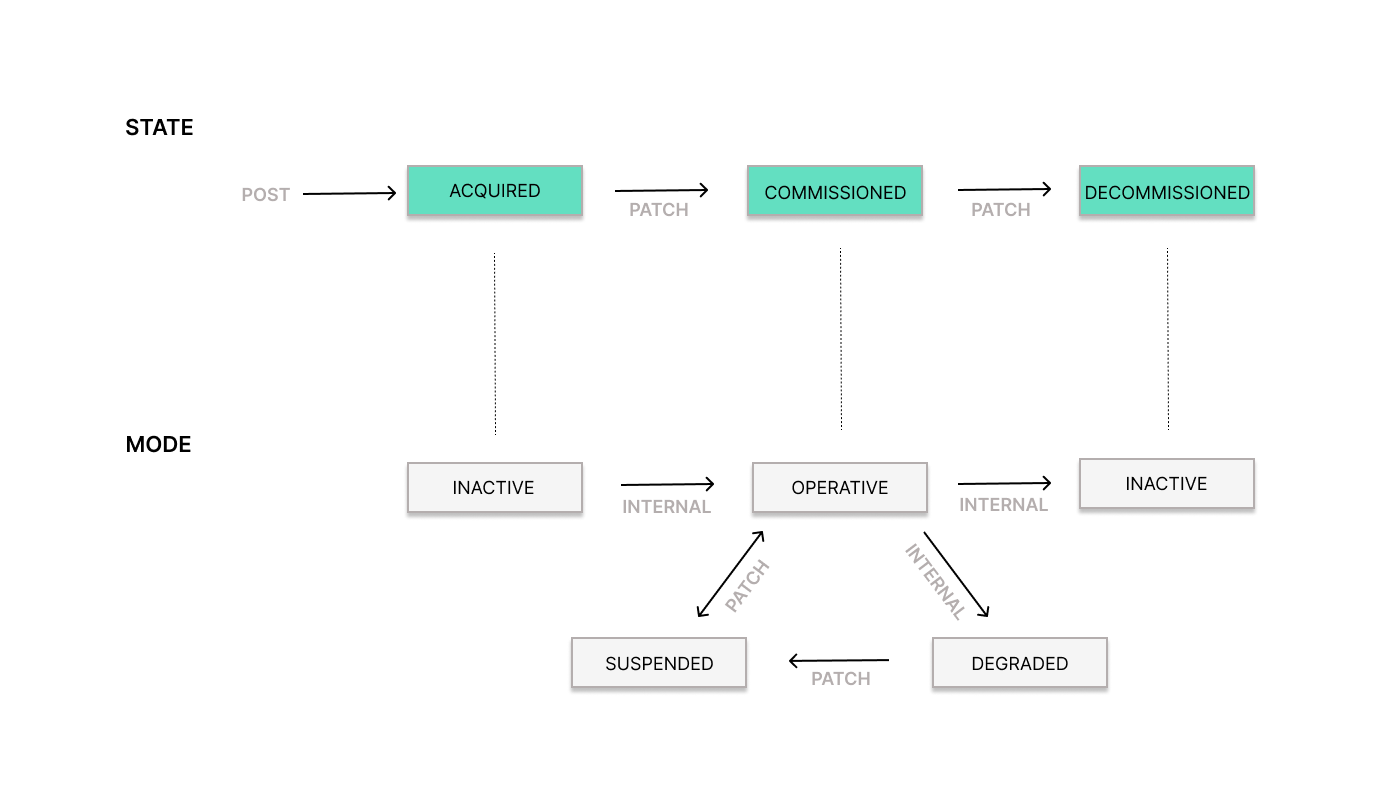
Each transition is triggered either by an external API call or occurs automatically based on internal system logic:
PATCHindicates that an external API call is required to initiate the transition.INTERNALindicates that the transition is triggered automatically within the system.
Bidirectional arrows indicate that the transition can occur in both directions — for example, a PATCH call can move the resource mode from OPERATIVE → SUSPENDED or from SUSPENDED → OPERATIVE.
States
Section titled “States”- Acquired: Initial state of the resource upon creation. Operations cannot be performed in this state.
- Commissioned: Resource is ready and fully operational (provided that the mode is operative).
- Decommissioned: Resource is no longer operational and cannot perform any tasks.
- Inactive: Initial mode of the resource upon creation. Operations cannot be performed in this mode.
- Operative: Resource is fully functional and operating as intended.
- Suspended: Resource is temporarily paused via an API call (
PATCH) — e.g. to update Fisconline credentials or other resource information. Once the update is complete, the resource can be set back to Operative. - Degraded: Resource has encountered a persistent Fisconline credential error against AdE. Record submissions are blocked until Fisconline credentials are fixed and the Taxpayer is manually restored to Operative.
Learn more in the dedicated article: What is DEGRADED mode and how to recover
State Transitions
Section titled “State Transitions”All state transitions are irreversible.
- Acquired → Commissioned: Requires an API call (
PATCH) to activate the resource. If successful, the corresponding mode automatically transitions from Inactive to Operative. - Commissioned → Decommissioned: Requires an API call (
PATCH) to mark the resource as no longer in use. If successful, the corresponding mode transitions from Operative to Inactive, marking the end of the resource lifecycle. - Acquired → Decommissioned: Requires an API call (
PATCH) to end the resource’s lifecycle without ever commissioning it. This is useful, for example, when a resource was created by mistake and never needs to become operative. Since the resource was never activated, the corresponding mode remains Inactive throughout.
For most contracts, Systems are the units used for billing with fiskaly.
A System becomes relevant for billing once you change its state from ACQUIRED to COMMISSIONED in the LIVE environment.
Resources in the TEST environment are not billed.
For the exact billing conditions, please refer to your contract with fiskaly.
Mode Transitions
Section titled “Mode Transitions”- Inactive → Operative: Transitions automatically when the state is successfully updated to Commissioned via an API call (
PATCH). - Operative → Suspended: Triggered via an API call (
PATCH) — e.g. to temporarily pause operations while updating Fisconline credentials or other resource information. - Operative → Degraded: Transitions automatically — e.g. due to persistent Fisconline credentials errors. Learn more in the dedicated article: What is DEGRADED mode and how to recover
- Degraded → Suspended: Must be manually triggered via an API call (
PATCH) to address persistent Fisconline credential errors before restoring the Taxpayer to Operative. Learn more in the dedicated article: What is DEGRADED mode and how to recover - Suspended → Operative: Triggered via an API call (
PATCH) once the necessary updates — e.g. Fisconline credentials or other resource information — have been completed.