Vous consultez la documentation pour la version API 2026-05-04. La dernière version est 2026-06-01.
Ce guide vous accompagne tout au long du processus complet d’intégration de l’API fiskaly SIGN IT pour la conformité fiscale italienne, en utilisant une combinaison du fiskaly HUB et de requêtes API. À la fin, vous disposerez d’un System entièrement fonctionnel avec des Records transmis à l’Agenzia delle Entrate (AdE).
Workflow d’intégration
Section intitulée « Workflow d’intégration »Le diagramme ci-dessous illustre le workflow et met en évidence les étapes essentielles nécessaires à la réussite de votre intégration. Chaque tuile renvoie directement à l’étape de configuration correspondante ci-dessous.
Les étapes marquées en jaune doivent être effectuées directement sur HUB, tandis que les étapes restantes doivent être gérées via l’API SIGN IT. Effectuer chaque action dans le bon contexte est une étape importante vers une intégration réussie.
Prérequis
Section intitulée « Prérequis »Vous aurez besoin d’un outil pour effectuer des requêtes HTTP — tel que cURL (ligne de commande), Postman, ou votre propre code applicatif. Une compréhension de base des API REST et des flux d’authentification est recommandée.
Vous pouvez également télécharger notre collection Postman pour SIGN IT, qui comprend des requêtes prédéfinies pour chaque étape de ce guide.
Avant de commencer, jetez un coup d’œil à la vue d’ensemble de ce que vous allez configurer.
Configuration étape par étape
Section intitulée « Configuration étape par étape »S'inscrire sur HUB
Commencez par vous inscrire sur le fiskaly HUB.
Pour plus d’informations sur la prise en main, rendez-vous dans notre section HUB - Premiers pas.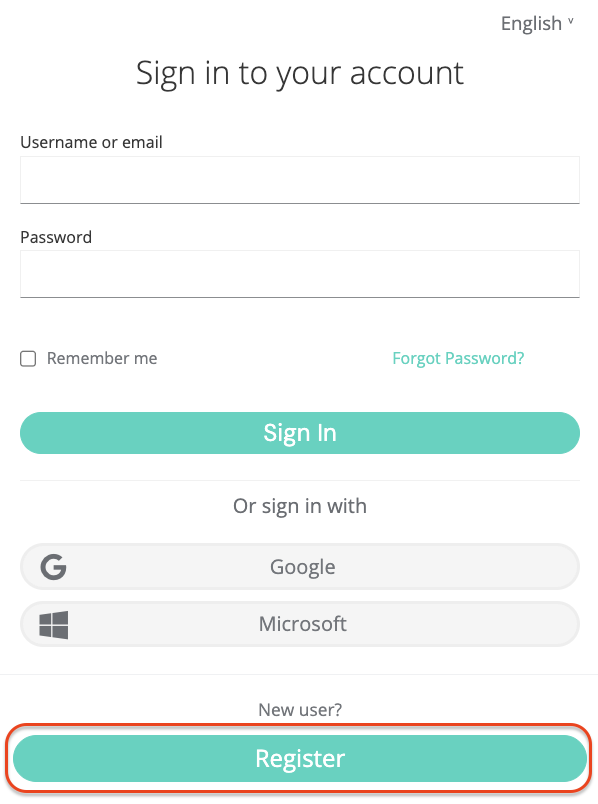
Créer un Account & Organization
GROUPLa création d’un Account fiskaly est la première étape, après quoi vous pouvez procéder à la mise en place de la première structure organisationnelle pour votre entreprise et à la génération de votre clé API.
L’Account représente le fournisseur de POS ou un détaillant qui exploite son propre système POS. C’est l’organisation de niveau supérieur dans la structure.
Après avoir créé votre Account fiskaly, vous serez dirigé vers le sélecteur d’organisation où vous pourrez créer votre Group. Un Group est un niveau intermédiaire au sein d’un Account qui vous aide à organiser plusieurs Units en clusters logiques.
Créer une clé API
L’étape suivante consiste à générer une clé API pour votre Organisation via le HUB au sein de votre Group.
Vous recevrez une clé API et un secret API. Conservez-les en lieu sûr — vous en aurez besoin pour vous authentifier dans l’API SIGN IT et créer vos Organisation(s) de type
UNIT(étape 5). Le secret API n’est affiché qu’une seule fois. Assurez-vous de le sauvegarder en lieu sûr avant de fermer la boîte de dialogue.💡Environnements TEST et LIVELes clés API générées dans l’environnement TEST (
https://test.api.fiskaly.com) créeront des ressources TEST, tandis que celles de l’environnement LIVE (https://live.api.fiskaly.com) créeront des ressources LIVE. Pour plus de détails, consultez notre article sur les environnements TEST et LIVE.
Créer un Token
À partir de cette étape, vous utiliserez l’API SIGN IT.
Appelez l’endpoint createToken avec la clé API et le secret de l’étape 3 pour obtenir un token
bearer. Incluez ce token dans l’en-têteAuthorizationdes étapes 5 et 6.curl -X POST https://test.api.fiskaly.com/tokens \ -H "Content-Type: application/json" \ -H "X-Api-Version: 2026-05-04" \ -H "X-Idempotency-Key: $(uuidgen)" \\ -d '{ "content": { "type": "API_KEY", "key": "your_api_key", "secret": "your_api_secret" } }'const response = await fetch( "https://test.api.fiskaly.com/tokens", { method: "POST", headers: { "Content-Type": "application/json", "X-Api-Version": "2026-05-04", "X-Idempotency-Key": crypto.randomUUID(), }, body: JSON.stringify({ content: { type: "API_KEY", key: "your_api_key", secret: "your_api_secret", }, }), } ); const token = await response.json(); const accessToken = token.content.authentication.bearer;Exemple de réponse (200 OK)
{"content": {"id": "6f1c5c9e-3d9c-4f8c-9f20-7de8f3a91b11","authentication": {"type": "JWT","bearer": "eyJhbGciOiJSUzI1NiIsInR5cCI6IkpXVCJ9...","expires_at": "2026-03-02T12:00:00Z"},"organization": {"id": "b7b6f971-5a3c-4e1e-9f58-2f2a8457bb2d"},"subject": {"id": "2d4a0c2a-c2c9-4e3b-a0e8-b8f7e70d6f33"}}}Créer une Organization
UNITCréez une Organisation de type
UNITvia l’endpoint createOrganization. UneUNITreprésente une seule entité juridique (marchand). Vous devrez créer une OrganisationUNITpour chaque représentation de contribuable que vous gérez.L’utilisation du token
bearergénéré à l’étape 4 avec la clé API et le secret créés pour votre Group garantit que laUNITest correctement imbriquée sous ce Group dans la hiérarchie.curl -X POST https://test.api.fiskaly.com/organizations \ -H "Content-Type: application/json" \ -H "X-Api-Version: 2026-05-04" \ -H "X-Idempotency-Key: $(uuidgen)" \ -H "Authorization: Bearer ${ACCESS_TOKEN}" \ -d '{ "content": { "type": "UNIT", "name": "My Retail Store" } }'const response = await fetch( "https://test.api.fiskaly.com/organizations", { method: "POST", headers: { "Content-Type": "application/json", "X-Api-Version": "2026-05-04", "X-Idempotency-Key": crypto.randomUUID(), "Authorization": `Bearer ${accessToken}`, }, body: JSON.stringify({ content: { type: "UNIT", name: "My Retail Store", }, }), } ); const organization = await response.json(); const organizationId = organization.content.id;Exemple de réponse (201 Créé)
{"content": {"id": "9a746f13-0ef7-4a0f-a7df-8e52089c5f3a","state": "ENABLED","type": "UNIT","name": "My Retail Store","organization": {"id": "d4c7b3d1-71f6-45d6-a289-4adf5d54b9c1"}},"metadata": {"trace_identifier": "trace_abc123","api_version": "2026-05-04"}}Créer un Subject (clé API)
Créez un Subject de type
API_KEYpour l’OrganisationUNITvia l’endpoint createSubject.Pour associer le Subject (clé API) à votre
UNIT, incluez l’en-têteX-Scope-Identifierdéfini sur l’idde l’OrganisationUNITdans votre requête.curl -X POST https://test.api.fiskaly.com/subjects \ -H "Content-Type: application/json" \ -H "X-Api-Version: 2026-05-04" \ -H "X-Idempotency-Key: $(uuidgen)" \ -H "Authorization: Bearer ${ACCESS_TOKEN}" \ -H "X-Scope-Identifier: ${ORGANIZATION_ID}" \ -d '{ "content": { "type": "API_KEY", "name": "my-api-key-03" } }'const response = await fetch( "https://test.api.fiskaly.com/subjects", { method: "POST", headers: { "Content-Type": "application/json", "X-Api-Version": "2026-05-04", "X-Idempotency-Key": crypto.randomUUID(), "Authorization": `Bearer ${accessToken}`, "X-Scope-Identifier": organizationId, }, body: JSON.stringify({ content: { type: "API_KEY", name: "my-api-key-03", }, }), } ); const subject = await response.json(); // Save the returned key and secret for the next stepExemple de réponse (201 Créé)
{"content": {"id": "2d4a0c2a-c2c9-4e3b-a0e8-b8f7e70d6f33","state": "ENABLED","type": "API_KEY","name": "my-api-key-03","credentials": {"key": "fsk_unit_abc123","secret": "secret_only_shown_once"}},"metadata": {"trace_identifier": "trace_abc123","api_version": "2026-05-04"}}Créer un Token
Créez un token à l’aide de la clé API et du secret Subject que vous venez de générer. Ce token
bearersera utilisé pour toutes les étapes suivantes afin de créer des ressources au sein de l’OrganisationUNITcorrespondante.curl -X POST https://test.api.fiskaly.com/tokens \ -H "Content-Type: application/json" \ -H "X-Api-Version: 2026-05-04" \ -H "X-Idempotency-Key: $(uuidgen)" \\ -d '{ "content": { "type": "API_KEY", "key": "subject_api_key", "secret": "subject_api_secret" } }'const tokenResponse = await fetch( "https://test.api.fiskaly.com/tokens", { method: "POST", headers: { "Content-Type": "application/json", "X-Api-Version": "2026-05-04", "X-Idempotency-Key": crypto.randomUUID(), }, body: JSON.stringify({ content: { type: "API_KEY", key: "subject_api_key", secret: "subject_api_secret", }, }), } ); const token = await tokenResponse.json(); const unitToken = token.content.authentication.bearer;Exemple de réponse (200 OK)
{"content": {"id": "3a5b4c61-2e8d-4a9d-9ac1-6df5a4e9138d","authentication": {"type": "JWT","bearer": "eyJhbGciOiJSUzI1NiIsInR5cCI6IkpXVCJ9...","expires_at": "2026-03-02T12:00:00Z"},"organization": {"id": "9a746f13-0ef7-4a0f-a7df-8e52089c5f3a"},"subject": {"id": "2d4a0c2a-c2c9-4e3b-a0e8-b8f7e70d6f33"}},"metadata": {"trace_identifier": "trace_abc123","api_version": "2026-05-04"}}Créer un Taxpayer
Vous êtes maintenant prêt à créer les parties opérationnelles nécessaires à la fiscalisation en Italie.
Utilisez l’endpoint createTaxpayer pour ajouter les informations du Taxpayer à l’Organisation
UNITque vous avez précédemment créée :- Définissez le Taxpayer comme type
COMPANY(personne morale) ouINDIVIDUAL(personne physique). Dans les deux cas, lenameet l’addressdoivent être fournis. - Dans les informations de
fiscalizationitaliennes, les données de contribuable suivantes doivent être fournies :tax_id_number: Code fiscal italien (Codice fiscale) de l’entreprisevat_id_number: Numéro de TVA italien (Partita IVA) de l’entreprisecredentials: PIN, mot de passe et numéro d’identification fiscale de l’utilisateur Fisconline requis pour accéder aux services de l’AdE
curl -X POST https://test.api.fiskaly.com/taxpayers \
  -H "Content-Type: application/json" \
  -H "X-Api-Version: 2026-05-04" \
  -H "X-Idempotency-Key: $(uuidgen)" \
  -H "Authorization: Bearer ${UNIT_TOKEN}" \
  -d '{
    "content": {
      "type": "COMPANY",
      "name": {
        "legal": "La Pizzeria di Mario S.r.l.",
        "trade": "La Pizzeria di Mario"
      },
      "address": {
        "line": {
          "type": "STREET_NUMBER",
          "street": "Via Roma",
          "number": "123"
        },
        "code": "00100",
        "city": "Rome",
        "country": "IT"
      },
      "fiscalization": {
        "type": "IT",
        "tax_id_number": "12345678901",
        "vat_id_number": "12345678901",
        "credentials": {
          "type": "FISCONLINE",
          "pin": "1234567890",
          "password": "MySecurePassword123",
          "tax_id_number": "RSSMRA85M01H501Z"
        }
      }
    }
  }'
const response = await fetch( "https://test.api.fiskaly.com/taxpayers", { method: "POST", headers: { "Content-Type": "application/json", "X-Api-Version": "2026-05-04", "X-Idempotency-Key": crypto.randomUUID(), "Authorization": `Bearer ${unitToken}`, }, body: JSON.stringify({ content: { type: "COMPANY", name: { legal: "La Pizzeria di Mario S.r.l.", trade: "La Pizzeria di Mario", }, address: { line: { type: "STREET_NUMBER", street: "Via Roma", number: "123", }, code: "00100", city: "Rome", country: "IT", }, fiscalization: { type: "IT", tax_id_number: "12345678901", vat_id_number: "12345678901", credentials: { type: "FISCONLINE", pin: "1234567890", password: "MySecurePassword123", tax_id_number: "RSSMRA85M01H501Z", }, }, }, }), } ); const taxpayer = await response.json(); const taxpayerId = taxpayer.content.id;Exemple de réponse (201 Créé)
{"content": {"address": {"city": "Rome","code": "00100","country": "IT","line": {"number": "123","street": "Via Roma","type": "STREET_NUMBER"}},"country": "Italy","created_at": "2026-03-05T14:58:05.729928Z","fiscalization": {"credentials": {"password": "ccf9ac1c","pin": "c775e7b7","tax_id_number": "RSSMRA85M01H501Z","type": "FISCONLINE"},"tax_id_number": "12345678901","type": "IT","vat_id_number": "12345678901"},"id": "019cbe81-8721-7e27-99d9-1bb4a267ba56","locations": [{"description": "Head office location.","type": "HEAD_OFFICE"},{"description": "Branch location.","type": "BRANCH"}],"mode": "INACTIVE","name": {"legal": "La Pizzeria di Mario S.r.l.","trade": "La Pizzeria di Mario"},"state": "ACQUIRED","type": "COMPANY","updated_at": "2026-03-05T14:58:05.729928Z","vat_number": "IT12345678901"}}Une fois un Taxpayer créé, son
stateest défini surACQUIREDpar défaut. Pour le rendre pleinement fonctionnel, mettez à jour l’état àCOMMISSIONEDen utilisant l’endpoint updateTaxpayer :curl -X PATCH "https://test.api.fiskaly.com/taxpayers/${TAXPAYER_ID}" \ -H "Content-Type: application/json" \ -H "X-Api-Version: 2026-05-04" \ -H "Authorization: Bearer ${UNIT_TOKEN}" \ -d '{ "content": { "state": "COMMISSIONED" } }'await fetch( `https://test.api.fiskaly.com/taxpayers/${taxpayerId}`, { method: "PATCH", headers: { "Content-Type": "application/json", "X-Api-Version": "2026-05-04", "Authorization": `Bearer ${unitToken}`, }, body: JSON.stringify({ content: { state: "COMMISSIONED", }, }), } );Exemple de réponse (200 OK)
{"content": {"address": {"city": "Rome","code": "00100","country": "IT","line": {"number": "123","street": "Via Roma","type": "STREET_NUMBER"}},"country": "Italy","created_at": "2026-03-05T14:58:05.729928Z","fiscalization": {"credentials": {"password": "ccf9ac1c","pin": "c775e7b7","tax_id_number": "RSSMRA85M01H501Z","type": "FISCONLINE"},"tax_id_number": "12345678901","type": "IT","vat_id_number": "12345678901"},"id": "019cbe81-8721-7e27-99d9-1bb4a267ba56","locations": [{"description": "Head office location.","type": "HEAD_OFFICE"},{"description": "Branch location.","type": "BRANCH"}],"mode": "OPERATIVE","name": {"legal": "La Pizzeria di Mario S.r.l.","trade": "La Pizzeria di Mario"},"state": "COMMISSIONED","type": "COMPANY","updated_at": "2026-03-05T15:02:41.223565Z","vat_number": "IT12345678901"}}📘NoteSeules les identifiants Fisconline sont valides pour utiliser SIGN IT lite. Le contribuable doit effectuer manuellement une première connexion au portail web de l’Agence fiscale afin de s’assurer que les identifiants fonctionnent correctement et d’accepter les conditions, clauses et termes supplémentaires prévus.
⚠️Renouvellement des identifiants requisLes identifiants Fisconline expirent tous les 90 jours sur le portail AdE, bien que nous recommandions de les renouveler tous les 60 jours comme bonne pratique. Découvrez comment dans cet article : SIGN IT - How to update the FISCONLINE credentials
Pour plus d’informations, veuillez consulter notre section Identifiants.
Pour un guide du marchand détaillé sur la manière de demander des identifiants Fisconline, veuillez contacter notre équipe commerciale.
- Définissez le Taxpayer comme type
Créer une Location
Pour chaque emplacement commercial opérationnel, vous devez créer une Location de type
BRANCHvia l’endpoint createLocation.curl -X POST https://test.api.fiskaly.com/locations \ -H "Content-Type: application/json" \ -H "X-Api-Version: 2026-05-04" \ -H "X-Idempotency-Key: $(uuidgen)" \ -H "Authorization: Bearer ${UNIT_TOKEN}" \ -d '{ "content": { "type": "BRANCH", "taxpayer": { "id": "your_taxpayer_id" }, "name": "Roma Centro Branch", "address": { "line": { "type": "STREET_NUMBER", "street": "Via Roma", "number": "1" }, "code": "00100", "city": "Roma", "country": "IT" } }, "metadata": { "store_code": "STORE001" } }'const response = await fetch( "https://test.api.fiskaly.com/locations", { method: "POST", headers: { "Content-Type": "application/json", "X-Api-Version": "2026-05-04", "X-Idempotency-Key": crypto.randomUUID(), "Authorization": `Bearer ${unitToken}`, }, body: JSON.stringify({ content: { type: "BRANCH", taxpayer: { id: taxpayerId, }, name: "Roma Centro Branch", address: { line: { type: "STREET_NUMBER", street: "Via Roma", number: "1", }, code: "00100", city: "Roma", country: "IT", }, }, }), } ); const location = await response.json(); const locationId = location.content.id;Exemple de réponse (201 Créé)
{"content": {"address": {"city": "Roma","code": "00100","country": "IT","line": {"number": "1","street": "Via Roma","type": "STREET_NUMBER"}},"created_at": "2026-03-05T15:07:09.776328Z","id": "019cbe89-d450-7501-9928-1e7d94339208","mode": "INACTIVE","name": "Roma Centro Branch","state": "ACQUIRED","systems": [{"description": "Fiscal device (SIGN IT lite).","type": "FISCAL_DEVICE"}],"taxpayer": {"id": "019cbe81-8721-7e27-99d9-1bb4a267ba56"},"type": "BRANCH","updated_at": "2026-03-05T15:07:09.776328Z"},"metadata": {"store_code": "STORE001"}}Une fois une Location créée, son
stateest défini surACQUIREDpar défaut. Mettez à jour l’état àCOMMISSIONEDen utilisant l’endpoint updateLocation avant de continuer.📘NoteSi le contribuable opère depuis un seul emplacement commercial qui coïncide avec l’adresse légale, la création d’une
Location::BRANCHn’est pas obligatoire. UneLocation::HEAD_OFFICEest automatiquement créée lors de la création du Taxpayer et partage le même UUID que le Taxpayer. Lorsque le Taxpayer est mis àCOMMISSIONED, laLocation::HEAD_OFFICEest automatiquement mise àCOMMISSIONEDégalement.Créer un System (
FISCAL_DEVICE)L’endpoint createSystem vous permet de créer une abstraction de chaque système d’enregistrement électronique (ERS) utilisé pour les opérations fiscales. Chaque caisse enregistreuse ou point de vente doit être fourni(e) comme nouveau System de type
FISCAL_DEVICE.- Un System sera connecté à une Location spécifique, préalablement créée.
- Pour chaque System, vous devez fournir des informations sur le
produceret lesoftwareafin de suivre quel appareil effectue les transactions fiscales. Pour plus d’informations, consultez cet article FAQ.
curl -X POST https://test.api.fiskaly.com/systems \
  -H "Content-Type: application/json" \
  -H "X-Api-Version: 2026-05-04" \
  -H "X-Idempotency-Key: $(uuidgen)" \
  -H "Authorization: Bearer ${UNIT_TOKEN}" \
  -d '{
    "content": {
      "type": "FISCAL_DEVICE",
      "location": {
        "id": "your_location_id"
      },
      "producer": {
        "type": "MPN",
        "number": "FD-001",
        "details": {
          "name": "My Fiscal Device"
        }
      },
      "software": {
        "name": "My POS Software",
        "version": "1.0.0"
      }
    }
  }'
const response = await fetch( "https://test.api.fiskaly.com/systems", { method: "POST", headers: { "Content-Type": "application/json", "X-Api-Version": "2026-05-04", "X-Idempotency-Key": crypto.randomUUID(), "Authorization": `Bearer ${unitToken}`, }, body: JSON.stringify({ content: { type: "FISCAL_DEVICE", location: { id: locationId, }, producer: { type: "MPN", number: "FD-001", details: { name: "My Fiscal Device", }, }, software: { name: "My POS Software", version: "1.0.0", }, }, }), } ); const system = await response.json(); const systemId = system.content.id;Exemple de réponse (201 Créé)
{"content": {"compliance": {"software": {"name": "My POS Software","version": "1.0.0"}},"created_at": "2026-03-05T13:57:00.016909Z","id": "019cbe49-97f0-7dde-adae-e10fea9d64c9","journal": {"cryptography": {"certificate": {"expires_at": "2029-03-05T13:57:00Z","serial_number": "7E7D991D5D1768AF224A754A3E815537","x509_pem": "-----BEGIN CERTIFICATE-----\nMIIC8jCCAdqgAwIBAgIQfn2ZHV0XaK8iSnVKPoFVNzANBgkqhkiG9w0BAQsFADAT\nMREwDwYDVQQKEwhmaXNrYWx5LjAeFw0yNjAzMDUxMzU3MDBaFw0yOTAzMDUxMzU3\nMDBaMBMxETAPBgNVBAoTCGZpc2thbHkuMIIBIjANBgkqhkiG9w0BAQEFAAOCAQ8A\nMIIBCgKCAQEAzE++CjP6UrE9d4ftaRU50yWWycU1/ql5iLgpFjjBZdXAuay82ely\n11sMfjlL3RJaIkIF8w9VcrnaCnSJLzSihEPcohFF8B9iX+/GLHA9FNHMpRrNBaC/\nMmXv7iuPkOFZDTxueWtkti0BqEE+H3RoCsOkPxzMMQ0UYCtZx9V5i/bXO+Akb8HC\nuq80+73m/DP1WFQgD6d/vwfqr+eM4jZTUiRPyy9W6yBOj02SbFL6Oeop2yDNo7Ws\nhZLoquNgVe9lEHZV2N62AVe1OEXdDzn2BlNvCnlwb9RJCGTVCMQbOsN84EMhpwOG\nsRNHgezSeGhO7aca+/igmiuSW7Uw3YdWWwIDAQABo0IwQDAOBgNVHQ8BAf8EBAMC\nAoQwDwYDVR0TAQH/BAUwAwEB/zAdBgNVHQ4EFgQUn+BqmtpyTeC4wdZNEMYf96hV\ny78wDQYJKoZIhvcNAQELBQADggEBACXaL/EXGW4PnjC+Dj5ZUySE5vtysPUV0Tkw\n4+EtLJUs86itNZgyhQpXfwzvpgj/wL7XA+GAnPqpUbrMOXLawsWGtID8BZHrQRRJ\ny/ZcHRQyIwoHNNl5bbDDNC/icG78GhK+RmdCw3wcVyxABBzpE/CckNn4hltsCqUo\n01eqms+SmY+MBUBj3ec1iVcD0bz/pyMmIQSVfWjKWtHofwUTCkgEm9cKqtyfajzB\ne6bKoScTziojhlCtnEfPb20vtQ+UE183FOG36WfuRV8EtS+3Cgx83yEj8QXVuYcA\nKQAgoPy6/6xHMDkZH3P/XTOfBf8UkZvQy5egibgC6k2wqjxYWtY=\n-----END CERTIFICATE-----\n"},"signature": {"hash": "SHA-256","type": "RSA"}}},"kind": "INTERNAL","location": {"id": "019cbe89-d450-7501-9928-1e7d94339208"},"mode": "INACTIVE","producer": {"details": {"name": "My Fiscal Device"},"number": "FD-001","type": "MPN"},"records": [{"description": "Intention of an upcoming transaction.","type": "INTENTION::TRANSACTION"},{"description": "Receipt transaction information.","type": "TRANSACTION::RECEIPT"},{"description": "Correction of an issued transaction.","type": "TRANSACTION::CORRECTION"},{"description": "Cancellation of an issued transaction.","type": "TRANSACTION::CANCELLATION"}],"software": {"name": "SIGN IT Lite","version": "v1.0.0"},"state": "ACQUIRED","type": "FISCAL_DEVICE","updated_at": "2026-03-05T13:57:00.016909Z","vat_exemptions": [{"code": "NOT_SUBJECT","description": "Not subject (Non soggette)"},{"code": "NOT_TAXABLE","description": "Not taxable (Non imponibili)"},{"code": "CAUSE_1","description": "Exempt (Esenti)"},{"code": "CAUSE_2","description": "Exclusive Art. 15"},{"code": "CAUSE_3","description": "Marginal scheme (Regime del margine)"},{"code": "CAUSE_4","description": "Other (Altre non IVA)"}],"vat_rates": [{"code": "STANDARD","description": "Standard VAT rate","historic": false,"percentage": "22"},{"code": "REDUCED_1","description": "Reduced VAT rate 1","historic": false,"percentage": "10"},{"code": "REDUCED_2","description": "Reduced VAT rate 2","historic": false,"percentage": "5"},{"code": "REDUCED_3","description": "Super-reduced VAT rate","historic": false,"percentage": "4"}]}}Une fois un System créé, son
stateest défini surACQUIREDpar défaut. Pour créer des Records, son état doit être mis à jour àCOMMISSIONEDen utilisant l’endpoint updateSystem.📘Remarque sur la facturationPour la plupart des contrats, les
Systemsont les unités utilisées pour la facturation chez fiskaly. UnSystemdevient pertinent pour la facturation dès que son état passe deACQUIREDàCOMMISSIONEDdans l’environnement LIVE. Les ressources de l’environnement TEST ne sont pas facturées. Pour connaître les conditions de facturation exactes, veuillez vous référer à votre contrat avec fiskaly.Créer un Record
Pour chaque opération commerciale effectuée dans le System, l’endpoint createRecord doit être utilisé en deux appels successifs :
- Partie A)
INTENTION: enregistre l’intention de démarrer uneTRANSACTION - Partie B)
TRANSACTION: fournit les données de transaction
Partie A) Créer l’Intention
Un Record de type
INTENTIONcontient l’association avec le System qui effectuera la transaction et une Opération de typeTRANSACTION, représentant l’intention du System d’enregistrer une transaction.curl -X POST https://test.api.fiskaly.com/records \ -H "Content-Type: application/json" \ -H "X-Api-Version: 2026-05-04" \ -H "X-Idempotency-Key: $(uuidgen)" \ -H "Authorization: Bearer ${UNIT_TOKEN}" \ -d '{ "content": { "type": "INTENTION", "system": { "id": "your_system_id" }, "operation": { "type": "TRANSACTION" } } }'const intentionResponse = await fetch( "https://test.api.fiskaly.com/records", { method: "POST", headers: { "Content-Type": "application/json", "X-Api-Version": "2026-05-04", "X-Idempotency-Key": crypto.randomUUID(), "Authorization": `Bearer ${unitToken}`, }, body: JSON.stringify({ content: { type: "INTENTION", system: { id: systemId, }, operation: { type: "TRANSACTION", }, }, }), } ); const intention = await intentionResponse.json(); const intentionId = intention.content.id;Exemple de réponse (201 Créé)
{"content": {"file": {"location": "SERVICE"},"id": "019cbe96-8e57-7693-a4ef-4ed89a76ef9b","journal": {"signature": "yrrXNoHGF0YYPVgUWH81tXQYCf6H3BCjTed6YUT2ZvmmRaq8qoZAUOaP8wJI4ipN","signed_at": "2026-03-05T15:21:03.84326335Z"},"mode": "PROCESSING","operation": "{\"type\":\"TRANSACTION\"}","state": "ACCEPTED","system": {"id": "019cbe96-7245-7b49-91d6-ba66a235fc72"},"type": "INTENTION::TRANSACTION"}}Partie B) Créer la Transaction
Un Record de type
TRANSACTIONest associé à l’INTENTIONprécédemment créée et peut effectuer l’une des opérations suivantes :RECEIPT: Représente la vente d’un bien ou d’un service, incluant les détails du document (p. ex. numéro de document, montants totaux TVA comprise et TVA exclue) et les lignes d’articles (identification d’uneSALE, description, s’il s’agit d’unGOODou d’unSERVICE, etc.).CORRECTION: Représente un processus de retour. Contient les mêmes données qu’une opérationRECEIPT, plus unidde référence vers le documentRECEIPToriginal.CANCELLATION: Utilisé pour invalider une transaction entière. Nécessite l’idd’un record précédemment créé.
curl -X POST https://test.api.fiskaly.com/records \
  -H "Content-Type: application/json" \
  -H "X-Api-Version: 2026-05-04" \
  -H "X-Idempotency-Key: $(uuidgen)" \
  -H "Authorization: Bearer ${UNIT_TOKEN}" \
  -d '{
    "content": {
      "type": "TRANSACTION",
      "record": {
        "id": "your_intention_id"
      },
      "operation": {
        "type": "RECEIPT",
        "document": {
          "number": "1",
          "total_vat": {
            "amount": "2.20",
            "exclusive": "10.00",
            "inclusive": "12.20"
          }
        },
        "entries": [
          {
            "type": "SALE",
            "details": {
              "concept": "GOOD"
            },
            "data": {
              "type": "ITEM",
              "text": "Margherita Pizza",
              "unit": {
                "quantity": "1",
                "price": "12.20"
              },
              "value": {
                "base": "10.00",
                "discount": "0.00"
              },
              "vat": {
                "type": "VAT_RATE",
                "code": "STANDARD",
                "percentage": "22.00",
                "exclusive": "10.00",
                "inclusive": "12.20",
                "amount": "2.20"
              }
            }
          }
        ],
        "payments": [
          {
            "type": "CASH",
            "details": {
              "amount": "12.20"
            }
          }
        ]
      }
    }
  }'
const transactionResponse = await fetch( "https://test.api.fiskaly.com/records", { method: "POST", headers: { "Content-Type": "application/json", "X-Api-Version": "2026-05-04", "X-Idempotency-Key": crypto.randomUUID(), "Authorization": `Bearer ${unitToken}`, }, body: JSON.stringify({ content: { type: "TRANSACTION", intention: { id: intentionId, }, operation: { type: "RECEIPT", document: { number: 1, date: "2026-05-04", total: { amount_incl_vat: "12.20", amount_excl_vat: "10.00", }, }, entries: [ { type: "SALE", description: "Margherita Pizza", category: "GOOD", quantity: 1, unit_price: "10.00", vat_rate: "22.00", amount_incl_vat: "12.20", }, ], }, }, }), } ); const transaction = await transactionResponse.json();Exemple de réponse (201 Créé)
{"content": {"compliance": {"data": "DCW0000/0000-0000","url": "https://ivaservizi.agenziaentrate.gov.it/ser/api/documenti/v1/doc/documenti/00000000/stampa/"},"file": {"location": "SERVICE"},"id": "019cbea1-4775-7b70-9b83-79cac7107266","journal": {"record": {"id": "019cbe96-8e57-7693-a4ef-4ed89a76ef9b"},"signature": "vGQtUR29rogalpYCVIJPnu-3gPLScA5wEEyxrllfviUGvoK2lkLj5bw3OimfvzuP","signed_at": "2026-03-05T15:32:46.594042649Z"},"mode": "FINISHED","operation": "{\"document\":{\"number\":\"1\",\"total_vat\":{\"amount\":\"2.20\",\"exclusive\":\"10.00\",\"inclusive\":\"12.20\"}},\"entries\":[{\"data\":{\"text\":\"Margherita Pizza\",\"type\":\"ITEM\",\"unit\":{\"price\":\"12.20\",\"quantity\":\"1\"},\"value\":{\"base\":\"10.00\",\"discount\":\"0.00\"},\"vat\":{\"amount\":\"2.20\",\"code\":\"STANDARD\",\"exclusive\":\"10.00\",\"inclusive\":\"12.20\",\"percentage\":\"22.00\",\"type\":\"VAT_RATE\"}},\"details\":{\"concept\":\"GOOD\",\"purpose\":\"STANDARD\"},\"type\":\"SALE\"}],\"payments\":[{\"details\":{\"amount\":\"12.20\"},\"type\":\"CASH\"}],\"type\":\"RECEIPT\"}","record": {"id": "019cbe96-8e57-7693-a4ef-4ed89a76ef9b"},"state": "COMPLETED","system": {"id": "019cbe49-97f0-7dde-adae-e10fea9d64c9"},"transmission": {"request": {"data": "e30A","type": "application/json"},"response": {"data": "e30A","type": "application/json"}},"type": "TRANSACTION::RECEIPT"}}Une fois la transaction correctement enregistrée et les informations du document commercial transmises avec succès au portail web de l’AdE (état
COMPLETED, modeFINISHED), lacompliance.dataretournée dans la réponse API inclut le numéro progressif attribué par l’AdE au document commercial (numéro DCW) et, si fourni, le code de loterie du consommateur.Remarque : Si un état
REJECTEDouFAILEDest retourné à la place, veuillez consulter notre section États et modes des Records pour plus d’informations.📘NoteLes Records créés dans l’environnement LIVE sont transmis aux autorités fiscales et génèrent des documents commerciaux valides. Ces documents doivent donc toujours refléter des transactions réelles.
- Partie A)
Étapes suivantes
Section intitulée « Étapes suivantes »Référence API SIGN IT
Documentation API complète pour l'endpoint SIGN IT — toutes les ressources, paramètres et réponses.
Gestion des pertes de connexion
Apprenez à gérer les scénarios de perte de connexion et à assurer la conformité fiscale lors des pannes.
Glossaire
Termes clés et définitions pour le système de conformité fiscale italien.
Guide HUB
Apprenez à gérer les organisations, les clés API et les ressources via fiskaly HUB.