Trova le risposte a 44 domande frequenti su SIGN DE, organizzate per argomento.
Exports (6)
TAR Export for DEFECTIVE TSS — May 2026 Incident
TAR exports for TSS instances that were set to DEFECTIVE as part of the May 2026 incident should be possible without any issues.
If you encounter an error during the export process, please contact our support team at dev-support@fiskaly.com and include the following information:
-
TSS ID
-
Export ID
-
Error message
We will look into the issue and get back to you as soon as possible.
How can I trigger and download a TSS export (TAR export)?
WARNING: Triggering an export may disrupt normal operations, including signing transactions, for a short period of time. To avoid conflicts, exports should be triggered outside business hours.
TSS exports in TAR format can be triggered and downloaded via the fiskaly Dashboard:
- Login
Access the fiskaly Dashboard.
- Choose the correct view
In the panel in the upper left corner of the screen, toggle on the corresponding mode (‘LIVE’ or ‘TEST’).
- Select Country and Product
On the left sidebar, choose ‘Germany’, then ‘SIGN DE V2’, followed by ‘Technical Security Systems’.
- Choose a TSS
A page listing all TSS instances will appear. Select the TSS for which you want to trigger an export by clicking on the corresponding ID.
- Trigger the export
Click on ‘TRIGGER EXPORT’ on the top left corner.
-
Apply necessary filters or opt for a complete export. Select the period required, then click ‘EXPORT’.
-
Download the export
Click on ‘Exports’ in the left sidebar.
- The first export listed is the most recent. Scroll to the right and click on ‘DOWNLOAD’.
You can also trigger and download the export via the SIGN DE API:
-
Trigger an Export: Use the Trigger an export endpoint.
-
Download the Export: Retrieve the TAR file generated by the export operation using the endpoint Retrieve the TAR file generated by an export operation.
Note: The client_id query parameter should not be used in combination with other query parameters.
Why are my filter options ignored in TSS exports?
Please find here the description of the SIGN DE API V2 endpoint triggerExport which you can use to generate TSS exports (.tar exports).
If your filter options are ignored in the export, you should especially check if you actually passed e.g. start_date, end_date, start_transaction_number, end_transaction_number as query parameters (and not as request body) in your request.
Please also note when using filtering on a client (client_id) all other query parameters will be ignored.
Why are time intervals ignored in TSS exports when filtering on a client?
Find here the description of the SIGN DE API V2 endpoint triggerExport which is used to generate TSS exports (.tar exports).
Please keep in mind, that the query parameter client_id is not meant to be used in combination with other query parameters (e.g. start_date, end_date, start_transaction_number, end_transaction_number).
When filtering on a particular client all other query parameters will be ignored.
Timeout after triggering a TSS Export (.tar export)
After triggering a TSS export on SIGN DE API V2, the TSS is blocked until the export is completed (around 10-20 seconds).
Any other requests created on this TSS during this period will run into a timeout.
Please consider this behavior in your implementation.
Is it possible to display log data of a TSE export in a readable format?
Log data is not designed to be read by humans. Its content is signed and validated digitally.
General (14)
What is the DSFinV-TW transaction data schema and who should use it?
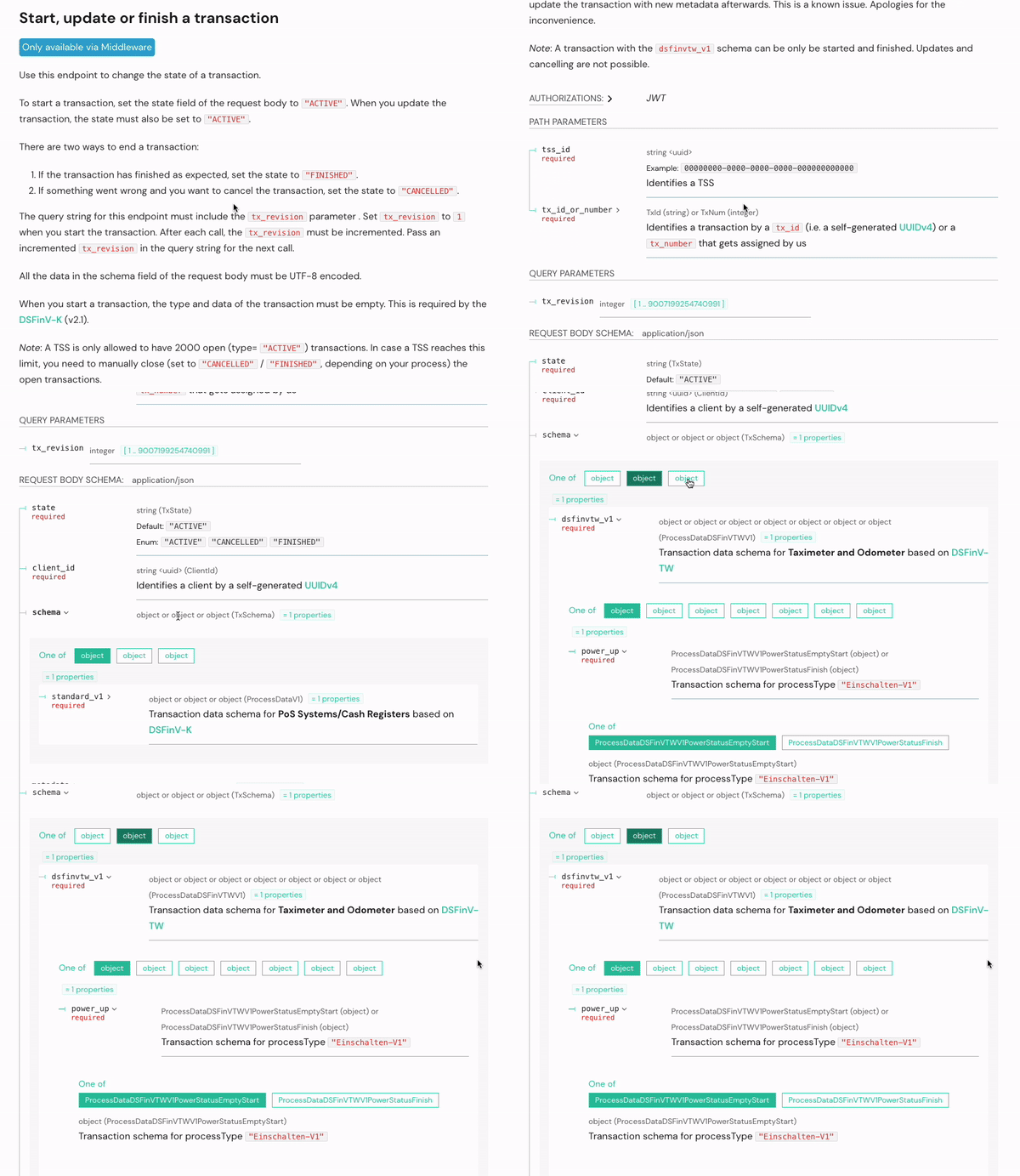
The DSFin-TW transaction data schema is only relevant for companies dealing with taximeters and odometers. It is based on a defined set of legal requirements for taximeters and odometers (DSFinV-TW) aimed at providing standardized data exports for tax audits in Germany.
For this purpose, the dsfinvtw_v1 schema within the SIGN DE V2 API endpoint Start, update or finish a transaction should be used.
The official DSFinV-TW documents can be downloaded via the German Federal Central Tax Office website.
How do I manually add the latest SSL certificate for SIGN DE V2?
For operating systems that are kept up to date, SSL certificates do not have to be installed manually in case of a certificate update.
If your system has problems connecting to SIGN DE V2, it may be necessary to upload the certificates manually.
Below you will find an instruction on how to install the latest SSL certificate in case it is not yet uploaded:
- download the zip-File 2023-09-04-fiskaly-root-certificates and unpack it
- enter the following commands in the terminal (this will ensure that the cert chain is installed in the system):
certutil -addstore -f "Root" gsr4.pemcertutil -addstore -f "Root" gtsr1.pemcertutil -addstore -f "Root" gtsr2.pemcertutil -addstore -f "Root" gtsr3.pemcertutil -addstore -f "Root" gtsr4.pemcertutil -addstore -f "Root" isrgrootx1.pemcertutil -addstore -f "Root" isrg-root-x2.pemcertutil -addstore -f "Root" SSLcom-TLS-Root-2022-ECC.pemcertutil -addstore -f "Root" SSLcom-TLS-Root-2022-RSA.pemHow many managed organizations and TSSs should I create?
For each location (store) a separate managed_organization should be created via the Management API endpoint createOrganization.
Within each managed_organization, at least one TSS should be created via the SIGN DE API V2 endpoint createTss. As a TSS can only process one request at a time, in some business scenarios, it might be useful to create more than one TSS.
For every POS used, a separate client (linked to a TSS) should be created via the SIGN DE API V2 endpoint createClient.
What is the difference between the transaction schemas receipt (Kassenbeleg-V1) and order (Bestellung-V1)?
A receipt (Kassenbeleg-V1) transaction is used for short transactions when the payment is done immediately, for example in typical retail scenarios.
For long-lasting transactions, e.g. in gastronomy, order (Bestellung-V1) transactions should be used additionally.
Good examples and explanations of the different scenarios using order (Bestellung-V1) transactions can be found in Attachment H (Anhang H Erleichterungsregelungen) of the official DSFinV-K documents of the Federal Central Tax Office (Bundeszentralamt für Steuern) which can be downloaded here. Unfortunately, Attachment H is not included in the English translation of the document.
How can the QR code of a receipt be validated?
fiskalcheck App
With the app **fiskalcheck **developed by fiskaly you can easily validate receipt data compliance to KassenSichV.
**fiskalcheck **enables a simple check of the QR code of receipts, eReceipts, etc. issued in Germany. The check takes into account the requirements for receipts from the German Cash Security Ordinance (KassenSichV) as well as the DSFinV‑K — the digital interface of the tax authorities for cash register systems.
The validation app **fiskalcheck **is available free of charge and is developed by fiskaly.
How does it work?
The app is easy to use. Simply scan the QR code, and the validation report will be displayed immediately. This gives you a fast and secure way to verify your TSS signature.
Overview of the features
Easy to use: scan QR code and view validation report
-
Signature verification of the transaction according to BSI TR-03151
-
Validation of the
processTypeand theprocessDataaccording to DSFinV‑K -
Validation of individual fields according to DSFinV‑K specifications for QR codes on receipts
-
Deriving the TSE serial number
-
Simplified visualization of the individual data fields
-
Simple representation of validation errors
-
Transfer information from the validation report to other applications via copy/paste
Download
The app **fiskalcheck **can be downloaded free of charge from the following links in the Google Play Store (Android), and the Apple App Store (iOS):
Can the fiskaly SDK, fiskaly Client or fiskaly Service used in V1 also be used for V2?
No. In SIGN DE V2 you should use a HTTP client of your choice to connect to the API.
The old fiskaly SDK, fiskaly Client and fiskaly Service are no longer maintained and cannot be used for V2.
Where to find a guide for SIGN DE V1 to V2 migration?
SIGN DE V1 will only be held operational until 30.12.2022. Only fiskaly SIGN DE V2 uses certified components, therefore it is required to migrate to this version.
You can find the migration guide on our developer page.
How do I manually add the TLS certificate for kassensichv.io of SIGN DE V1?
For operating systems which are kept up to date, TLS certificates do not have to be installed manually in case of a certificate update.
If your system has problems connecting to SIGN DE V1 via www.kassensichv.io, it may be necessary to upload the certificates manually.
Below you will find the instruction on how to install the latest TLS certificate for www.kassensichv.io if it is not yet uploaded:
- download the zip-File www_kassensichv_io_cert_chain.zip and unpack it
- enter the following commands in the terminal (this will ensure that the cert chain is installed in the system):
certutil -addstore -f "Root" USERTrustRSAAAACA.crtcertutil -addstore -f "Root" SectigoRSADomainValidationSecureServerCA.crtcertutil -addstore -f "Root" AAACertificateServices.crt
Please note: This process only affects SIGN DE V1. SIGN DE V2 is not affected by this update.
SIGN DE V1 is deprecated and can no longer be operated in productive use. Only GET requests remain functioning.
Can I use the same UUIDs from SIGN DE API V1 for Sign DE API V2?
No! We strongly advise not to do that.
A universally unique identifier (UUID) is a 128-bit label used for information in computer systems. The term globally unique identifier (GUID) is also used.
When generated according to the standard methods, UUIDs are, for practical purposes, unique.
For this reason, a particular UUID should not be used more than once. The UUID would then no longer be unique, which could lead to misbehavior in the system.
Which timeout should be set for the SIGN DE API requests?
Please note that in the event that the TSS is unavailable or temporarily instable, the checkout process will not be disrupted! The timeouts depend heavily on the frequency of the POS system. As a manufacturer, you should decide for yourself which timeout length you consider reasonable. No request should ever be open long enough to jeopardize the smooth operation of the cash register.
From our customers’ experience we can say that tx-endpoints timeouts between 3 and 5 seconds are reasonable.
If there seems to be a problem, please check the fiskaly Status Page as well as the How should I report an issue? article.
INFO
Pro Tipp: Make timeouts configurable. We recommend to create the possibility that the timeouts can be set (e.g a value between 1,5-3 seconds) by an administrator. This way, valuable development resources can be saved and a smooth operation of the POS is possible.
For TSS creation and personalization we recommend a Timeout of at least 30 seconds.
What are typical use cases for the metadata object(s)?
Metadata can be used for internal purposes. They are not used directly by fiskaly.
You can specify up to 20 key-value pairs in the metadata object. A key can be up to 40 characters long. A value can be up to 500 characters long.
For more information about the metadata field, see the API documentation and the Individual API endpoints.
Is it possible to permanently delete a TSS, client and/or transaction?
It is not possible to permanently delete an individual TSS, client, or transaction.
However, if needed, we can help you to delete an entire TEST organization or TEST managed organization. Before the deletion, it is necessary to deactivate all linked TEST resources.
Please refer to the following article: How to delete an organization.
The organization will be permanently deleted with all created resources in that case.
Important: Organizations with LIVE resources cannot be deleted.
Which data should be recorded on a receipt?
Below you can find all data that needs to be printed on the receipt, mapped with the values returned from the Sign API upsertTransaction endpoint.
It is sufficient to record either the QR code or the fields mentioned on the receipts.
INFO
We have been contacted by the relevant tax authorities with an appeal to highly recommend the QR code solution to our customers!
The TSS data (=secured data according to KassenSichV) should be stored in the QR code. This eliminates the need to print the TSS plain text on the receipts. In the event of a cash register inspection, the QR code simplifies the process. Shorter receipts save paper and therefore money. In addition, thermal paper pollutants are avoided and the environment is protected. As an alternative, you can switch to the digital fiskaly receipt and thus not use any thermal paper at all.
Please note, when using the simplification arrangements (Erleichterungregelungen) from DSFinV-K chapter 2.7, the start time of the first order transaction (TSE-Erstbestellung) must also be printed on the receipt (**not integrated in ****the **QR code).
Furthermore, it must be guaranteed that a connection in terms of content can be established via the ABRECHNUNGSKREIS field in the Bonkopf_AbrKreis file (cf. chapter 3.1.2.2) in the DSFinV-K data, so that it is possible to track the initiation and processing of the individual order and settlement processes.
As of 01.01.2024, receipts in Germany must also indicate the **serial number of the electronic record-keeping system **as well as the serial number of the security module (TSS) in addition to the TSS data already included (see AEAO to Section 146a, No. 2.2.3.1 and 2.2.3.2).
| Feld Beleg | Feld SIGN DE |
| TSE-Transaktion | number |
| TSE-Start | time_start |
| TSE-Stop | time_end |
| TSE-Seriennummer | tss_serial_number |
| TSE-Zeitformat | log.timestamp_format |
| TSE-Hashalgorithmus | signature.algorithm |
| TSE-PublicKey | signature.public_key |
| ClientID / KassenID | client_serial_number (corresponds to serial number of the electronic record-keeping system) |
| TSE-Erstbestellung | This field needs to be added manually by the cash register manufacturer |
| QR-Code | qr_code_data |
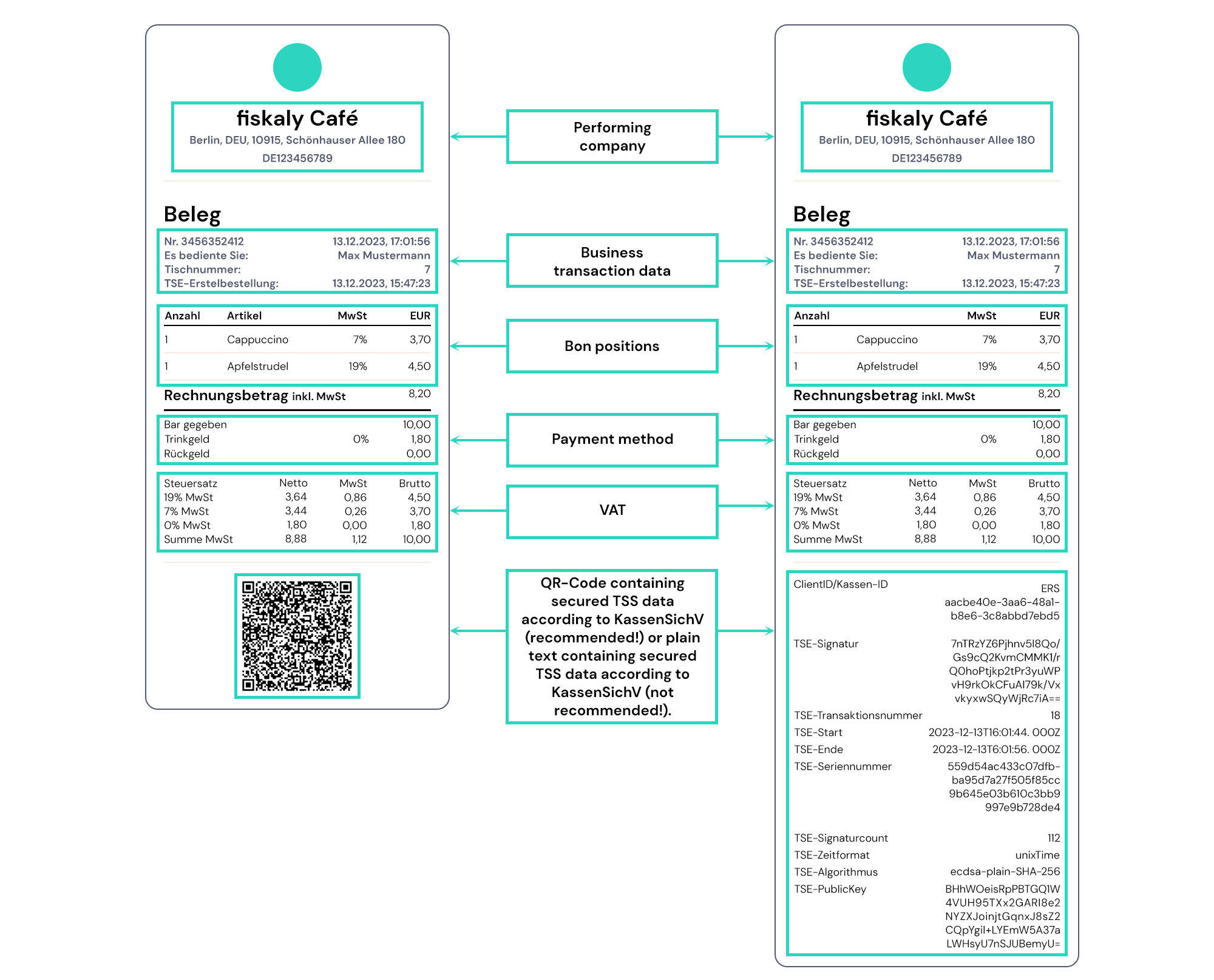
The first receipt shows the abbreviated version with the secured TSS data stored in the QR code. The second receipt on the right shows a receipt with printed plain text of the secured TSS data according to KassenSichV. Here, the difference in length and thus the saving of resources is obvious.
Where can I find the official documents for fiskaly SIGN DE certification?
All relevant documents for the certification of fiskaly SIGN DE can be found on the fiskaly workspace.
TSS - Technical Security System (9)
Can a TEST TSS certificate expire?
TEST TSS certificates expire one year after creation.
If your TEST TSS returns the error E_CERTIFICATE_EXPIRED, please create a new one.
Please note that this does not apply to LIVE TSS instances.
What does the state EVICTED of a TSS mean?
All TSS instances that are in the CREATED state for more than 3 months will be set to the state EVICTED.
TSS instances in the state EVICTED cannot be used for processing transactions and their state cannot be further updated. No certificate is available for these TSS instances.
To prevent their transition to EVICTED, it is crucial to change the state of newly created TSS instances from CREATED to UNINITIALIZED and then to INITIALIZED. TSS instances need to be in the INITIALIZED state in order to be able sign transactions. We recommend creating only as many TSS instances as needed for this purpose.
Is it possible to move a TSS from one organization to another?
It is not possible to move a TSS from one (managed-)organization to another.
As each (managed-)organization is technically a different location, a TSS should always be assigned to a certain location.
**Tip: **In case a TSS is no longer used in an organization, it is recommended to disable the TSS and also de-register any clients connected to it. However, please be aware that once a TSS has been disabled it is no longer possible to deregister a client - see SIGN DE - Can I deregister a client once a TSS is disabled?
Why is the signature_counter of a new TSS not zero?
When a TSS is initialized, some system-relevant processes already take place in the background, which are also included as signatures.
The system logs are the reason why the signature_counter does not match the number of transactions.
Why do I get the error 401 ERROR_AUTHENTICATION_FAILED (AUTHENTICATION_RESULT_PIN_IS_BLOCKED)?
Your admin_pin gets blocked after five unsuccessful authentication attempts.
In this case, you must reset your admin_pin.
Run the SIGN DE API V2 endpoint changeAdminPin request with your admin_puk and new_admin_pin.
Related article: Sign DE - Is it possible to retrieve the Admin PIN of a TSS afterwards?
SIGN DE – Why is a TSS in the TEST environment set to DELETED?
In the TEST environment, all TSS that are in the status DISABLED or have been inactive for more than 14 days are deleted every Sunday. All related resources are removed and the affected TSS are set to the status DELETED in the database.
If the TSS limit in the TEST environment has been reached, new TSS can be created by setting existing TSS to DISABLED.
The following article explains how to disable a TSS: SIGN DE - How can I disable a TSS?
What does the state DEFECTIVE of a TSS mean?
Due to a technical issue on a TSS, it might be necessary that fiskaly sets the state of this TSS to DEFECTIVE.
In this rare case, the TSS must be replaced with a new one. Existing clients must be linked to the new TSS again, each with a new client_id.
Triggering and downloading TSS exports (TAR files) is still possible.
Is it possible to retrieve the Admin PUK of a TSS at a later stage?
Please note: It is very important to keep Admin PUK and Admin PIN of a TSS stored securely.
If the TSS is still in the state CREATED, an idempotent request to the SIGN DE API endpoint createTss with the corresponding tss_id as path parameter will return the Admin PUK of the TSS.
In case the TSS is already in a different state, there is no direct way to access the admin PUK. In this case, please send us a support ticket with the corresponding tss_id (dev-support@fiskaly.com), so that we can coordinate the further procedure.
How can I disable a TSS?
A TSS can be set to the state "DISABLED" via the SIGN DE API V2 endpoint updateTss or via the fiskaly HUB. This step is irreversible. However, it is still possible to export older data of this TSS (triggerExport).
Only a TSS in the state "UNINITIALIZED" or "INITIALIZED" can be disabled.
Before the TSS can be disabled, Authenticate Admin (authenticateAdmin) must be performed.
This can also be done via the fiskaly HUB:
-
Log into your account and choose the corresponding organization.
-
In the panel in the upper left corner of the screen, toggle on the mode (‘LIVE’ or ‘TEST’) in which the TSS was created.
-
On the left side of the screen, select ‘SIGN DE’, then ‘TSS’.
-
A new page is displayed with a list of all TSS instances within the organization.
-
Select the TSS you would like to disable by clicking on its ID, which will open a new page.
-
On the TSS detail page, click on ‘Disable TSS’ in order to change its state to
"DISABLED". -
Admin PIN is required for the update.
Transactions (6)
How to find the last transaction processed by a TSS?
In order to find the last transaction processed by a TSS (Technical Security System):
- Use the retrieveTss endpoint and provide the ID of the TSS.
The field transaction_counter in the response indicates the number of the last transaction processed by the TSS.
- In the retrieveTransaction endpoint, use this
numberin the base URL of your request in order to retrieve the transaction.
How to handle retroactive cancellations?
The following example shows how to cancel a transaction which has already been closed (status FINISHED). In case of a cancellation, a new transaction is created via the SIGN DE API V2 endpoint upsertTransaction using the receipt_type "RECEIPT" and negative values.
In the DSFinV-K, the field transactions[].head.storno should be set to “true” in order to indicate that this new receipt is a cancellation of the initial one.
In addition, a reference to the initial transaction must be added in the Cash Point Closing. In transactions[].head.references via the endpoint insertCashPointClosing different schemas can be used in order to do so. For internal references, ReferenceInternalTransaction can be used.
Please note:
This scenario is different from an immediate cancellation.
What does the ideal checkout process look like?
This is what the ideal checkout process looks like:
-
Customer approaches the POS.
-
A transaction is started with state
ACTIVEand without the schema object (tx_revision=1). -
The sales process and payment process are performed at the POS.
-
The transaction is updated after the successful payment with filled schema and state
FINISHED(tx_revision=2).
In gastronomy scenarios, long lasting transactions with processType order (‘Bestellung-V1’) are needed additionally.
Details can be found in the simplification arrangements (Erleichterungsregelungen) of the official DSFinV-K documents:
DSFinV-K 2.3, (new version) (EN)
DSFinV-K 2.3, Stand März 2022 (DE)
How to deal with sales processes that are stopped after the transaction started?
The following process could be used in case a receipt needs to be cancelled immediately, before the transaction is closed, for example due to a mistake or when customers change their mind.
The transaction should be terminated by setting it into state``"CANCELLED" with the receipt_type "CANCELLATION" (AVBelegabbruch) and all other required fields.
No actual payment may take place in connection with this scenario.
Please note that this scenario is different from a refund and a retroactive cancellation.
Please note:
The options given are not exhaustive and should merely be seen as possibilities.
How to handle refunds?
In case of a refund, a new transaction is created via the SIGN DE API V2 endpoint upsertTransaction using the receipt_type "RECEIPT" and negative values.
Pursuant to the DSFinV-K, a reference to the initial transaction must be added in the Cash Point Closing. In transactions[].head.references via the endpoint insertCashPointClosing different schemas can be used in order to do so. For internal references, ReferenceInternalTransaction can be used.
Please note:
This scenario is different from an immediate cancellation.
Which fields should the schema of a transaction contain?
You will find the schema of the transaction in the SIGN DE API documentation:
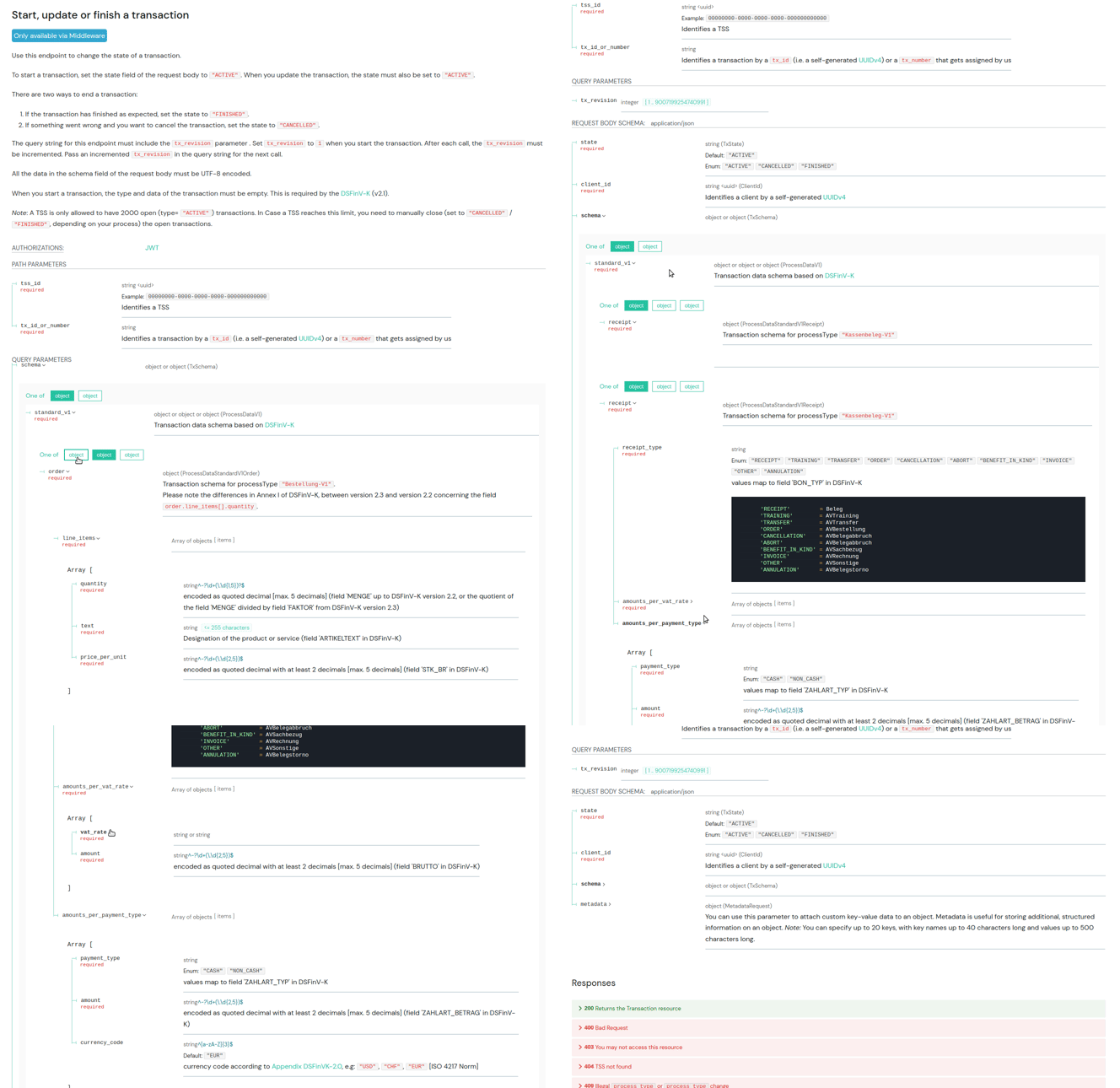
To start a transaction, set the state field of the request body to "ACTIVE" and use the correct client_id.
There are two ways to end a transaction:
-
If the transaction has finished as expected, set the state to
"FINISHED". -
If something went wrong and you want to cancel the transaction, set the state to
"CANCELLED".
The query string for this endpoint must include the tx_revision parameter . Set tx_revision to 1 when you start the transaction. After each call, the tx_revision must be incremented. Pass an incremented tx_revision in the query string for the next call.
All the data in the schema field of the request body must be UTF-8 encoded.
When you start a transaction, the type and data of the transaction must be empty. This is required by the DSFinV-K (v2.1).
Clients (6)
Can I deregister a client once a TSS is disabled?
Once a TSS has been disabled it is no longer possible to update the status of the Client connected to this TSS.
The status of a Client can only be DEREGISTERED prior to disabling the TSS it is connected to.
Is it possible to create a client associated to a TSS in state CREATED?
No. A client can only be created in association with a TSS in state UNINITIALIZED or INITIALIZED.
What data should I use for the serial_number when creating a client?
The serial_number of a client should reflect the unique identifier of the electronic record-keeping system as stated in paragraph 7.5 of BSI TR-03153 (Technical Guideline BSI TR-03153 - Technical security device for electronic record-keeping systems). The serial_number must be provided by the manufacturer.
How do I deactivate (deregister) a client that is no longer used?
You can set a client which is no longer used to the state "DEREGISTERED".
This is done via the SIGN DE API V2 endpoint updateClient.
Please note, before changing the state of a client, an admin authentication must be performed.
A client connected to a TSS in the state DISABLED can no longer be updated. It can no longer be used and will not be invoiced.
Useful article: SIGN DE - When exactly do I need the authenticate admin call?
Can a client be created in the dashboard or only by the SIGN DE API?
Clients can only be created via the SIGN DE API.
Please use the API endpoint createClient for this purpose.
Is it possible to start a transaction on one client and close the same transaction on another client?
it is not possible to use different client_ids for starting (state: ACTIVE) and closing (state: FINISHED) a transaction.
Take a look at the simplification arrangements of the DSFinV-K.
Depending on the use case, you might consider a solution such as the one shown on slide 5 on page 114 (German document).
download link DSFinV-K 2.3, March 2022(EN) + download Link DSFinV-K 2.3, Stand März 2022(DE)
Authentication (1)
When exactly do I need the authenticate admin call?
In addition to the API authentication with a valid access token, some endpoints of the SIGN DE API also require an admin authentication.
The admin authentication is done via the authenticateAdmin endpoint.
With authenticateAdmin, the used access token receives additional admin rights for the duration of its validity, or until the logoutAdmin endpoint is called.
These admin rights are required for some requests on TSSs and clients of the SIGN DE.
In the API documentation these endpoints are marked with the information Requires Admin Authentication.
-
updateTss (Requires Admin Authentication for state change to INITIALIZED and DISABLED)
Please note, the admin authentication of the SIGN DE API has nothing to do with the admin of the fiskaly Management API. An article about the admin of an organization can be found at What is the admin of an organization?.
Errors and Status codes (2)
Timeout after triggering a TSS Export (.tar export)
After triggering a TSS export on SIGN DE API V2, the TSS is blocked until the export is completed (around 10-20 seconds).
Any other requests created on this TSS during this period will run into a timeout.
Please consider this behavior in your implementation.
What do we have to do if there is no connection from the cash register to fiskaly?
In case of a connection loss between the cash register and fiskaly, the cash register should still remain operational!
If the fiskaly service is not reachable, it will not be possible to sign the transactions.
In this case, an error message describing the reason for the missing signature (e.g. “Connection to TSS not possible”) should be recorded on the receipt instead of the signature.
Subsequent signing of a transaction is not permitted.
Receipts will still be generated and will contain the information that there was no connection to the TSS.