You are viewing documentation for API version 2025-08-12. The latest version is 2026-06-01. Key changes include updated terminology (Asset → Organization, Entity → Taxpayer/Location).
This section describes the lifecycle of a Record — the possible state and mode values and the transitions between them, all of which are triggered automatically by the system.
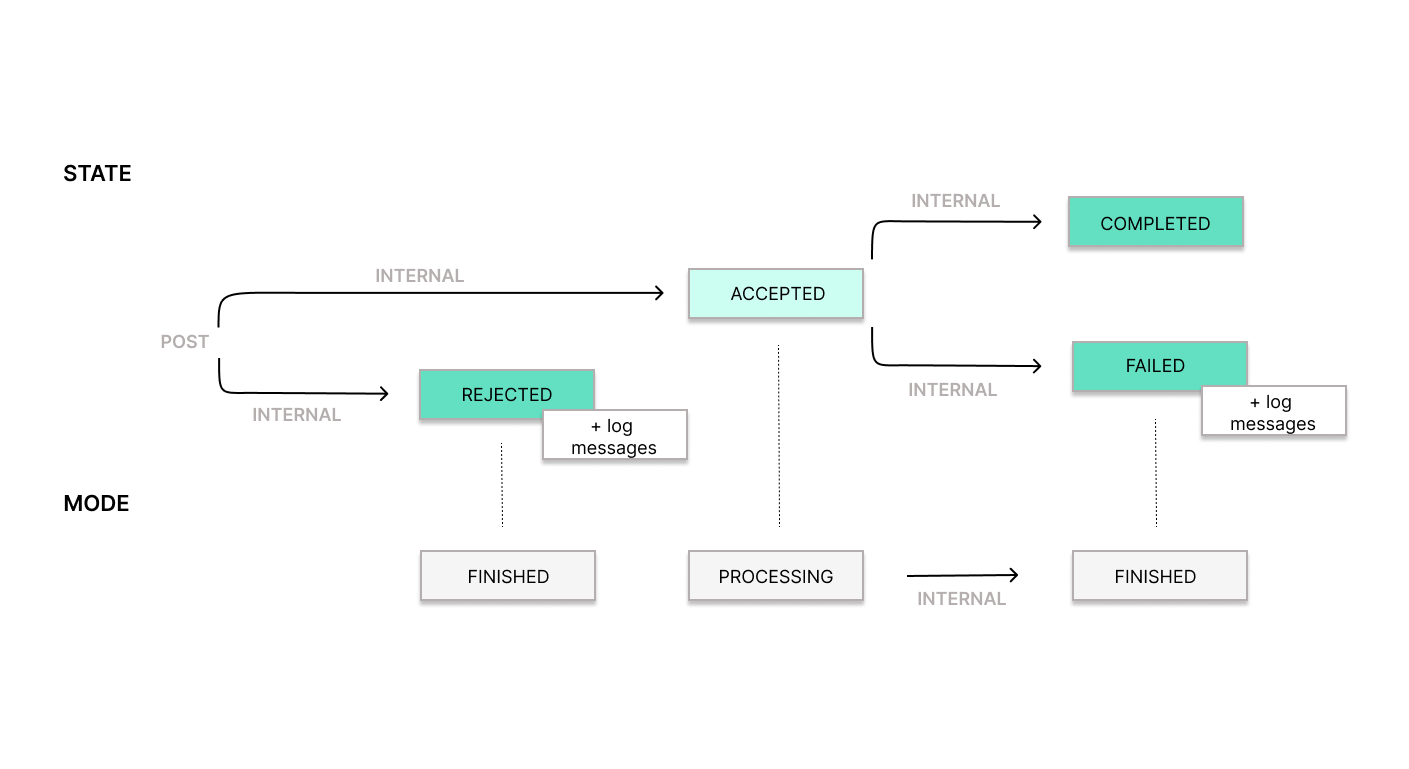
States
Section titled “States”- Accepted: The Record has been received and passed initial validation, but no final outcome has yet been persisted. This is a temporary state.
- Rejected: The Record has been received but did not pass our internal validation checks. Details are available in the log messages.
- Completed: The Record was successfully submitted to and accepted by the Tax Agency. This is a final state.
- Failed: An error occurred during processing. The Record either failed the Tax Agency’s validation checks, or an error prevented our system from confirming the transmission outcome. Details are available in the log messages. This is a final state.
- Processing: The Record is being processed. The corresponding state is Accepted.
- Finished: The Record has been processed, with either a successful or unsuccessful outcome. The corresponding state is either Rejected, Completed or Failed.
State Transitions
Section titled “State Transitions”POST→ Accepted: The Record is created via an API call and temporarily enters the Accepted state if validated successfully.POST→ Rejected: If the Record fails internal validation during creation, it automatically transitions to the Rejected state, providing additional log messages about the error.- Accepted → Completed: This transition occurs automatically once the Record has been successfully processed.
- Accepted → Failed: If an error occurs during processing, the Record automatically transitions to the Failed state, providing additional log messages for debugging.
The final state of a TRANSACTION record is returned directly in the synchronous POST response — no polling or webhooks are required.
Mode Transitions
Section titled “Mode Transitions”- Processing → Finished: Once the Record has been processed, regardless of whether the outcome is successful or unsuccessful, it automatically transitions to the Finished mode.
Processing is the default mode for each INTENTION at creation. Once the INTENTION is referenced in a TRANSACTION, it takes the state and mode of that TRANSACTION.
For TRANSACTION records, Processing is normally temporary and should resolve to Finished mode within seconds. If a TRANSACTION remains in Processing mode for more than a few minutes, treat it as a stuck transition and contact us with the record ID so we can investigate.