Receipt Data
Below you can find all data that needs to be printed on a receipt, mapped with the values returned from the SIGN DE API upsertTransaction endpoint.
It is sufficient to record either the QR code or the plain text fields on receipts.
We have been contacted by the relevant tax authorities with an appeal to highly recommend the QR code solution to our customers!
QR Code vs Plain Text Receipts
Section titled “QR Code vs Plain Text Receipts”QR Code Receipt
All TSS data is stored in the QR code. No need to print plain text fields. Shorter receipts save paper and money, and simplify cash register inspections.
Plain Text Receipt
All TSS fields are printed individually on the receipt. Results in longer receipts but does not require QR code scanning capability.
The TSS data (secured data according to KassenSichV) should be stored in the QR code. This eliminates the need to print the TSS plain text on the receipts. In the event of a cash register inspection, the QR code simplifies the process. Shorter receipts save paper and therefore money. In addition, thermal paper pollutants are avoided and the environment is protected.
As an alternative, you can switch to the digital eReceipt and avoid using thermal paper entirely.
Simplification Arrangements
Section titled “Simplification Arrangements”When using the simplification arrangements (Erleichterungsregelungen) from DSFinV-K chapter 2.7, the start time of the first order transaction (TSE-Erstbestellung) must also be printed on the receipt (not integrated in the QR code).
Furthermore, it must be guaranteed that a connection in terms of content can be established via the ABRECHNUNGSKREIS field in the Bonkopf_AbrKreis file (cf. chapter 3.1.2.2) in the DSFinV-K data, so that it is possible to track the initiation and processing of the individual order and settlement processes.
Serial Number Requirements (since 01.01.2024)
Section titled “Serial Number Requirements (since 01.01.2024)”As of 01.01.2024, receipts in Germany must also indicate the serial number of the electronic record-keeping system as well as the serial number of the security module (TSS) in addition to the TSS data already included (see AEAO to Section 146a, No. 2.2.3.1 and 2.2.3.2).
If you already use the QR code, no further changes regarding this update are needed as both data are already included.
Receipt Field Mapping
Section titled “Receipt Field Mapping”The following table maps the required receipt fields to their corresponding SIGN DE API response fields:
| Field on Receipt | SIGN DE API Field |
|---|---|
| TSE-Transaktion | number |
| TSE-Start | time_start |
| TSE-Stop | time_end |
| TSE-Seriennummer | tss_serial_number |
| TSE-Signatur | signature.value |
| TSE-Zeitformat | log.timestamp_format |
| TSE-Hashalgorithmus | signature.algorithm |
| TSE-PublicKey | signature.public_key |
| ClientID / KassenID | client_serial_number |
| TSE-Erstbestellung | Must be added manually by the cash register manufacturer |
| QR-Code | qr_code_data |
Receipt Comparison
Section titled “Receipt Comparison”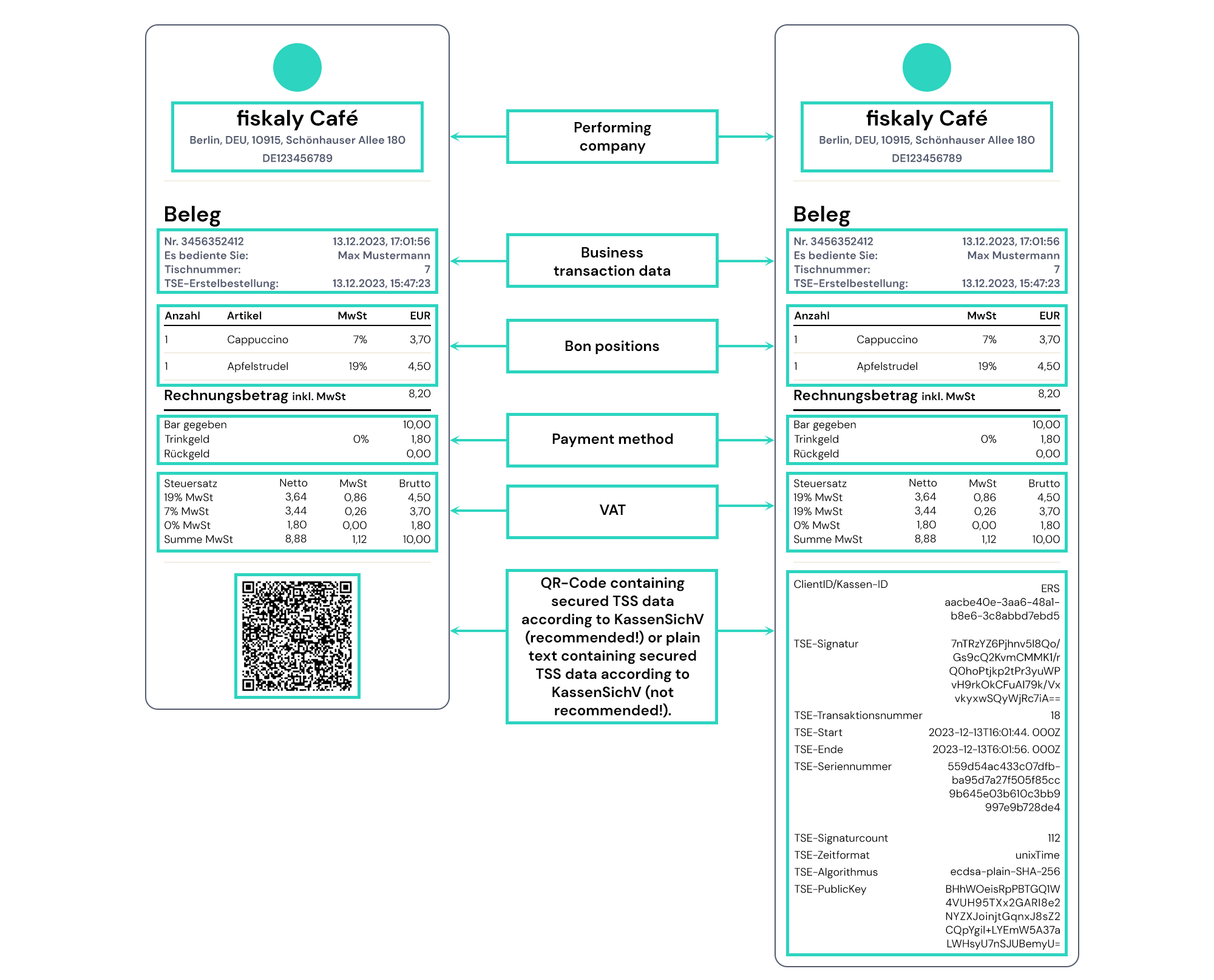
The first receipt on the left shows the abbreviated version with the secured TSS data stored in the QR code. The second receipt on the right shows a receipt with printed plain text of the secured TSS data according to KassenSichV. Here, the difference in length and thus the saving of resources can be clearly seen.
Use the QR code format whenever possible. It produces shorter receipts, saves
resources, and is explicitly recommended by German tax authorities. Ensure
your QR code contains all required TSS data fields by using the qr_code_data
value from the API response directly.
Related Pages
Section titled “Related Pages”Was this page helpful?