How to proceed with invoices with state REQUIRES_INSPECTION in Bizkaia?
When an invoice issued through the TicketBAI system is rejected in subchapter 1.1, SIGN ES will show the state REQUIRES_INSPECTION. In this cases, it is likely that the files need to be resubmitted to Bizkaia Tax Authority’s system, as long as a correcting invoice is not required according to the invoicing regulation in Spain. Depending on the situation, this can be done either by re-sending of subchapter 1.1 for invoices issued with guarantor software or via subchapter 1.2 for invoices issued without guarantor software.
SIGN ES enables the re-sending of invoices in the REGISTERED, REQUIRES_CORRECTION, and REQUIRES_INSPECTION registration state via REMEDY invoices through subchapters 1.1. and 1.2. The re-sending of invoices with PENDING and STORED registration state is not allowed. These invoices are either awaiting submission by SIGN ES or stored because transmission to the tax authority is not required.
Resubmitting via subchapter 1.1 is possible if,
-
the error is due to incorrect data introduced in the fields of the
annotationsblock -
the device certificate was either not registered or was incorrectly registered by the taxpayer at the time of transmission
When should an invoice be re-submitted via subchapter 1.2?
-
subchapter 1.1 was rejected, and re-sending through 1.1 is not an possible
-
invoices were issued in an offline scenario
-
the issuing device is broken, and the information cannot be retrieved
How are invoices uploaded to the BATUZ platform?
To access the platform, you need to visit the following link: https://www.batuz.eus/es/inicio

Select the corresponding model 140 or 240:
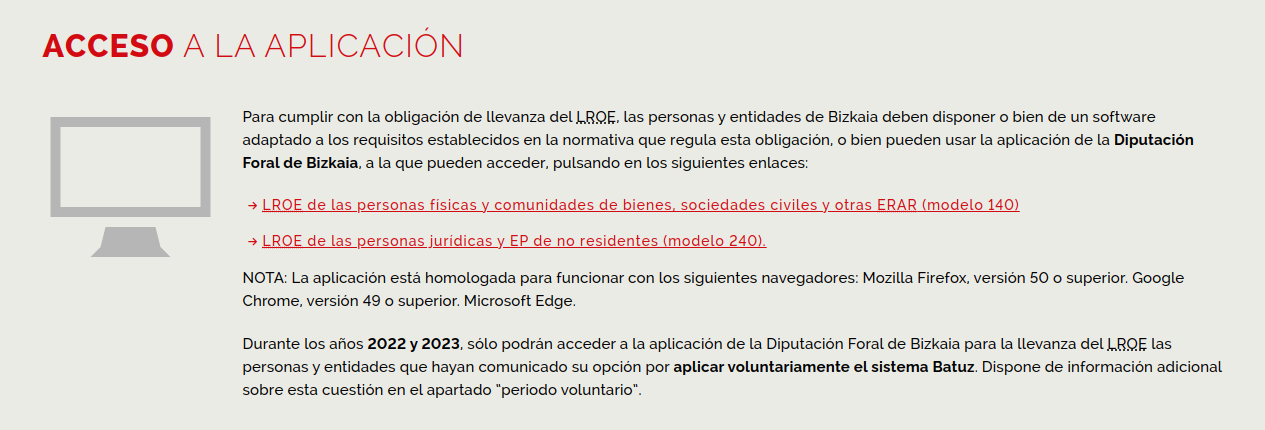
After logging in, select ‘Facturas emitidas’, then add a new invoice to be issued without a guarantor software (subsection 1.2) and upload the information of the corrected invoice.
Was this page helpful?