What does the general workflow look like?
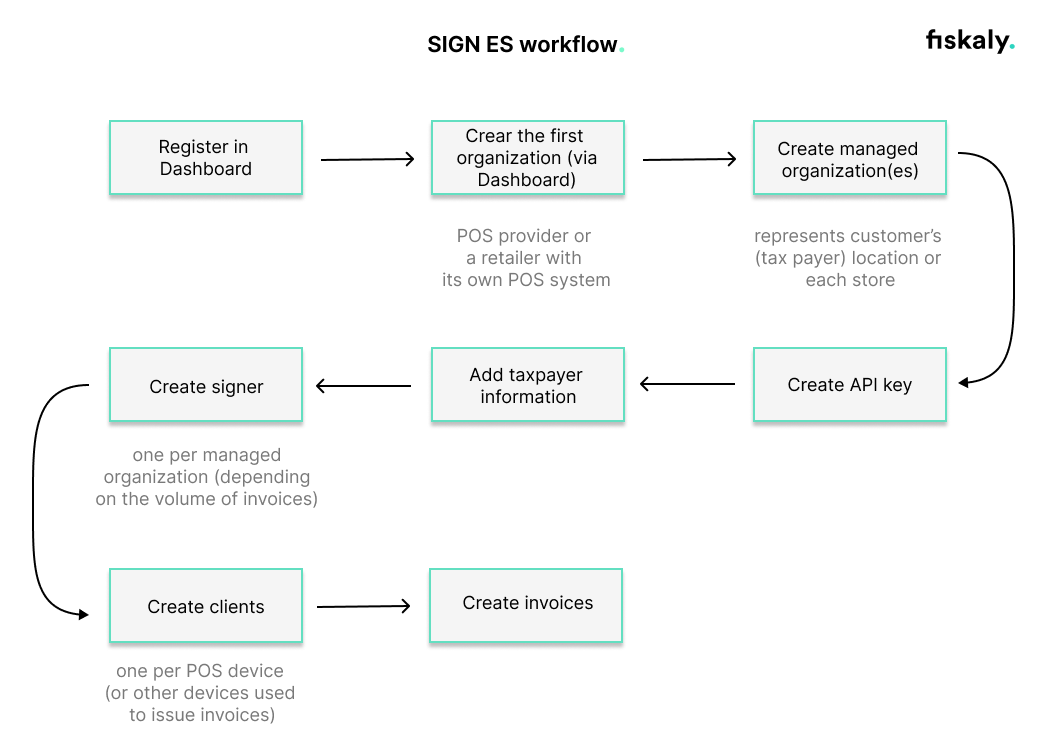
Step 1: Registration Begin by registering on the Dashboard. Creating an account is the first step, after which you can proceed with setting up the organizational structure for your business within our system.
Step 2: Creating your first organization Continue with creating your first organization using the Dashboard. This organization will represent the POS provider or retailer with its own POS system. It is necessary to include the billing address at this stage. This address will only be used for fiskaly’s billing purposes.
Step 3: Managed organizations After establishing your first organization, you will proceed to create managed organizations. Each managed organization represents a customer, enabling you to manage them separately.
Step 4: API key generation The next step is to generate an API key within each managed organization. This can be done via the Dashboard or the createApiKey endpoint of the Management API. This API key and secret pair is required for generating an access token, which is used for all subsequent API calls.
Note that API keys generated in TEST environment will create TEST resources, while those from the LIVE environment will create LIVE resources. For further details, refer to our article on Test and LIVE environment.
Step 5: Taxpayer information You must add the taxpayer’s information to the system via the createTaxpayer endpoint of the SIGN ES API. This is a compliance step to ensure that all invoices generated are in line with tax regulations and contain all the necessary taxpayer details.
Step 6: Signer creation Moving forward, you need to create a Signer via the createSigner endpoint for each managed organization. The signer is responsible for the electronic signature of the invoices. Each signing device requires a certificate.
For TicketBAI compliance, a device certificate is automatically allocated during the creation of a Signer, unless you want to provide your own external device certificate. This certificate can be retrieved from the API call response.
For Verifactu compliance, our electronic certificate is associated with the taxpayer.
**Step 7: Creation of Clients ** The workflow includes creating Clients via the createClient endpoint. You should create a Client for each POS device or any other invoicing device used within your organization.
Step 8: Invoice creation With all the previous steps completed, you are now ready to create invoices. This is the final step where invoices are generated and signed. SIGN ES ensures that all invoices are compliant with TicketBAI in the Basque Country, and Verifactu in the rest of the Spanish territory. Please refer to the invoicing regulations in Spain for additional information about invoice creation.
For more information, we’ve included a video: Organization Structure for Verifactu (includes English subtitles)
Was this page helpful?